FabCon is coming to Atlanta
Join us at FabCon Atlanta from March 16 - 20, 2026, for the ultimate Fabric, Power BI, AI and SQL community-led event. Save $200 with code FABCOMM.
Register now!- Power BI forums
- Get Help with Power BI
- Desktop
- Service
- Report Server
- Power Query
- Mobile Apps
- Developer
- DAX Commands and Tips
- Custom Visuals Development Discussion
- Health and Life Sciences
- Power BI Spanish forums
- Translated Spanish Desktop
- Training and Consulting
- Instructor Led Training
- Dashboard in a Day for Women, by Women
- Galleries
- Data Stories Gallery
- Themes Gallery
- Contests Gallery
- QuickViz Gallery
- Quick Measures Gallery
- Visual Calculations Gallery
- Notebook Gallery
- Translytical Task Flow Gallery
- TMDL Gallery
- R Script Showcase
- Webinars and Video Gallery
- Ideas
- Custom Visuals Ideas (read-only)
- Issues
- Issues
- Events
- Upcoming Events
The Power BI Data Visualization World Championships is back! Get ahead of the game and start preparing now! Learn more
- Power BI forums
- Forums
- Get Help with Power BI
- Desktop
- Re: No. of events in a column based on measure
- Subscribe to RSS Feed
- Mark Topic as New
- Mark Topic as Read
- Float this Topic for Current User
- Bookmark
- Subscribe
- Printer Friendly Page

- Mark as New
- Bookmark
- Subscribe
- Mute
- Subscribe to RSS Feed
- Permalink
- Report Inappropriate Content
No. of events in a column based on measure
Hello
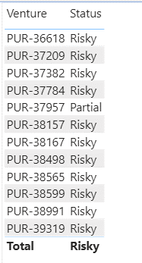
I have created a measure that shows me if the Venture is "Risky" or "Partial" against each venture. Now I want to count how many trades are "Risky" and how many are "Partial"
Thanks
Solved! Go to Solution.


- Mark as New
- Bookmark
- Subscribe
- Mute
- Subscribe to RSS Feed
- Permalink
- Report Inappropriate Content
Hi @muhammadh811 ,
Create 2 measures as below:
_Risky count = CALCULATE(COUNTROWS('Position Manager - Exported_Gra'),FILTER(ALL('Position Manager - Exported_Gra'),'Position Manager - Exported_Gra'[Status]="Risky"))_Partial count = CALCULATE(COUNTROWS('Position Manager - Exported_Gra'),FILTER(ALL('Position Manager - Exported_Gra'),'Position Manager - Exported_Gra'[Status]="Partial"))
And you will see:
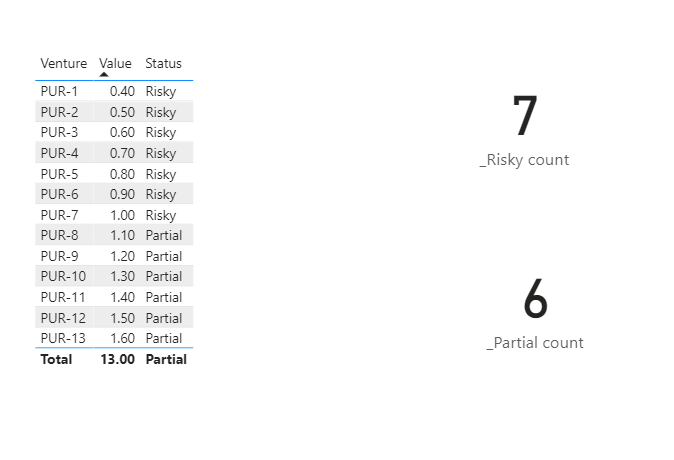
Here,status is a measure per your description.
For details,you may refer to attachment.
Kelly


- Mark as New
- Bookmark
- Subscribe
- Mute
- Subscribe to RSS Feed
- Permalink
- Report Inappropriate Content
https://drive.google.com/file/d/1ty4lgspcNz9loK5ISi-IRfoKdptfMNcW/view?usp=sharing
Find the file
Hope this is what you are looking for if so please mark this as solution and share your Kudoes
Vijay Perepa
Did I answer your question? Mark my post as a solution! Appreciate your Kudos!!
MY Blog || My YouTube Channel || Connect with me on Linkedin || My Latest Data Story - Ageing Analysis
Proud to be a Super User!
- Mark as New
- Bookmark
- Subscribe
- Mute
- Subscribe to RSS Feed
- Permalink
- Report Inappropriate Content
Just to clarify, I have [Status] as a measure not a column in data.
First I have created a measure which tells me whether a Venture is "Risky" or "Partial". Now I want to see how many Ventures are "Risky".

- Mark as New
- Bookmark
- Subscribe
- Mute
- Subscribe to RSS Feed
- Permalink
- Report Inappropriate Content
@muhammadh811
Did you try the solution that I shared, It uses your measure.
________________________
If my answer was helpful, please consider Accept it as the solution to help the other members find it
Click on the Thumbs-Up icon if you like this reply 🙂
⭕ Subscribe and learn Power BI from these videos
⚪ Website ⚪ LinkedIn ⚪ PBI User Group
- Mark as New
- Bookmark
- Subscribe
- Mute
- Subscribe to RSS Feed
- Permalink
- Report Inappropriate Content
Yes if you ignore the column part remaining to measures will tell what exactly you wanted to see.
Did I answer your question? Mark my post as a solution! Appreciate your Kudos!!
MY Blog || My YouTube Channel || Connect with me on Linkedin || My Latest Data Story - Ageing Analysis
Proud to be a Super User!
- Mark as New
- Bookmark
- Subscribe
- Mute
- Subscribe to RSS Feed
- Permalink
- Report Inappropriate Content
@muhammadh811
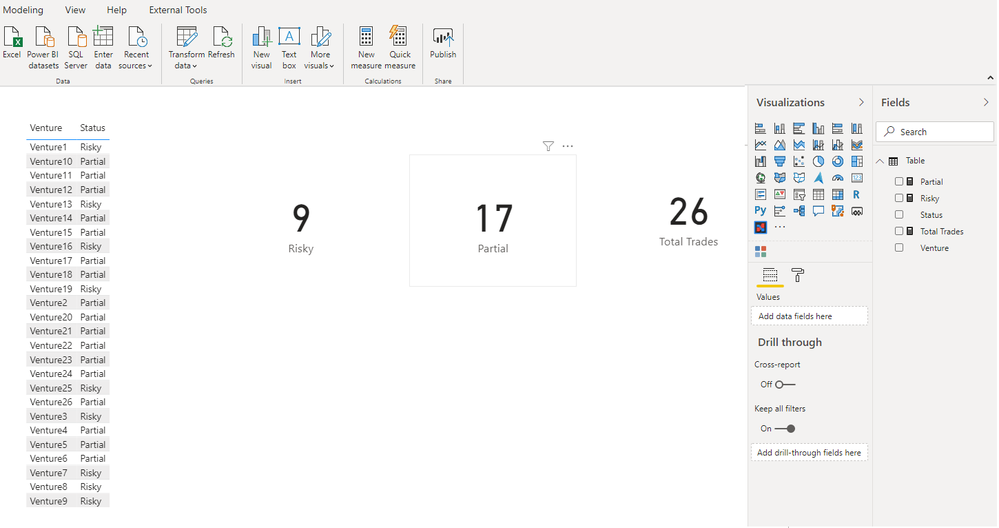
You can create two measures as
Risky Count =

CALCULATE(
    COUNTROWS('Table'),
    FILTER(
        Table,
        [Status] = "Risky")
)

---------------------------------------------
Partial Count =

CALCULATE(
    COUNTROWS('Table'),
    FILTER(
        Table,
        [Status] = "Partial")
)
________________________
If my answer was helpful, please consider Accept it as the solution to help the other members find it
Click on the Thumbs-Up icon if you like this reply 🙂
⭕ Subscribe and learn Power BI from these videos
⚪ Website ⚪ LinkedIn ⚪ PBI User Group
- Mark as New
- Bookmark
- Subscribe
- Mute
- Subscribe to RSS Feed
- Permalink
- Report Inappropriate Content

- Mark as New
- Bookmark
- Subscribe
- Mute
- Subscribe to RSS Feed
- Permalink
- Report Inappropriate Content
@muhammadh811 , Assume you have create some calculation , where you have like
Switch(True(),
<Condition>, "Risky",
/// and so on,
)
Same way create a measure that returns 1 for risky and 0 or Blank() when it not risky
Sumx(Values(Table[Venture]),
Switch(True(),
<Condition Risky is true>, 1, blank()
))
You can use IF in place of Switch.
- Mark as New
- Bookmark
- Subscribe
- Mute
- Subscribe to RSS Feed
- Permalink
- Report Inappropriate Content
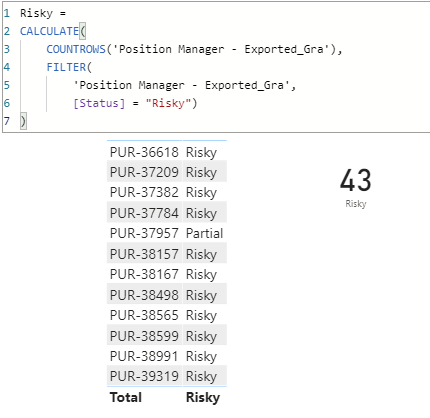
I tried your solution but it's not giving the correct number.

- Mark as New
- Bookmark
- Subscribe
- Mute
- Subscribe to RSS Feed
- Permalink
- Report Inappropriate Content
@muhammadh811
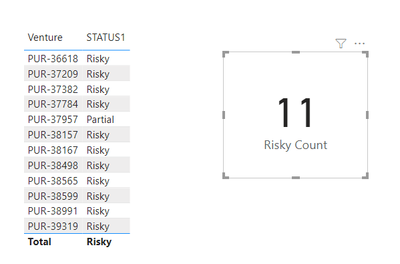
The measure I shared is not that, please check it again in my reply. I am getting 11 Risky
________________________
If my answer was helpful, please consider Accept it as the solution to help the other members find it
Click on the Thumbs-Up icon if you like this reply 🙂
⭕ Subscribe and learn Power BI from these videos
⚪ Website ⚪ LinkedIn ⚪ PBI User Group
- Mark as New
- Bookmark
- Subscribe
- Mute
- Subscribe to RSS Feed
- Permalink
- Report Inappropriate Content
Use The measures with Calculate(.....)in my pbix you will get the answer
Did I answer your question? Mark my post as a solution! Appreciate your Kudos!!
MY Blog || My YouTube Channel || Connect with me on Linkedin || My Latest Data Story - Ageing Analysis
Proud to be a Super User!
- Mark as New
- Bookmark
- Subscribe
- Mute
- Subscribe to RSS Feed
- Permalink
- Report Inappropriate Content
@VijayP
I can't use [Status] = "Risky" in calculate as "Status" is a measure and BI is throwing an error message.
- Mark as New
- Bookmark
- Subscribe
- Mute
- Subscribe to RSS Feed
- Permalink
- Report Inappropriate Content
Can you share the measure you have created to get the Risky,Partial. Based on that i can make soltuion out
Did I answer your question? Mark my post as a solution! Appreciate your Kudos!!
MY Blog || My YouTube Channel || Connect with me on Linkedin || My Latest Data Story - Ageing Analysis
Proud to be a Super User!
- Mark as New
- Bookmark
- Subscribe
- Mute
- Subscribe to RSS Feed
- Permalink
- Report Inappropriate Content
- Mark as New
- Bookmark
- Subscribe
- Mute
- Subscribe to RSS Feed
- Permalink
- Report Inappropriate Content
Hi @muhammadh811 ,
Create 2 measures as below:
_Risky count = CALCULATE(COUNTROWS('Position Manager - Exported_Gra'),FILTER(ALL('Position Manager - Exported_Gra'),'Position Manager - Exported_Gra'[Status]="Risky"))_Partial count = CALCULATE(COUNTROWS('Position Manager - Exported_Gra'),FILTER(ALL('Position Manager - Exported_Gra'),'Position Manager - Exported_Gra'[Status]="Partial"))
And you will see:
Here,status is a measure per your description.
For details,you may refer to attachment.
Kelly

Helpful resources

Power BI Dataviz World Championships
The Power BI Data Visualization World Championships is back! Get ahead of the game and start preparing now!

Power BI Monthly Update - November 2025
Check out the November 2025 Power BI update to learn about new features.

FabCon Atlanta 2026
Join us at FabCon Atlanta, March 16-20, for the ultimate Fabric, Power BI, AI and SQL community-led event. Save $200 with code FABCOMM.

| User | Count |
|---|---|
| 59 | |
| 43 | |
| 42 | |
| 23 | |
| 17 |


| User | Count |
|---|---|
| 190 | |
| 122 | |
| 96 | |
| 66 | |
| 47 |


