This time we’re going bigger than ever. Fabric, Power BI, SQL, AI and more. We're covering it all. You won't want to miss it.
Learn moreDid you hear? There's a new SQL AI Developer certification (DP-800). Start preparing now and be one of the first to get certified. Register now
Hi,
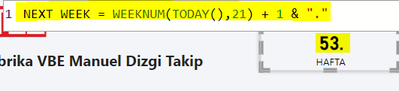
I am trying to reach nextweek number by adding +1, but I got Week 53.
How can i receive NEXT WEEK NUMBER ? Thanks a lot for your help.
Regards
Solved! Go to Solution.
You can create a simple IF condition to move to week 1 when you reach week 52, like this :
NEXT WEEK = IF(
WEEKNUM (TODAY (),21) = 52, "1.",
WEEKNUM (TODAY (),21) + 1 & "."
)
Thanks a lot.
After some research i also found this formula which works too,
You can create a simple IF condition to move to week 1 when you reach week 52, like this :
NEXT WEEK = IF(
WEEKNUM (TODAY (),21) = 52, "1.",
WEEKNUM (TODAY (),21) + 1 & "."
)
Thanks a lot.
After some research i also found this formula which works too,
Hey @kivanct,
what is your expectation?
Regards,
Tom
Check out the April 2026 Power BI update to learn about new features.
If you have recently started exploring Fabric, we'd love to hear how it's going. Your feedback can help with product improvements.
| User | Count |
|---|---|
| 36 | |
| 32 | |
| 31 | |
| 21 | |
| 15 |
| User | Count |
|---|---|
| 68 | |
| 57 | |
| 31 | |
| 29 | |
| 22 |