cancel
Showing results for 
Search instead for 
Did you mean: 

The Power BI Data Visualization World Championships is back! Get ahead of the game and start preparing now! Learn more

Reply
Aknas
Frequent Visitor

Newbies question - Multiple buckets

Hi all,

I'm trying to create buckets - but found difficult how to only get the last 3- month by ID. Basically wil only select the last 3- months to creat the buckets.


Here is the sample Data link - 


https://1drv.ms/x/s!Arm2JbpOh1VdgSU-gkfBnsXNKehF?e=tqzfSH 


I was able to create one by one buckets but thats not going to help what I'm trying to achieve.


Please  see if you can be help on this.


Dii


1 ACCEPTED SOLUTION
AbbasG
Memorable Member
Memorable Member

@Aknas

Here is the URL to my solution - Aknas multiple buckets solutions.pbix

I hope it helps. Please accept it as a solution if it helps you achieve your desired output.


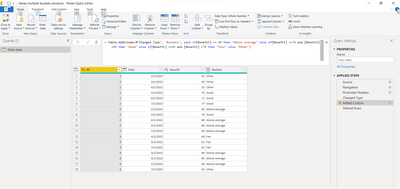
For creating buckets I have added a conditional column, you can find it in the power query applied steps.


AbbasG_0-1665326002083.png

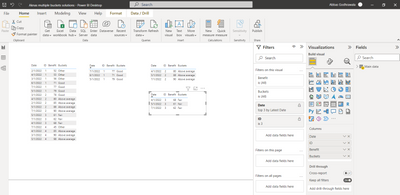
For filtering the dates, I have used TOP N on each of the corresponding IDs.

AbbasG_1-1665326045523.png


View solution in original post

5 REPLIES 5
Aknas
Frequent Visitor

Thanks Abas.

AbbasG
Memorable Member
Memorable Member

@Aknas

Here is the URL to my solution - Aknas multiple buckets solutions.pbix

I hope it helps. Please accept it as a solution if it helps you achieve your desired output.


For creating buckets I have added a conditional column, you can find it in the power query applied steps.


AbbasG_0-1665326002083.png

For filtering the dates, I have used TOP N on each of the corresponding IDs.

AbbasG_1-1665326045523.png


Aknas
Frequent Visitor

Thanks Abbas.

Is it possible to capture the last three months for each ID ( The month list can be dynamic) : 

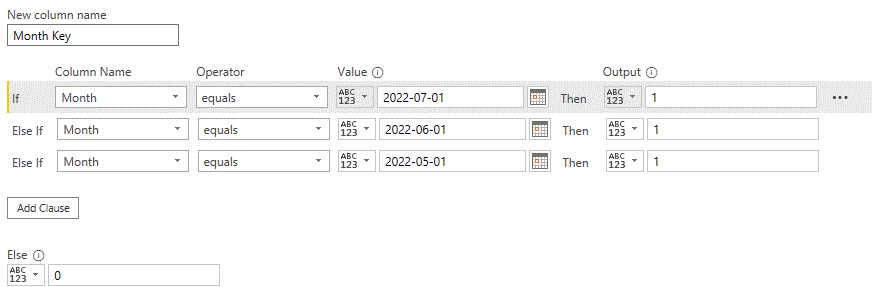
Right now I have a static conditional column [ Month Key]  but that's not true always.


https://1drv.ms/u/s!Arm2JbpOh1VdgScd8jJYOhMl1j8V?e=SBMRpi

 conditional.gif 


then want to change the below DAX formula  to capture the last 3-month only

Benefit Bucket =
SWITCH (
    TRUE (),
   [Month Key]=1
        && [Benfit]>=0.80, "top",
      [Month Key]=1
        && [Benfit]>0.7 && [Benfit]<0.80, "average",
  [Month Key]=1
        && [Benfit]>0.6 && [Benfit]<0.70, "poor","outlier"
)
 
thanks again


TomMartens
Super User
Super User

Hey @Aknas ,


provide sample data that can easily be copied to pbix file, describe the expected result based on the sample data you provide.


Regards,

Tom


Did I answer your question? Mark my post as a solution, this will help others!

Proud to be a Super User!
I accept Kudos 😉
Hamburg, Germany

 Thanks Tom.

Here is the sample Data link - I removed the salary column to make it easier.


https://1drv.ms/x/s!Arm2JbpOh1VdgSU-gkfBnsXNKehF?e=tqzfSH 


Helpful resources

Announcements
Power BI DataViz World Championships

Power BI Dataviz World Championships

The Power BI Data Visualization World Championships is back! Get ahead of the game and start preparing now!

December 2025 Power BI Update Carousel

Power BI Monthly Update - December 2025

Check out the December 2025 Power BI Holiday Recap!

FabCon Atlanta 2026 carousel

FabCon Atlanta 2026

Join us at FabCon Atlanta, March 16-20, for the ultimate Fabric, Power BI, AI and SQL community-led event. Save $200 with code FABCOMM.