Join us at FabCon Atlanta from March 16 - 20, 2026, for the ultimate Fabric, Power BI, AI and SQL community-led event. Save $200 with code FABCOMM.
Register now!Get Fabric Certified for FREE during Fabric Data Days. Don't miss your chance! Request now
Hi all,
I want to make a calculation. It doesn't matter to do it with Dax or M.
I have a dataset like as below. I have a customers. Our customers segment might change month by month.
| Segment | Customer | New_Segment | 04.2020 | 05.2020 |
| X | A | X | 1 | 0 |
| Y | A | Y | 0 | 1 |
| X | B | X | 1 | 1 |
| Z | C | Z | 1 | 1 |
| Z | D | Z | 1 | 0 |
| X | D | X | 0 | 1 |
I want to create a new column as Final_Segment
For a customer;
If columns 04.2020 and 05.2020 = 1 then Final_Segment will equal New_Segment
If column 04.2020 = 0 and 05.2020 = 1 then Final_Segment will equal New_Segment value which 04.2020 column = 1 row for same customer.
If column 04.2020 = 1 and 05.2020 = 0 then return 0
Expected output is;
| Segment | Customer | New_Segment | 04.2020 | 05.2020 | Final_Segment |
| X | A | X | 1 | 0 | 0 |
| Y | A | Y | 0 | 1 | X |
| X | B | X | 1 | 1 | X |
| Z | C | Z | 1 | 1 | Z |
| Z | D | Z | 1 | 0 | 0 |
| X | D | X | 0 | 1 | Z |
Solved! Go to Solution.
Hi @Anonymous
for DAX
Final_Segment =
SWITCH(TRUE(),
[04.2020] = 1 && [05.2020] = 1, [New_Segment],
[04.2020] = 0 && [05.2020] = 1, CALCULATE(FIRSTNONBLANK(Table[New_Segment], 1), ALLEXCEPT(Table, Table[Customer]), Table[04.2020] = 1,
[04.2020] = 1 && [05.2020] = 0, 0
)
Hi @Anonymous
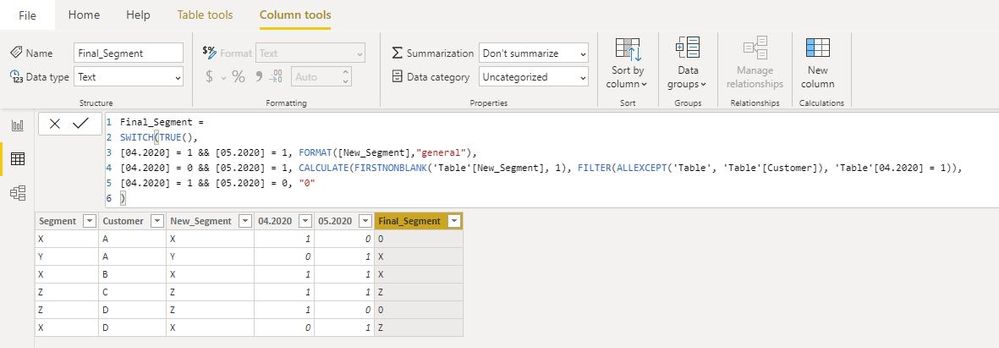
I would value az38's answer, but a little change below:
Final_Segment =
SWITCH(TRUE(),
[04.2020] = 1 && [05.2020] = 1, FORMAT([New_Segment],"general"),
[04.2020] = 0 && [05.2020] = 1, CALCULATE(FIRSTNONBLANK('Table'[New_Segment], 1), FILTER(ALLEXCEPT('Table', 'Table'[Customer]), 'Table'[04.2020] = 1)),
[04.2020] = 1 && [05.2020] = 0, "0"
)
Best Regards
Maggie
Community Support Team _ Maggie Li
If this post helps, then please consider Accept it as the solution to help the other members find it more quickly.
Hi @Anonymous
I would value az38's answer, but a little change below:
Final_Segment =
SWITCH(TRUE(),
[04.2020] = 1 && [05.2020] = 1, FORMAT([New_Segment],"general"),
[04.2020] = 0 && [05.2020] = 1, CALCULATE(FIRSTNONBLANK('Table'[New_Segment], 1), FILTER(ALLEXCEPT('Table', 'Table'[Customer]), 'Table'[04.2020] = 1)),
[04.2020] = 1 && [05.2020] = 0, "0"
)
Best Regards
Maggie
Community Support Team _ Maggie Li
If this post helps, then please consider Accept it as the solution to help the other members find it more quickly.
Hi @Anonymous
for DAX
Final_Segment =
SWITCH(TRUE(),
[04.2020] = 1 && [05.2020] = 1, [New_Segment],
[04.2020] = 0 && [05.2020] = 1, CALCULATE(FIRSTNONBLANK(Table[New_Segment], 1), ALLEXCEPT(Table, Table[Customer]), Table[04.2020] = 1,
[04.2020] = 1 && [05.2020] = 0, 0
)
Check out the November 2025 Power BI update to learn about new features.
Advance your Data & AI career with 50 days of live learning, contests, hands-on challenges, study groups & certifications and more!