Share feedback directly with Fabric product managers, participate in targeted research studies and influence the Fabric roadmap.
Sign up nowGet Fabric certified for FREE! Don't miss your chance! Learn more
Hi There,
Could someone please confirm if with the new update it is creating a mess in the querys?
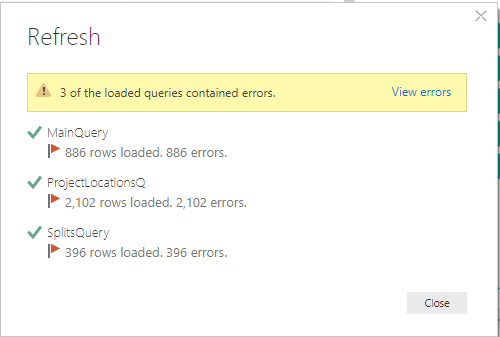
I have two PC's one with previous build and the file loads the querys without any issue, but with this update I am getting this:
Version: 2.70.5494.562 64-bit (June 2019)
So to fix this... I installed the previous PowerBI version as I had the old x64 installation file..
Black looks better anyway...
This is so odd..
It's happening to us as well.
All permissions seem fine - seems like its the SP Online queries that are suddenly not working.
from SharePoint? What is the source?
@sajarac wrote:Hi There,
Could someone please confirm if with the new update it is creating a mess in the querys?
I have two PC's one with previous build and the file loads the querys without any issue, but with this update I am getting this:
Version: 2.70.5494.562 64-bit (June 2019)
Yes, SharePoint list is the datasource
Thx
I had the same issue and here is how I fixed it:
1) Go into the query editor and click on edit source.
2) click change source
3) You just have to copy the workbook URL and paste it back in.
I had to do for every single file that I was referencing so it took me a hot minute. Then refresh.
If it still doesn't work (Which I didn't have luck the first time)
Try changing the permission and signing back into your SharePoint account with your Auth method.
Then follow the steps aboce.
Thanks for your response,
It doesn't work. and I also did "Clear Permissions"
😞
If you love stickers, then you will definitely want to check out our Community Sticker Challenge!
Check out the January 2026 Power BI update to learn about new features.
| User | Count |
|---|---|
| 61 | |
| 58 | |
| 45 | |
| 21 | |
| 18 |
| User | Count |
|---|---|
| 122 | |
| 119 | |
| 37 | |
| 35 | |
| 29 |