Join us at FabCon Atlanta from March 16 - 20, 2026, for the ultimate Fabric, Power BI, AI and SQL community-led event. Save $200 with code FABCOMM.
Register now!The Power BI Data Visualization World Championships is back! Get ahead of the game and start preparing now! Learn more
Hi,
I have a table that looks something like this
Product
ProdA
ProdBProdA
ProdC
ProdDProdB
ProdE
I want to add a new column and set the value to GroupA if any of the row has ProdA in it, otherwise, I want to set it GroupOther.
My desired output is something like this
Product Group
ProdA GroupA
ProdBProdA GroupA
ProdC GroupOther
ProdE GroupOther
Please advise how to accomplish it
Thanks in advance
Solved! Go to Solution.
Try to add a new column like this:
Group =
IF (
ISERROR ( SEARCH ( "ProdA", yourTable[Product] ) ),
"GroupOther",
"GroupA"
)
Hi @talhaparvaiz ,
You can use the following measure:
Group = var test1=FIND("ProdA",MAX('Table'[Product ]),,0) return IF(test1=0,"GroupOther","GroupA")
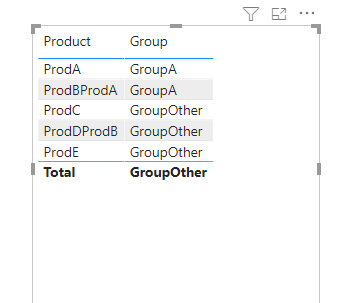
Then you will see the below:
Wish it is helpful for you!
Best Regard
Lucien Wang
Try to add a new column like this:
Group =
IF (
ISERROR ( SEARCH ( "ProdA", yourTable[Product] ) ),
"GroupOther",
"GroupA"
)
@talhaparvaiz , Create a new column like
Switch( True() ,
[Product] in {"ProdA","ProdBProdA"} ,"GroupA",
[Product] in {"ProdC","ProdE"} ,"GroupOther",
,"GroupOther"
)
Also check
Check out the November 2025 Power BI update to learn about new features.
Advance your Data & AI career with 50 days of live learning, contests, hands-on challenges, study groups & certifications and more!