Join us at FabCon Atlanta from March 16 - 20, 2026, for the ultimate Fabric, Power BI, AI and SQL community-led event. Save $200 with code FABCOMM.
Register now!The Power BI Data Visualization World Championships is back! Get ahead of the game and start preparing now! Learn more
Hello! I am new to PowerBI but have been exploring it for a couple months now. I come from Excel and Access and having discovered now PowerBI, I believe I am going to use it more often.
I need to know which and how many items are most used across different projects.
Using "New column" (instead of "New measure"), I have created:
DistinctProjects = CALCULATE ( DISTINCTCOUNT (Table1[Project]); FILTER ( Table1; Table1[ItemNr] = EARLIER(Table1[ItemNr] ) )
When not filtering any of the projects on the slicer "Project", it shows the correct behaviour, i.e. e.g. there are 2 items utilized in 3 different projects. These 2 items are 'Item 01' and 'Item 02'.
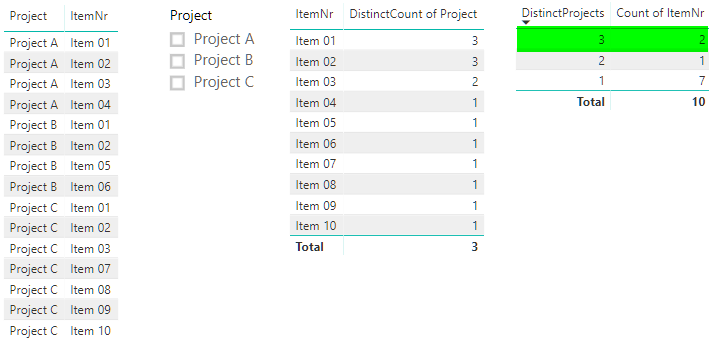
That's OK, but when I filter on the slicer for 'Project A' and 'Project B', it does not show the correct statistics, i.e. it should say that only 2 items are utilized in 2 different projects, and not 3 (because it is counting in all the projects universe of Table1 unfiltered).
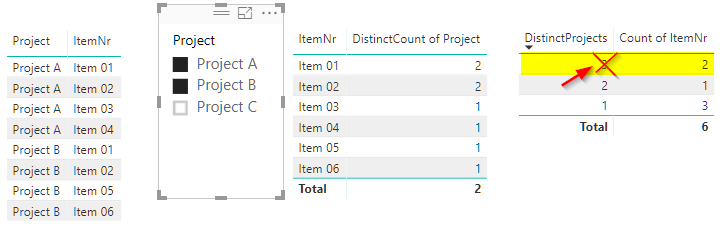
HELP! I can I make it work?
Thanks for any hint or direction in the right path!
Cheers,
Jorge
Solved! Go to Solution.
Hi @almeidajac,
I'm afraid it is not available to achieve such a requirement. You should be aware that the values resturned by calculated column are static once it is initialized. So, the [DistinctProjects] items displayed in visual won't be dynamically changed based on slicer. However, if you get DistinctProjects via measure, it could be dynamical, but measure will only show one single value in a visual without any context.
Regards,
Yuliana Gu
Hi @almeidajac,
I'm afraid it is not available to achieve such a requirement. You should be aware that the values resturned by calculated column are static once it is initialized. So, the [DistinctProjects] items displayed in visual won't be dynamically changed based on slicer. However, if you get DistinctProjects via measure, it could be dynamical, but measure will only show one single value in a visual without any context.
Regards,
Yuliana Gu
Here's the file I have been using, if it helps.
https://www.dropbox.com/s/smapnmf720hxyoc/Test%20count%20items%20project.pbix?dl=0
The Power BI Data Visualization World Championships is back! Get ahead of the game and start preparing now!
Check out the November 2025 Power BI update to learn about new features.
| User | Count |
|---|---|
| 59 | |
| 43 | |
| 42 | |
| 23 | |
| 17 |
| User | Count |
|---|---|
| 190 | |
| 122 | |
| 96 | |
| 66 | |
| 47 |