FabCon is coming to Atlanta
Join us at FabCon Atlanta from March 16 - 20, 2026, for the ultimate Fabric, Power BI, AI and SQL community-led event. Save $200 with code FABCOMM.
Register now!- Power BI forums
- Get Help with Power BI
- Desktop
- Service
- Report Server
- Power Query
- Mobile Apps
- Developer
- DAX Commands and Tips
- Custom Visuals Development Discussion
- Health and Life Sciences
- Power BI Spanish forums
- Translated Spanish Desktop
- Training and Consulting
- Instructor Led Training
- Dashboard in a Day for Women, by Women
- Galleries
- Data Stories Gallery
- Themes Gallery
- Contests Gallery
- QuickViz Gallery
- Quick Measures Gallery
- Visual Calculations Gallery
- Notebook Gallery
- Translytical Task Flow Gallery
- TMDL Gallery
- R Script Showcase
- Webinars and Video Gallery
- Ideas
- Custom Visuals Ideas (read-only)
- Issues
- Issues
- Events
- Upcoming Events
Learn from the best! Meet the four finalists headed to the FINALS of the Power BI Dataviz World Championships! Register now
- Power BI forums
- Forums
- Get Help with Power BI
- Desktop
- Re: New Table using Latest Distinct Value
- Subscribe to RSS Feed
- Mark Topic as New
- Mark Topic as Read
- Float this Topic for Current User
- Bookmark
- Subscribe
- Printer Friendly Page


- Mark as New
- Bookmark
- Subscribe
- Mute
- Subscribe to RSS Feed
- Permalink
- Report Inappropriate Content
New Table using Latest Distinct Value
Hi!
So I have this table that has consolidated list of client and the corresponding sales representative during the period.
| Client | Sales Rep | YearMonth |
| A | Barney | 202001 |
| B | Ted | 202001 |
| C | Robin | 202001 |
| D | Lily | 202001 |
| A | Marshall | 202002 |
| B | Ted | 202002 |
| E | Rachel | 202002 |
What I need is to create a new table that will consolidate unique values from the client field but show corresponding sales representative based on latest date.
Desired new table:
| Client | Sales Rep |
| A | Marshall |
| B | Ted |
| C | Robin |
| D | Lily |
| E | Rachel |
Solved! Go to Solution.


- Mark as New
- Bookmark
- Subscribe
- Mute
- Subscribe to RSS Feed
- Permalink
- Report Inappropriate Content
@newgirl I think @amitchandak works if you create it as a measure, then in a table visual add the Client and the Measure.
Last Sales Rep = LASTNONBLANKVALUE('Table'[YearMonth],max('Table'[Sales Rep]))
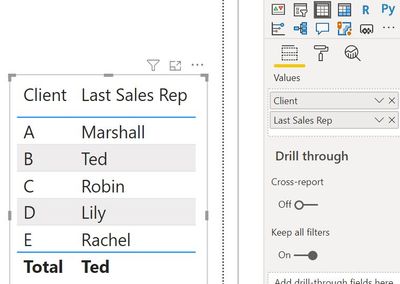
If you want it as a seperate table, you could also do this:
Table 2 = SUMMARIZECOLUMNS('Table'[Client],"Last Sales Rep",[Last Sales Rep])
Respectfully,
Zoe Douglas (DataZoe)
Follow me on LinkedIn at https://www.linkedin.com/in/zoedouglas-data
See my reports and blog at https://www.datazoepowerbi.com/


- Mark as New
- Bookmark
- Subscribe
- Mute
- Subscribe to RSS Feed
- Permalink
- Report Inappropriate Content
@newgirl - Some something like:
Table =
  VAR __Table =
      ADDCOLUMNS(
        DISTINCT('Table'[Client])
        "Latest",
        MAX('Table'[YearMonth])
      )
  VAR __Table1 =
      __Table,
      "Sales Rep",
      MAXX(FILTER('Table','Table'[Client] = [Client] && 'Table'[YearMonth] = [Latest]),'Table'[Sales Rep])
RETURN
  __Table1
Follow on LinkedIn
@ me in replies or I'll lose your thread!!!
Instead of a Kudo, please vote for this idea
Become an expert!: Enterprise DNA
External Tools: MSHGQM
YouTube Channel!: Microsoft Hates Greg
Latest book!: DAX For Humans
DAX is easy, CALCULATE makes DAX hard...
- Mark as New
- Bookmark
- Subscribe
- Mute
- Subscribe to RSS Feed
- Permalink
- Report Inappropriate Content
Hi, @Greg_Deckler !
I tried your measure although I think it lacked a certain DAX formula in the _Table1. I guessed it was ADDCOLUMNS so this is the measure I did:
Table =
  VAR __Table =
      ADDCOLUMNS(
        DISTINCT('Table'[Client]),
        "Latest",
        MAX('Table'[YearMonth])
      )
  VAR __Table1 =
      ADDCOLUMNS(
      __Table,
      "Sales Rep",
      MAXX(FILTER('Table','Table'[Client] = [Client] && 'Table'[YearMonth] = [Latest]),'Table'[Sales Rep])
      )
RETURN
  __Table1
However, it returned a table wherein the Client values were indeed unique but in the column for Sales Rep, it shows one Sales Rep value that is the same across all rows.


- Mark as New
- Bookmark
- Subscribe
- Mute
- Subscribe to RSS Feed
- Permalink
- Report Inappropriate Content
- Mark as New
- Bookmark
- Subscribe
- Mute
- Subscribe to RSS Feed
- Permalink
- Report Inappropriate Content
Hi @amitchandak !
I tried your suggested formula in creating a new table but it says "The expression specified in the query is not a valid table expression".
I think it's also missing certain fields? Because in the desired table, I need the column for Client and another column for the Sales Rep.
- Mark as New
- Bookmark
- Subscribe
- Mute
- Subscribe to RSS Feed
- Permalink
- Report Inappropriate Content
@newgirl I think @amitchandak works if you create it as a measure, then in a table visual add the Client and the Measure.
Last Sales Rep = LASTNONBLANKVALUE('Table'[YearMonth],max('Table'[Sales Rep]))
If you want it as a seperate table, you could also do this:
Table 2 = SUMMARIZECOLUMNS('Table'[Client],"Last Sales Rep",[Last Sales Rep])
Respectfully,
Zoe Douglas (DataZoe)
Follow me on LinkedIn at https://www.linkedin.com/in/zoedouglas-data
See my reports and blog at https://www.datazoepowerbi.com/
- Mark as New
- Bookmark
- Subscribe
- Mute
- Subscribe to RSS Feed
- Permalink
- Report Inappropriate Content
- Mark as New
- Bookmark
- Subscribe
- Mute
- Subscribe to RSS Feed
- Permalink
- Report Inappropriate Content
@newgirl , for the new table try
summarize(Table, Table[Client], "Sales Rep",lastnonblankvalue(Table[YearMonth],max(Table[Sales Rep])))
That was a measure you can use in visual

Helpful resources

Join our Fabric User Panel
Share feedback directly with Fabric product managers, participate in targeted research studies and influence the Fabric roadmap.

Power BI Monthly Update - February 2026
Check out the February 2026 Power BI update to learn about new features.

FabCon Atlanta 2026
Join us at FabCon Atlanta, March 16-20, for the ultimate Fabric, Power BI, AI and SQL community-led event. Save $200 with code FABCOMM.

| User | Count |
|---|---|
| 61 | |
| 54 | |
| 40 | |
| 17 | |
| 14 |


| User | Count |
|---|---|
| 96 | |
| 83 | |
| 36 | |
| 30 | |
| 25 |


