Join us at FabCon Atlanta from March 16 - 20, 2026, for the ultimate Fabric, Power BI, AI and SQL community-led event. Save $200 with code FABCOMM.
Register now!The Power BI Data Visualization World Championships is back! Get ahead of the game and start preparing now! Learn more
Hello,
I´m trying to create a new measure to calculate the value of Sales from max ID when I filter a date.
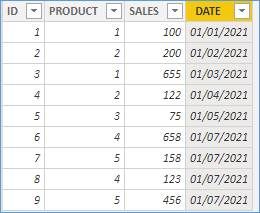
For example, if i have the next table:
| ID | PRODUCT | SALES | DATE |
| 1 | 1 | 100 | 01/01/2021 |
| 2 | 2 | 200 | 02/01/2021 |
| 3 | 1 | 655 | 03/01/2021 |
| 4 | 2 | 122 | 04/01/2021 |
| 5 | 3 | 75 | 05/01/2021 |
| 6 | 4 | 658 | 07/01/2021 |
| 7 | 5 | 158 | 07/01/2021 |
| 8 | 4 | 123 | 07/01/2021 |
| 9 | 5 | 456 | 07/01/2021 |
If I filter the date with a slicer (for example 02/01/2021-07/01/2021). The result should be the next:
| PRODUCTID | SALES_MEASURE |
| 1 | 655 |
| 2 | 122 |
| 3 | 75 |
| 4 | 123 |
| 5 | 456 |
I´m trying to resolve this with the next measure, but the result is not correct
SALES_MEASURE = CALCULATE(MAX(TABLE[SALES]), FILTER(TABLE, TABLE[ID] = CALCULATE(MAX(TABLE[ID]))))
Can you help me¿?
Thaaanks a lot!!!!
Solved! Go to Solution.
Hi, @Anonymous
Please check the below picture and the sample pbix file's link down below.
https://www.dropbox.com/s/8cxibhomohn74x6/jmfreire.pbix?dl=0
Hi, My name is Jihwan Kim.
If this post helps, then please consider accept it as the solution to help other members find it faster, and give a big thumbs up.
Linkedin: linkedin.com/in/jihwankim1975/
Twitter: twitter.com/Jihwan_JHKIM
Hi, @Anonymous
Try to create a measure below:
_Switch =
VAR _maxID =
MAXX (
FILTER ( ALL ( 'Table' ), 'Table'[PRODUCT] <= MAX ( 'Table'[PRODUCT] ) ),
'Table'[ID]
)
RETURN
IF ( SELECTEDVALUE ( 'Table'[ID] ) = _maxID, 1, 0 )
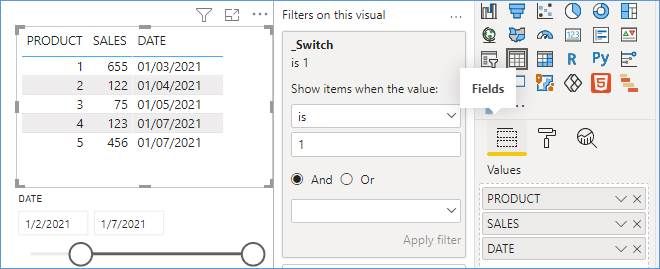
Then filter the items when _Switch is 1 like result below
Sample:
Result:
Please refer to the attachment below for details
Is this the result you want? Hope this is useful to you
Please feel free to let me know If you have further questions
Best Regards,
Community Support Team _ Zeon Zheng
If this post helps, then please consider Accept it as the solution to help the other members find it more quickly.
Hi, @Anonymous
Please check the below picture and the sample pbix file's link down below.
https://www.dropbox.com/s/8cxibhomohn74x6/jmfreire.pbix?dl=0
Hi, My name is Jihwan Kim.
If this post helps, then please consider accept it as the solution to help other members find it faster, and give a big thumbs up.
Linkedin: linkedin.com/in/jihwankim1975/
Twitter: twitter.com/Jihwan_JHKIM
The Power BI Data Visualization World Championships is back! Get ahead of the game and start preparing now!
Check out the November 2025 Power BI update to learn about new features.
| User | Count |
|---|---|
| 59 | |
| 43 | |
| 42 | |
| 23 | |
| 17 |
| User | Count |
|---|---|
| 190 | |
| 122 | |
| 96 | |
| 66 | |
| 47 |