cancel
Showing results for 
Search instead for 
Did you mean: 

Learn from the best! Meet the four finalists headed to the FINALS of the Power BI Dataviz World Championships! Register now

Reply
Anonymous
Not applicable

New Data Value Alert

I am working with  a column whose domain can change and I need to provide explicit support for these. As an example, suppose a column contains a set of Strings {"Good", "Bad", "Ugly"} and I will create a column based of this column to give numerical scale {1,2,3}, using if conditions. I understand there is a generic way to do this mapping, but this is just an example and for my actual case I need to provide hard coded support.


I need a way to be notifed that a new value, say "Superb" has been added to a row after a data refresh so I can provide necessary support. 


Thanks.


1 ACCEPTED SOLUTION
nickchobotar
Skilled Sharer
Skilled Sharer

@Anonymous


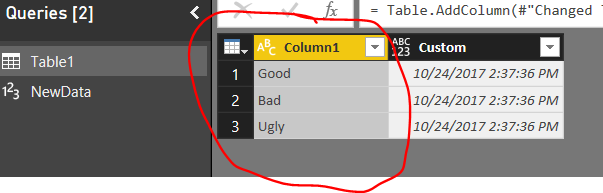
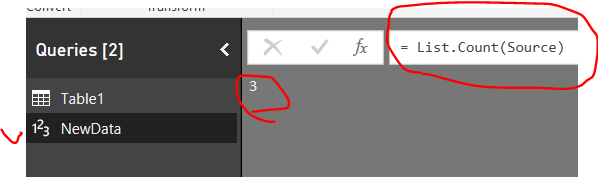
The easiest way to do this is to create a new query and reference only that field from your data table you want to keep an eye on, turn it into a list and get a count on it.   (Preferred way is to set this up inside your server environment )


image.png

Create a new query and bring in the field you need as a list.


let
    Source = Table1[Column1],
    Custom1 = List.Count(Source)
in
    Custom1


image.png


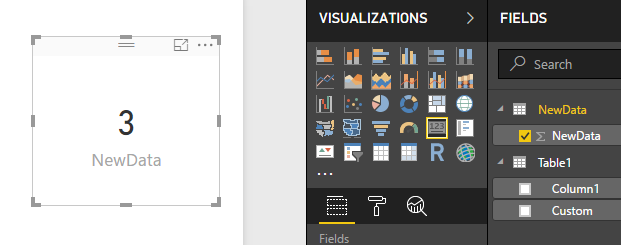
Close and save power query and bring your count into the report view. So, once new value gets added up to your dataset , you will see this immediately reflected in your report.


image.png

View solution in original post

3 REPLIES 3
v-ljerr-msft
Microsoft Employee
Microsoft Employee

Hi @Anonymous,


Have you tried the solution provided by @nickchobotar above? Does it work in your scenario? If it works, could you accept it as solution to close this thread?


If you still have any question on this issue, feel free to post here. Smiley Happy


Regards

HI,

I am pretty new on this, so would it be possible to have little more information on how to do it?


I have a table name table1 with several columns and several values. I would like to make a data alert when a new record is added to the table1 for the column1 but only for a specific value (e.g. column1 contains two values like "blue" and "red" and I want to know only a new record for "blue").


How can I build a KPI on it in order to be able to set a data alert that notify me when a new value is added?


thanks

ANdrea

nickchobotar
Skilled Sharer
Skilled Sharer

@Anonymous


The easiest way to do this is to create a new query and reference only that field from your data table you want to keep an eye on, turn it into a list and get a count on it.   (Preferred way is to set this up inside your server environment )


image.png

Create a new query and bring in the field you need as a list.


let
    Source = Table1[Column1],
    Custom1 = List.Count(Source)
in
    Custom1


image.png


Close and save power query and bring your count into the report view. So, once new value gets added up to your dataset , you will see this immediately reflected in your report.


image.png

Helpful resources

Announcements
Join our Fabric User Panel

Join our Fabric User Panel

Share feedback directly with Fabric product managers, participate in targeted research studies and influence the Fabric roadmap.

February Power BI Update Carousel

Power BI Monthly Update - February 2026

Check out the February 2026 Power BI update to learn about new features.

FabCon Atlanta 2026 carousel

FabCon Atlanta 2026

Join us at FabCon Atlanta, March 16-20, for the ultimate Fabric, Power BI, AI and SQL community-led event. Save $200 with code FABCOMM.