
cancel
Showing results for 
Search instead for 
Did you mean: 

The Power BI Data Visualization World Championships is back! Get ahead of the game and start preparing now! Learn more

Reply
th340385
Helper I
Helper I

New Column

Hello - I currently have a chart of accounts table that includes financial statement roll up description at the bottom of the same table (see screenshot below). I am trying to include a new column (blue) that includes the financial statement roll up description for each account. Any guidance on how to accomplish this would be appreciated! 


Account #DescriptionTotaling RangeNew Column Expectation
100000Cash 1 = Total Cash and Cash Equivalents
100001Cash 2 = Total Cash and Cash Equivalents
100002Cash 3 = Total Cash and Cash Equivalents
193000.1Land = Total Fixed Assets
193000.2Land Improvements = Total Fixed Assets
193000.25Accum. Depr. - Land Improvements = Total Fixed Assets
193000.3Building = Total Fixed Assets
193000.35Accum. Depr. - Buildings = Total Fixed Assets
100999Total Cash and Cash Equivalents099999.000..100999.000 
196999Total Fixed Assets193000.000..196999.000 
1 ACCEPTED SOLUTION
v-lionel-msft
Community Support
Community Support

Hi @th340385 ,


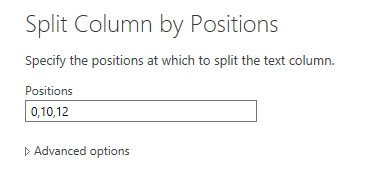
1. Split [Totaling Range] column

ff2.PNG

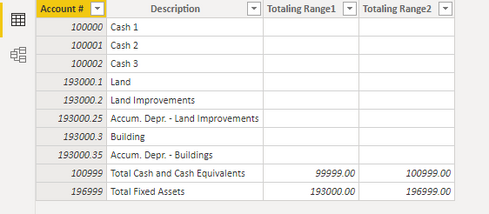
Then you can get such a table.

ff3.PNG

2. Create a table like this.

Table = 
SUMMARIZE(
    FILTER(
        Sheet1,
        Sheet1[Totaling Range1] <> BLANK()
    ),
    [Account #], [Description], [Totaling Range1],[Totaling Range2]
)

ff4.PNG

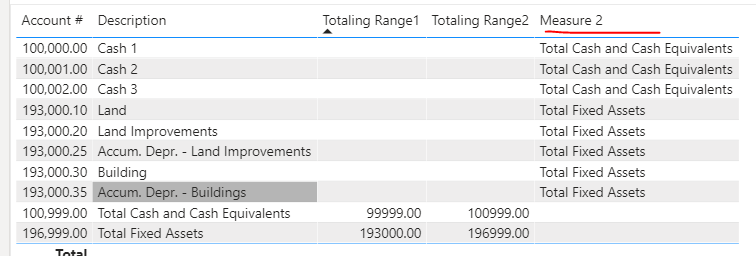
3. Create a measure like this.

Measure 2 = 
VAR x = 
SWITCH(
    TRUE(),
    MAX(Sheet1[Account #]) >= MIN('Table'[Totaling Range1]) && MAX(Sheet1[Account #]) <= MIN('Table'[Totaling Range2]), MIN('Table'[Description]),
    MAX(Sheet1[Account #]) >= MAX('Table'[Totaling Range1]) && MAX(Sheet1[Account #]) <= MAX('Table'[Totaling Range2]), MAX('Table'[Description])
)
RETURN
IF(
    CONTAINSSTRING( MAX(Sheet1[Description]), "Total"),
    BLANK(),
    x
)

ff5.PNG

(Note: Do not establish a relationship between the two tables.)


Best regards,
Lionel Chen

If this post helps, then please consider Accept it as the solution to help the other members find it more quickly.

View solution in original post

5 REPLIES 5
v-lionel-msft
Community Support
Community Support

Hi @th340385 ,


1. Split [Totaling Range] column

ff2.PNG

Then you can get such a table.

ff3.PNG

2. Create a table like this.

Table = 
SUMMARIZE(
    FILTER(
        Sheet1,
        Sheet1[Totaling Range1] <> BLANK()
    ),
    [Account #], [Description], [Totaling Range1],[Totaling Range2]
)

ff4.PNG

3. Create a measure like this.

Measure 2 = 
VAR x = 
SWITCH(
    TRUE(),
    MAX(Sheet1[Account #]) >= MIN('Table'[Totaling Range1]) && MAX(Sheet1[Account #]) <= MIN('Table'[Totaling Range2]), MIN('Table'[Description]),
    MAX(Sheet1[Account #]) >= MAX('Table'[Totaling Range1]) && MAX(Sheet1[Account #]) <= MAX('Table'[Totaling Range2]), MAX('Table'[Description])
)
RETURN
IF(
    CONTAINSSTRING( MAX(Sheet1[Description]), "Total"),
    BLANK(),
    x
)

ff5.PNG

(Note: Do not establish a relationship between the two tables.)


Best regards,
Lionel Chen

If this post helps, then please consider Accept it as the solution to help the other members find it more quickly.

amitchandak
Super User
Super User

@th340385 , you have write logic using switch true and containsstring

https://blog.enterprisedna.co/using-switch-true-logic-in-power-bi-dax-concepts/


https://docs.microsoft.com/en-us/dax/containsstring-function-dax

https://docs.microsoft.com/en-us/dax/search-function-dax

Share with Power BI Enthusiasts: Full Power BI Video (20 Hours) YouTube
Microsoft Fabric Series 60+ Videos YouTube
Microsoft Fabric Hindi End to End YouTube

Can you please provide an example? 

jthomson
Solution Sage
Solution Sage

Just seems like a simple if statement to me

Can you please provide example? 

Helpful resources

Announcements
Power BI DataViz World Championships

Power BI Dataviz World Championships

The Power BI Data Visualization World Championships is back! Get ahead of the game and start preparing now!

December 2025 Power BI Update Carousel

Power BI Monthly Update - December 2025

Check out the December 2025 Power BI Holiday Recap!

FabCon Atlanta 2026 carousel

FabCon Atlanta 2026

Join us at FabCon Atlanta, March 16-20, for the ultimate Fabric, Power BI, AI and SQL community-led event. Save $200 with code FABCOMM.