cancel
Showing results for 
Search instead for 
Did you mean: 

The Power BI Data Visualization World Championships is back! It's time to submit your entry. Live now!

Reply
Anonymous
Not applicable

New Calculated Column With Grouping

Hi,


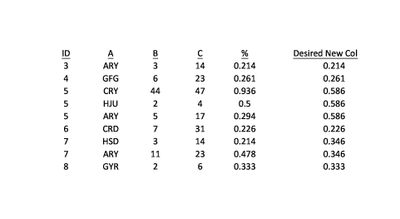
Here is my data, with the column I'd like to create.

Book.jpg

I want a column that divides B by C, but when the ID is the same, returns the average of all those calculations for that particular ID. For example, with ID=3 there is only 1 value, so the % is returned, but for ID=7 there are two values so (0.214+0.478)/2 is returned for all rows with ID=7.


I hope that makes sense. I know I could just set the default summarization of the % row to average, rather than sum, but I will be unpivoting the table in another step.


Thanks for your help


Sean


1 ACCEPTED SOLUTION
Omega
Impactful Individual

I created % measure using the below formula: 


Average (B,C) = SUM(Table1[B])/SUM(Table1[C])

For the new measure, try using the below formula: 


New Measure = SUMX(ALLEXCEPT(Table1,Table1[ID]),[Average (B,C)])/CALCULATE(COUNTROWS(Table1),ALLEXCEPT(Table1,Table1[ID]))

View solution in original post

4 REPLIES 4
Omega
Impactful Individual

I created % measure using the below formula: 


Average (B,C) = SUM(Table1[B])/SUM(Table1[C])

For the new measure, try using the below formula: 


New Measure = SUMX(ALLEXCEPT(Table1,Table1[ID]),[Average (B,C)])/CALCULATE(COUNTROWS(Table1),ALLEXCEPT(Table1,Table1[ID]))
themistoklis
Community Champion
Community Champion

@Anonymous


It seems that ID to currency is one to many.


What you can do is the following

1. Create a table with ID as first column

2. B Column will be a measure   

Measure_B = SUM(Table[Column_B])

3.  C Column will be a measure 

Measure_C = SUM(Table[Column_C])

 4. Desire Column will be:

( [Measure_B] / [Measure_C] ) / COUNT(Table[Column_ID]

 5. Currency wont be included in this table

Anonymous
Not applicable

Not sure what you mean. There's no currency involved. This is my fact table. ID and A both connect to dimensions.

When you say B column will be a measure, do you mean creating a column or creating a measure? Aren't those different things?


I couldn't get your steps to work.

@Anonymous


Sorry i thought A was a currency field.


Yes i meant create a measure based on Column B and also based on Column C.

Then another measure as described on step 4.


Finally on the table put ID, and then the 3 measures above

Helpful resources

Announcements
December 2025 Power BI Update Carousel

Power BI Monthly Update - December 2025

Check out the December 2025 Power BI Holiday Recap!

FabCon Atlanta 2026 carousel

FabCon Atlanta 2026

Join us at FabCon Atlanta, March 16-20, for the ultimate Fabric, Power BI, AI and SQL community-led event. Save $200 with code FABCOMM.