Don't miss your chance to take the Fabric Data Engineer (DP-600) exam for FREE! Find out how by watching the DP-600 session on-demand now through April 28th.
Learn moreJoin the FabCon + SQLCon recap series. Up next: Power BI, Real-Time Intelligence, IQ and AI, and Data Factory take center stage. All sessions are available on-demand after the live show. Register now
Hi,
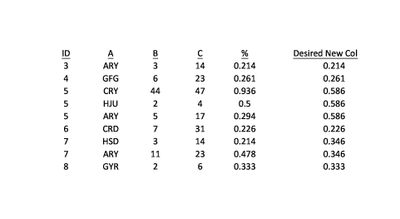
Here is my data, with the column I'd like to create.
I want a column that divides B by C, but when the ID is the same, returns the average of all those calculations for that particular ID. For example, with ID=3 there is only 1 value, so the % is returned, but for ID=7 there are two values so (0.214+0.478)/2 is returned for all rows with ID=7.
I hope that makes sense. I know I could just set the default summarization of the % row to average, rather than sum, but I will be unpivoting the table in another step.
Thanks for your help
Sean
Solved! Go to Solution.
I created % measure using the below formula:
Average (B,C) = SUM(Table1[B])/SUM(Table1[C])
For the new measure, try using the below formula:
New Measure = SUMX(ALLEXCEPT(Table1,Table1[ID]),[Average (B,C)])/CALCULATE(COUNTROWS(Table1),ALLEXCEPT(Table1,Table1[ID]))
I created % measure using the below formula:
Average (B,C) = SUM(Table1[B])/SUM(Table1[C])
For the new measure, try using the below formula:
New Measure = SUMX(ALLEXCEPT(Table1,Table1[ID]),[Average (B,C)])/CALCULATE(COUNTROWS(Table1),ALLEXCEPT(Table1,Table1[ID]))
@Anonymous
It seems that ID to currency is one to many.
What you can do is the following
1. Create a table with ID as first column
2. B Column will be a measure
Measure_B = SUM(Table[Column_B])
3. C Column will be a measure
Measure_C = SUM(Table[Column_C])
4. Desire Column will be:
( [Measure_B] / [Measure_C] ) / COUNT(Table[Column_ID]
5. Currency wont be included in this table
Not sure what you mean. There's no currency involved. This is my fact table. ID and A both connect to dimensions.
When you say B column will be a measure, do you mean creating a column or creating a measure? Aren't those different things?
I couldn't get your steps to work.
@Anonymous
Sorry i thought A was a currency field.
Yes i meant create a measure based on Column B and also based on Column C.
Then another measure as described on step 4.
Finally on the table put ID, and then the 3 measures above
Check out the April 2026 Power BI update to learn about new features.
If you have recently started exploring Fabric, we'd love to hear how it's going. Your feedback can help with product improvements.
A new Power BI DataViz World Championship is coming this June! Don't miss out on submitting your entry.
| User | Count |
|---|---|
| 41 | |
| 37 | |
| 34 | |
| 21 | |
| 16 |
| User | Count |
|---|---|
| 64 | |
| 58 | |
| 31 | |
| 25 | |
| 25 |