Get Fabric or SQL Certified for Free.
Get certified for free when you join Fabric Data Days 2026 and dive into Fabric, Power BI, SQL, AI, and other essential data skills.
Join now- Power BI forums
- Get Help with Power BI
- Desktop
- Service
- Report Server
- Power Query
- Mobile Apps
- Developer
- DAX Commands and Tips
- Custom Visuals Development Discussion
- Health and Life Sciences
- Power BI Spanish forums
- Translated Spanish Desktop
- Training and Consulting
- Instructor Led Training
- Dashboard in a Day for Women, by Women
- Galleries
- Data Stories Gallery
- Themes Gallery
- Contests Gallery
- QuickViz Gallery
- Quick Measures Gallery
- Visual Calculations Gallery
- Notebook Gallery
- Translytical Task Flow Gallery
- TMDL Gallery
- R Script Showcase
- Webinars and Video Gallery
- Ideas
- Custom Visuals Ideas (read-only)
- Issues
- Issues
- Events
- Upcoming Events
Data Days is here! Join us now for 60+ days of learning, challenges, and connection. Learn more
- Power BI forums
- Forums
- Get Help with Power BI
- Desktop
- Re: Networkdays DAX function
- Subscribe to RSS Feed
- Mark Topic as New
- Mark Topic as Read
- Float this Topic for Current User
- Bookmark
- Subscribe
- Printer Friendly Page


- Mark as New
- Bookmark
- Subscribe
- Mute
- Subscribe to RSS Feed
- Permalink
- Report Inappropriate Content
Networkdays DAX function
Hello,
can somebody help me? Is there any simple method how to calculate Working Days left in actual month?
In excel I am using NETWORKDAYS function.
Any example?
Thanks
Solved! Go to Solution.


- Mark as New
- Bookmark
- Subscribe
- Mute
- Subscribe to RSS Feed
- Permalink
- Report Inappropriate Content
Try something like this:
WD = VAR WDinMonth = CALCULATE(COUNTROWS('Calendar');
FILTER('Calendar'; 'Calendar'[DayOfWeekNumber] >= 1
&& 'Calendar'[DayOfWeekNumber] <= 5 ))

VAR WDinMonthThusFar = CALCULATE(COUNTROWS('Calendar');
FILTER('Calendar'; 'Calendar'[DayOfWeekNumber] >= 1
&& 'Calendar'[DayOfWeekNumber] <= 5 ) && 'Calendar'[Date] < TODAY())

RETURN (WDinMonth -WDinMonthThusFar)
I'm assuming you have some sort of [Date] column in your table.
Follow on LinkedIn
@ me in replies or I'll lose your thread!!!
Instead of a Kudo, please vote for this idea
Become an expert!: Enterprise DNA
External Tools: MSHGQM
YouTube Channel!: Microsoft Hates Greg
Latest book!: DAX For Humans
DAX is easy, CALCULATE makes DAX hard...

- Mark as New
- Bookmark
- Subscribe
- Mute
- Subscribe to RSS Feed
- Permalink
- Report Inappropriate Content
- Mark as New
- Bookmark
- Subscribe
- Mute
- Subscribe to RSS Feed
- Permalink
- Report Inappropriate Content
This is what I found, and tried to replicate. At this time I have got this:
WD = CALCULATE(COUNTROWS('Calendar');
FILTER('Calendar'; 'Calendar'[DayOfWeekNumber] >= 1
&& 'Calendar'[DayOfWeekNumber] <= 5 ))
Which works fine. It returns count of working days in month.
But how to filter it, to get the count of working days till the end of the month?
So to show me for today: 5 working days, tommorow 4 working days, etc
- Mark as New
- Bookmark
- Subscribe
- Mute
- Subscribe to RSS Feed
- Permalink
- Report Inappropriate Content
Try something like this:
WD = VAR WDinMonth = CALCULATE(COUNTROWS('Calendar');
FILTER('Calendar'; 'Calendar'[DayOfWeekNumber] >= 1
&& 'Calendar'[DayOfWeekNumber] <= 5 ))

VAR WDinMonthThusFar = CALCULATE(COUNTROWS('Calendar');
FILTER('Calendar'; 'Calendar'[DayOfWeekNumber] >= 1
&& 'Calendar'[DayOfWeekNumber] <= 5 ) && 'Calendar'[Date] < TODAY())

RETURN (WDinMonth -WDinMonthThusFar)
I'm assuming you have some sort of [Date] column in your table.
Follow on LinkedIn
@ me in replies or I'll lose your thread!!!
Instead of a Kudo, please vote for this idea
Become an expert!: Enterprise DNA
External Tools: MSHGQM
YouTube Channel!: Microsoft Hates Greg
Latest book!: DAX For Humans
DAX is easy, CALCULATE makes DAX hard...
- Mark as New
- Bookmark
- Subscribe
- Mute
- Subscribe to RSS Feed
- Permalink
- Report Inappropriate Content
Hello,
If I have dates in the below format and there is a condition that I can not use calendar table,
How would I calculate networking days in a period,
Please see data carefully below,
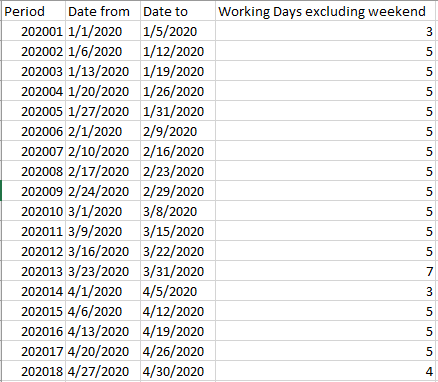
I have period, start date and end date and i want to calculate networking days between these 2 dates in power bi, how can I do that...
Thanks in advance
- Mark as New
- Bookmark
- Subscribe
- Mute
- Subscribe to RSS Feed
- Permalink
- Report Inappropriate Content
Hi @Greg_Deckler exactly, I have got Date column in my Kalendar table.
So I should be able just copy your code. That is what I did, but got the error:
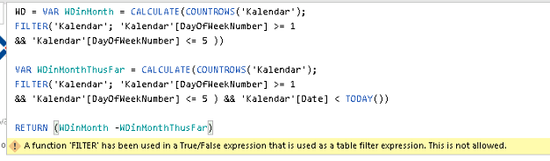
Do I need to adjust something?
- Mark as New
- Bookmark
- Subscribe
- Mute
- Subscribe to RSS Feed
- Permalink
- Report Inappropriate Content
Already found it and now it works like a charm. Many thanks @Greg_Deckler.
FYI error was in the second filter, mismatch of parenthesis.
WD = VAR WDinMonth = CALCULATE(COUNTROWS('Kalendar');
FILTER('Kalendar'; 'Kalendar'[DayOfWeekNumber] >= 1
&& 'Kalendar'[DayOfWeekNumber] <= 5 ))
VAR WDinMonthThusFar = CALCULATE(COUNTROWS('Kalendar');
FILTER('Kalendar'; 'Kalendar'[DayOfWeekNumber] >= 1
&& 'Kalendar'[DayOfWeekNumber] <= 5 && 'Kalendar'[Date] < TODAY()))
RETURN (WDinMonth -WDinMonthThusFar)
- Mark as New
- Bookmark
- Subscribe
- Mute
- Subscribe to RSS Feed
- Permalink
- Report Inappropriate Content
Can we get this to exclude holidays?

Helpful resources

Fabric Data Days 2026
Don't miss out on Data Days, June 15 through August 7. Learn Fabric, Power BI, SQL, AI and more.

Power BI Monthly Update - May 2026
Check out the May 2026 Power BI update to learn about new features.

Power BI DataViz World Championships - June 2026
A new Power BI DataViz World Championship is coming this June! Don't miss out on submitting your entry.

| User | Count |
|---|---|
| 23 | |
| 23 | |
| 21 | |
| 20 | |
| 15 |


| User | Count |
|---|---|
| 58 | |
| 55 | |
| 43 | |
| 30 | |
| 24 |


