Join us at FabCon Atlanta from March 16 - 20, 2026, for the ultimate Fabric, Power BI, AI and SQL community-led event. Save $200 with code FABCOMM.
Register now!The Power BI Data Visualization World Championships is back! Get ahead of the game and start preparing now! Learn more
Hello,
can anyone please help out in the following problem?
Got 2 tables related to this task:
1) Date
2) unique contracts with valid from date(start of month) and valid to (end of month).. The range varies from several years to months.
Basically need to filter out those contracts that are valid in the selected period (Year-Month)- selection from slicer?
My approach was getting the value from the slicer and sending it into the query defining the new table. The problem however is that my Selected Period is a measure and the table does not get affected by the changes on visual. My dax formula is below.
Lookng into an alternative working solution. Is there any chance I can loop every individual rows from date table and comparing it against indvidual rows (falls between the valid from & to dates or not) in Contracts - ie: nesting 2 row contexts between 2 different tables? The result would be a new table with combination of Contracts and Year-Months. Then I can join the new table with my contract table and can do the filtering based on relationship? Or any other solution to this problem you can think of?
Thanks in advance!
Tomas
Solved! Go to Solution.
Hi @TomasSamu ,
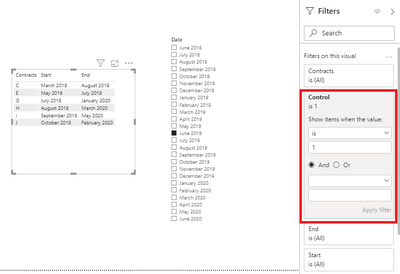
If you want to filter the contract table based on date slicer, you can create this control measure and set its value as 1 in the visual filter:
Control =
VAR _Date =
SELECTEDVALUE ( 'Date'[Date] )
VAR startdate =
SELECTEDVALUE ( ContractConfiguration[Start] )
VAR enddate =
SELECTEDVALUE ( ContractConfiguration[End] )
RETURN
IF ( _Date = BLANK (), 1, IF ( _Date > startdate && _Date < enddate, 1, 0 ) )
Sample file is attached that hopes to help you: Nest filtering.pbix
Best Regards,
Yingjie Li
If this post helps then please consider Accept it as the solution to help the other members find it more quickly.
Hi @TomasSamu ,
If you want to filter the contract table based on date slicer, you can create this control measure and set its value as 1 in the visual filter:
Control =
VAR _Date =
SELECTEDVALUE ( 'Date'[Date] )
VAR startdate =
SELECTEDVALUE ( ContractConfiguration[Start] )
VAR enddate =
SELECTEDVALUE ( ContractConfiguration[End] )
RETURN
IF ( _Date = BLANK (), 1, IF ( _Date > startdate && _Date < enddate, 1, 0 ) )
Sample file is attached that hopes to help you: Nest filtering.pbix
Best Regards,
Yingjie Li
If this post helps then please consider Accept it as the solution to help the other members find it more quickly.
The Power BI Data Visualization World Championships is back! Get ahead of the game and start preparing now!
| User | Count |
|---|---|
| 151 | |
| 130 | |
| 109 | |
| 79 | |
| 54 |