Get certified for free when you join Fabric Data Days 2026 and dive into Fabric, Power BI, SQL, AI, and other essential data skills.
Join nowData Days is here! Join us now for 60+ days of learning, challenges, and connection. Learn more
Hello,
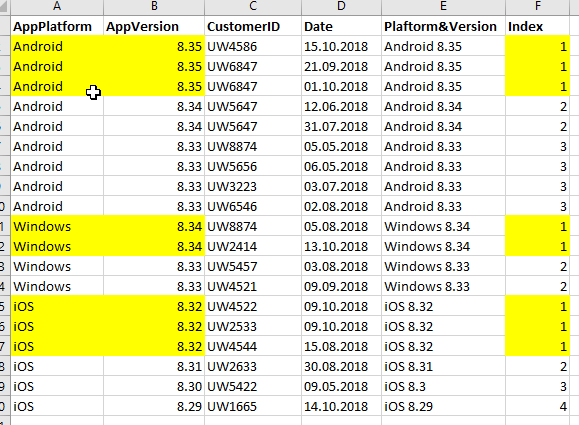
I am trying to get a nested index column in Power Query based on the following dataset.
Index assignes the lowest rank (1) to the latest AppVersion on each Platform. And it still keeps other fields like CustomerID and Date.
I used the code below (and some variations of it), but it doesnt give the result i want.
#"Sorted Rows" =
Table.Sort(#"Platform&Version",{{"AppVersion", Order.Descending}}),
#"Grouped Rows" =
Table.Group(#"Sorted Rows", {"AppPlatform"}, {{"Count", each Table.AddIndexColumn(_ , "Index", 1,1), type table}}),
#"Expanded Count" =
Table.ExpandTableColumn(#"Grouped Rows", "Count", {"CustomerID", "Date", "Platform&Version", "Index"}, {"CustomerID", "Date", "Platform&Version", "Index"}),I guess that index should be based on distinct values of Platform&AppVersion field, but i dont know how to implement logic into the code. Any ideas, please?
Thank you
Solved! Go to Solution.
Please try this.
Please see the attached file for steps
let
Source = Table.FromRows(Json.Document(Binary.Decompress(Binary.FromText("i45WcsxLKcrPTFHSUbLQMzYFUol5lSUZmXnpQKaBoa5XYp6uoTmQDVWnAFYVq0NAoxG5Go2J1WiCptEEq0YTwhpNidVojKbRDKtGY8IazcnVaEGuRks8GsMz81Lyy4uxBo6hAUIjVB0icPBqNCRWI5pTDY2wasTiVHSNxrg0xgIA", BinaryEncoding.Base64), Compression.Deflate)), let _t = ((type text) meta [Serialized.Text = true]) in type table [AppPlatform = _t, AppVersion = _t, CustomerID = _t, Date = _t, #"Platform&Version" = _t]),
#"Changed Type" = Table.TransformColumnTypes(Source,{{"AppPlatform", type text}, {"AppVersion", type number}, {"CustomerID", type text}, {"Date", type date}, {"Platform&Version", type text}}),
#"Sorted Rows" = Table.Sort(#"Changed Type",{{"AppPlatform", Order.Ascending}, {"AppVersion", Order.Descending}}),
#"Grouped Rows" = Table.Group(#"Sorted Rows", {"AppPlatform", "AppVersion"}, {{"All Rows", each _, type table}}),
#"Grouped Rows1" = Table.Group(#"Grouped Rows", {"AppPlatform"}, {{"All Rows", each Table.AddIndexColumn(_,"Index",1,1), type table}}),
#"Expanded All Rows" = Table.ExpandTableColumn(#"Grouped Rows1", "All Rows", {"AppVersion", "All Rows", "Index"}, {"AppVersion", "All Rows.1", "Index"}),
#"Expanded All Rows.1" = Table.ExpandTableColumn(#"Expanded All Rows", "All Rows.1", {"CustomerID", "Date", "Platform&Version"}, {"CustomerID", "Date", "Platform&Version"})
in
#"Expanded All Rows.1"
Please try this.
Please see the attached file for steps
let
Source = Table.FromRows(Json.Document(Binary.Decompress(Binary.FromText("i45WcsxLKcrPTFHSUbLQMzYFUol5lSUZmXnpQKaBoa5XYp6uoTmQDVWnAFYVq0NAoxG5Go2J1WiCptEEq0YTwhpNidVojKbRDKtGY8IazcnVaEGuRks8GsMz81Lyy4uxBo6hAUIjVB0icPBqNCRWI5pTDY2wasTiVHSNxrg0xgIA", BinaryEncoding.Base64), Compression.Deflate)), let _t = ((type text) meta [Serialized.Text = true]) in type table [AppPlatform = _t, AppVersion = _t, CustomerID = _t, Date = _t, #"Platform&Version" = _t]),
#"Changed Type" = Table.TransformColumnTypes(Source,{{"AppPlatform", type text}, {"AppVersion", type number}, {"CustomerID", type text}, {"Date", type date}, {"Platform&Version", type text}}),
#"Sorted Rows" = Table.Sort(#"Changed Type",{{"AppPlatform", Order.Ascending}, {"AppVersion", Order.Descending}}),
#"Grouped Rows" = Table.Group(#"Sorted Rows", {"AppPlatform", "AppVersion"}, {{"All Rows", each _, type table}}),
#"Grouped Rows1" = Table.Group(#"Grouped Rows", {"AppPlatform"}, {{"All Rows", each Table.AddIndexColumn(_,"Index",1,1), type table}}),
#"Expanded All Rows" = Table.ExpandTableColumn(#"Grouped Rows1", "All Rows", {"AppVersion", "All Rows", "Index"}, {"AppVersion", "All Rows.1", "Index"}),
#"Expanded All Rows.1" = Table.ExpandTableColumn(#"Expanded All Rows", "All Rows.1", {"CustomerID", "Date", "Platform&Version"}, {"CustomerID", "Date", "Platform&Version"})
in
#"Expanded All Rows.1"
Hi Zubair,
This is a great solution, simple and easy.
Thank you for sharing your wisdom
have a great day. you've just made mine better 🙂
Also you can do the same with DAX calculated column
Calc Column =
RANKX (
FILTER ( Table1, [AppPlatform] = EARLIER ( [AppPlatform] ) ),
[AppVersion],
,
DESC,
DENSE
)
Don't miss out on Data Days, June 15 through August 7. Learn Fabric, Power BI, SQL, AI and more.
Check out the May 2026 Power BI update to learn about new features.
| User | Count |
|---|---|
| 23 | |
| 23 | |
| 21 | |
| 20 | |
| 15 |
| User | Count |
|---|---|
| 58 | |
| 54 | |
| 42 | |
| 30 | |
| 24 |