cancel
Showing results for 
Search instead for 
Did you mean: 

Next up in the FabCon + SQLCon recap series: The roadmap for Microsoft SQL and Maximizing Developer experiences in Fabric. All sessions are available on-demand after the live show. Register now

Reply
KG1
Resolver I
Resolver I

Nested If / And Statement

Hi


I have had the following formula sent to me in Excel - could you please advise how I would go about replicating this in a column?


I am really not expecting anyone to retype this out for me. The column refs will need to be renamed to the column headers in the Powerbi data table. I'm just not sure where to start with the rules within Powerbi


Thank you in advance

=IF(AND(AQ37=TRUE,AU37=TRUE,AW37=TRUE,AX37=TRUE,AZ37=TRUE,BK37=TRUE,BM37=TRUE,OR(BO37=TRUE,BP37=TRUE)),"Receipting",IF(AND(OR(AQ37=TRUE,AR37=TRUE),AV37=TRUE,AX37=TRUE,BA37=TRUE,BD37=TRUE,BF37=TRUE,BI37=TRUE,BT37="No"),"Short-Costing - Site",IF(AND(OR(AQ37=TRUE,AR37=TRUE),AV37=TRUE,AX37=TRUE,BA37=TRUE,BD37=TRUE,BF37=TRUE,BI37=TRUE,BT37="Yes"),"Short-Costing - Procurement",IF(AND(AQ37=TRUE,AU37=TRUE,AW37=TRUE,AX37=TRUE,AZ37=TRUE,BC37=TRUE,BE37=TRUE,BF37=TRUE,BH37=TRUE,BK37=TRUE,BM37=TRUE),"Overbill",IF(BN37=TRUE,"Cancelled Lines",IF(AS37=TRUE,"No PO",IF(AT37=TRUE,"No Lines in Oracle","AP Query"))))))),"")

1 ACCEPTED SOLUTION
Anonymous
Not applicable

Hi  @KG1 ,

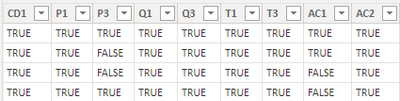
I created some data:

vyangliumsft_0-1656394675033.png

Here are the steps you can follow:

1. Create calculated column.

Column =
SWITCH(
    TRUE(), 'Table'[CD1]="TRUE"&&'Table'[P1]="TRUE"&&'Table'[P3]="TRUE"&&'Table'[Q1]="TRUE"&&'Table'[T1]="TRUE"&&'Table'[T3]="TRUE"
    ||
    AND('Table'[AC1]="TRUE",'Table'[AC2]="TRUE")
    ,"Receipting")

2. Result:

vyangliumsft_1-1656394675034.png


Best Regards,

Liu Yang

If this post helps, then please consider Accept it as the solution to help the other members find it more quickly

View solution in original post

4 REPLIES 4
Anonymous
Not applicable

Hi  @KG1 ,

I created some data:

vyangliumsft_0-1656394675033.png

Here are the steps you can follow:

1. Create calculated column.

Column =
SWITCH(
    TRUE(), 'Table'[CD1]="TRUE"&&'Table'[P1]="TRUE"&&'Table'[P3]="TRUE"&&'Table'[Q1]="TRUE"&&'Table'[T1]="TRUE"&&'Table'[T3]="TRUE"
    ||
    AND('Table'[AC1]="TRUE",'Table'[AC2]="TRUE")
    ,"Receipting")

2. Result:

vyangliumsft_1-1656394675034.png


Best Regards,

Liu Yang

If this post helps, then please consider Accept it as the solution to help the other members find it more quickly

amitchandak
Super User
Super User

@KG1 , You can use Switch with True, that will simplify it. Alos use column name in place of cell name


refer if this can help

Switch-Case statement of #PowerBI: https://www.youtube.com/watch?v=gelJWktlR80&list=PLPaNVDMhUXGaaqV92SBD5X2hk3TMNlHhb&index=56

Share with Power BI Enthusiasts: Full Power BI Video (20 Hours) YouTube
Microsoft Fabric Series 60+ Videos YouTube
Microsoft Fabric Hindi End to End YouTube

switch ( True (),( [CD1] = "TRUE" && [P1] = "TRUE" && [P3] = "TRUE" && [Q1] = "TRUE" && [Q3] ="TRUE" && [T1] = "TRUE" && [T3] = "TRUE" ) ||[AC1] = "TRUE" && [AC2]  = "TRUE" , "Receipting"


@amitchandak  - can you please help with the above - it works fine up to the ||[AC1] = "TRUE" && [AC2]  = "TRUE"  - I can't get it to include this within the statement - the result should be false if either AC1 and AC2 are False but it keeps returning Receipting - it's like its completely ignoring the ||

Great - thank you - is it a new switch at the start of each new IF e.g


Test = switch ( True (),( [CD1] = "TRUE" && [P1] = "TRUE" && [P3] = "TRUE" && [Q1] = "TRUE" && [Q3] ="TRUE" && [T1] = "TRUE" && [T3] = "TRUE" ) ||[AC1] = "TRUE" && [AC2] = "TRUE" , "Receipting" , switch ( True (), [CD1] = "TRUE" && [CD2] = "TRUE" && [P2] = "TRUE" && [Q1] = "TRUE" && [Q4 - Positive] ="TRUE" && [R2] = "TRUE" && [S1] = "No" && [S4 - Positive] = "TRUE" && [Catalogue] = "NO", "Short-Costing - Procurement"))

Helpful resources

Announcements
New to Fabric survey Carousel

New to Fabric Survey

If you have recently started exploring Fabric, we'd love to hear how it's going. Your feedback can help with product improvements.

Power BI DataViz World Championships carousel

Power BI DataViz World Championships - June 2026

A new Power BI DataViz World Championship is coming this June! Don't miss out on submitting your entry.

Join our Fabric User Panel

Join our Fabric User Panel

Share feedback directly with Fabric product managers, participate in targeted research studies and influence the Fabric roadmap.

March Power BI Update Carousel

Power BI Community Update - March 2026

Check out the March 2026 Power BI update to learn about new features.