This is best Fabric, Power BI, SQL and AI community event. How do we know? The last event sold out! Save €200 with code FABCMTY200.
Register nowA new Data Days event is coming soon! This time we’re going bigger than ever. Fabric, Power BI, SQL, AI and more. Don't miss out.
Hi
I have had the following formula sent to me in Excel - could you please advise how I would go about replicating this in a column?
I am really not expecting anyone to retype this out for me. The column refs will need to be renamed to the column headers in the Powerbi data table. I'm just not sure where to start with the rules within Powerbi
Thank you in advance
=IF(AND(AQ37=TRUE,AU37=TRUE,AW37=TRUE,AX37=TRUE,AZ37=TRUE,BK37=TRUE,BM37=TRUE,OR(BO37=TRUE,BP37=TRUE)),"Receipting",IF(AND(OR(AQ37=TRUE,AR37=TRUE),AV37=TRUE,AX37=TRUE,BA37=TRUE,BD37=TRUE,BF37=TRUE,BI37=TRUE,BT37="No"),"Short-Costing - Site",IF(AND(OR(AQ37=TRUE,AR37=TRUE),AV37=TRUE,AX37=TRUE,BA37=TRUE,BD37=TRUE,BF37=TRUE,BI37=TRUE,BT37="Yes"),"Short-Costing - Procurement",IF(AND(AQ37=TRUE,AU37=TRUE,AW37=TRUE,AX37=TRUE,AZ37=TRUE,BC37=TRUE,BE37=TRUE,BF37=TRUE,BH37=TRUE,BK37=TRUE,BM37=TRUE),"Overbill",IF(BN37=TRUE,"Cancelled Lines",IF(AS37=TRUE,"No PO",IF(AT37=TRUE,"No Lines in Oracle","AP Query"))))))),"")
Solved! Go to Solution.
Hi @KG1 ,
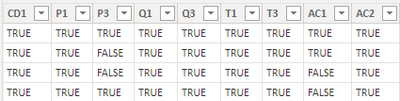
I created some data:
Here are the steps you can follow:
1. Create calculated column.
Column =
SWITCH(
TRUE(), 'Table'[CD1]="TRUE"&&'Table'[P1]="TRUE"&&'Table'[P3]="TRUE"&&'Table'[Q1]="TRUE"&&'Table'[T1]="TRUE"&&'Table'[T3]="TRUE"
||
AND('Table'[AC1]="TRUE",'Table'[AC2]="TRUE")
,"Receipting")
2. Result:
Best Regards,
Liu Yang
If this post helps, then please consider Accept it as the solution to help the other members find it more quickly
Hi @KG1 ,
I created some data:
Here are the steps you can follow:
1. Create calculated column.
Column =
SWITCH(
TRUE(), 'Table'[CD1]="TRUE"&&'Table'[P1]="TRUE"&&'Table'[P3]="TRUE"&&'Table'[Q1]="TRUE"&&'Table'[T1]="TRUE"&&'Table'[T3]="TRUE"
||
AND('Table'[AC1]="TRUE",'Table'[AC2]="TRUE")
,"Receipting")
2. Result:
Best Regards,
Liu Yang
If this post helps, then please consider Accept it as the solution to help the other members find it more quickly
@KG1 , You can use Switch with True, that will simplify it. Alos use column name in place of cell name
refer if this can help
Switch-Case statement of #PowerBI: https://www.youtube.com/watch?v=gelJWktlR80&list=PLPaNVDMhUXGaaqV92SBD5X2hk3TMNlHhb&index=56
switch ( True (),( [CD1] = "TRUE" && [P1] = "TRUE" && [P3] = "TRUE" && [Q1] = "TRUE" && [Q3] ="TRUE" && [T1] = "TRUE" && [T3] = "TRUE" ) ||[AC1] = "TRUE" && [AC2] = "TRUE" , "Receipting"
@amitchandak - can you please help with the above - it works fine up to the ||[AC1] = "TRUE" && [AC2] = "TRUE" - I can't get it to include this within the statement - the result should be false if either AC1 and AC2 are False but it keeps returning Receipting - it's like its completely ignoring the ||
Great - thank you - is it a new switch at the start of each new IF e.g
Check out the May 2026 Power BI update to learn about new features.
Sign up to receive a private message when registration opens and key events begin.
If you have recently started exploring Fabric, we'd love to hear how it's going. Your feedback can help with product improvements.
| User | Count |
|---|---|
| 31 | |
| 26 | |
| 23 | |
| 22 | |
| 13 |
| User | Count |
|---|---|
| 61 | |
| 47 | |
| 27 | |
| 23 | |
| 18 |