Don't miss your chance to take exam DP-600 or DP-700 on us!
Request nowLearn from the best! Meet the four finalists headed to the FINALS of the Power BI Dataviz World Championships! Register now
Hello,
I'm working with a dataset that contains multiple clients, all who have multiple unique identifers. Clients can match based on any of the Code datafields that are listed below (I've bolded all matching identifers). In this example, 4 client records are listed but there's truly one single person referenced in all 4 records. I'd like to be able to identify all unique people in my dataset using the desired index column listed at the end of the table.
In my real dataset, there are at least 9 datafields that I use to identify clients, but unforuntately, none of these fields are able to match every single record that could possibly belong to each unique client.
Is there a way to utilize the Group By feature to get the desired indexing?
| Client Name | Code 1 | Code 2 | Code 3 | Desired Indexing |
| Bob Greeny | abc | 123 | V | 1 |
| Bobby Green | abc | 999 | T | 1 |
| B. Greene | qrs | 123 | F | 1 |
| Bob J. Grenne | ipq | 777 | F | 1 |
Thanks,
Solved! Go to Solution.
Hi SDream7,
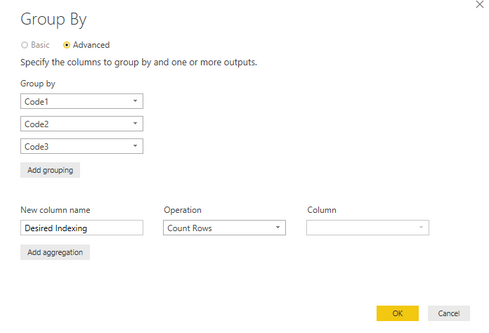
Click Query Editor-> Click "Transform"-> Click on [Client Name] column -> Click "Group By" like below:
Regards,
Jimmy Tao
Hi SDream7,
Click Query Editor-> Click "Transform"-> Click on [Client Name] column -> Click "Group By" like below:
Regards,
Jimmy Tao
Share feedback directly with Fabric product managers, participate in targeted research studies and influence the Fabric roadmap.
Check out the February 2026 Power BI update to learn about new features.
| User | Count |
|---|---|
| 51 | |
| 40 | |
| 37 | |
| 14 | |
| 14 |
| User | Count |
|---|---|
| 84 | |
| 69 | |
| 38 | |
| 29 | |
| 27 |