Join us at FabCon Atlanta from March 16 - 20, 2026, for the ultimate Fabric, Power BI, AI and SQL community-led event. Save $200 with code FABCOMM.
Register now!Get Fabric Certified for FREE during Fabric Data Days. Don't miss your chance! Request now
Hi Team,
I have below data where I need to put filter on the customers which has order instance as 5. Once I get those customers I need to sum of the revenue of those customers only but revenue should be summed for all the order instance till 5.
| Customer | Order Instance | revenue |
| Cust01 | 1 | 10 |
| Cust01 | 2 | 20 |
| Cust01 | 3 | 30 |
| Cust01 | 4 | 40 |
| Cust01 | 5 | 50 |
| Cust01 | 6 | 60 |
| Cust05 | 1 | 60 |
| Cust05 | 2 | 70 |
| Cust05 | 3 | 80 |
| Cust08 | 1 | 90 |
| Cust09 | 2 | 100 |
| Cust10 | 1 | 110 |
| Cust11 | 1 | 120 |
| Cust12 | 1 | 130 |
| Cust12 | 2 | 140 |
| Cust14 | 1 | 150 |
| Cust15 | 1 | 160 |
| Cust16 | 1 | 170 |
Like in above example only Cust01 has orer instance 5, so the Cust01 shold be filtered out and then sum of revenue for Cust01 where Order Instance is <=5 so in this case revenue should be $150.
Please note Cust01 is filtered on the base of all those customers which reached upto order instance =5 and then put another filter to get sum of revenue for all order instance <=5, the 6th order instance wont be considered here.
This is kind of nested filter , kindly guide how it can be done in Power BI desktop may be with the help of DAX reference.
Thanks
Swapnil
Solved! Go to Solution.
Hi @Anonymous,
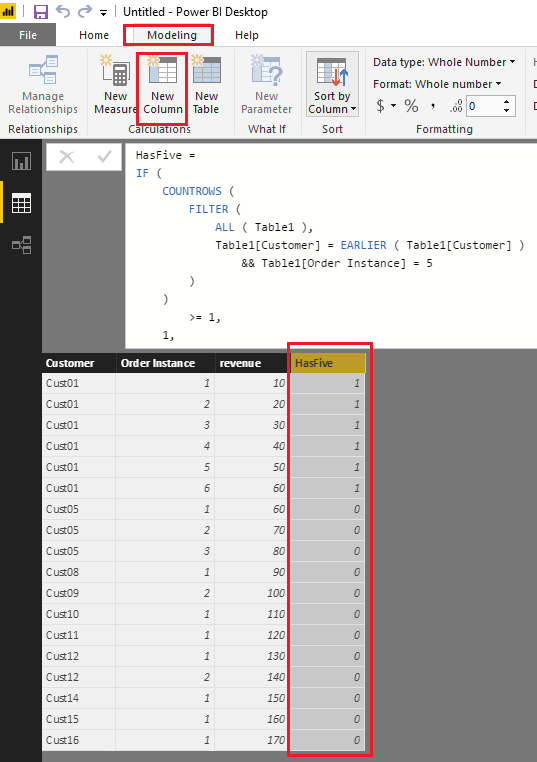
Based on my test, you can firstly use the formula below to create a new calculate column in your table to indicate if a customer has order instance as 5.
HasFive =
IF (
COUNTROWS (
FILTER (
ALL ( Table1 ),
Table1[Customer] = EARLIER ( Table1[Customer] )
&& Table1[Order Instance] = 5
)
)
>= 1,
1,
0
)
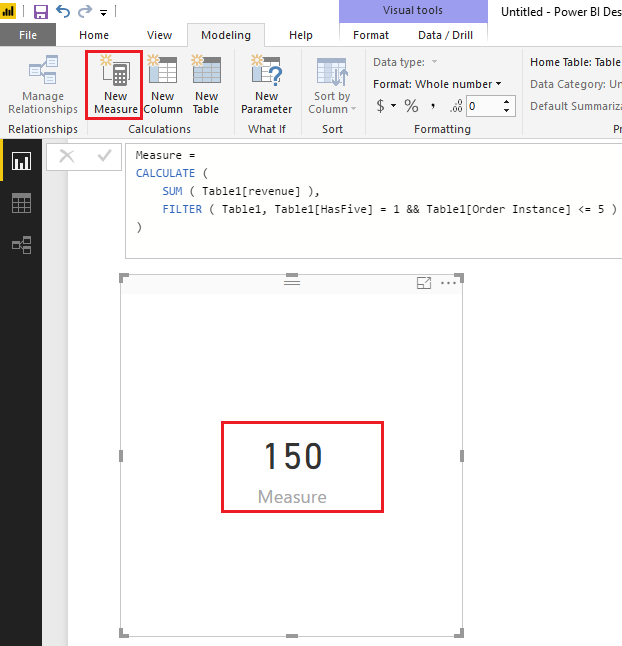
Then you should be able to use the formula below to create a measure to calculate sum of the revenue of those customers only but revenue should be summed for all the order instance till 5.
Measure =
CALCULATE (
SUM ( Table1[revenue] ),
FILTER ( Table1, Table1[HasFive] = 1 && Table1[Order Instance] <= 5 )
)
Here is the sample pbix file for your reference. ![]()
Regards
Hi @Anonymous,
Based on my test, you can firstly use the formula below to create a new calculate column in your table to indicate if a customer has order instance as 5.
HasFive =
IF (
COUNTROWS (
FILTER (
ALL ( Table1 ),
Table1[Customer] = EARLIER ( Table1[Customer] )
&& Table1[Order Instance] = 5
)
)
>= 1,
1,
0
)
Then you should be able to use the formula below to create a measure to calculate sum of the revenue of those customers only but revenue should be summed for all the order instance till 5.
Measure =
CALCULATE (
SUM ( Table1[revenue] ),
FILTER ( Table1, Table1[HasFive] = 1 && Table1[Order Instance] <= 5 )
)
Here is the sample pbix file for your reference. ![]()
Regards
it worked with bit work around, thank you
Check out the November 2025 Power BI update to learn about new features.
Advance your Data & AI career with 50 days of live learning, contests, hands-on challenges, study groups & certifications and more!