Don't miss your chance to take exam DP-600 or DP-700 on us!
Request nowLearn from the best! Meet the four finalists headed to the FINALS of the Power BI Dataviz World Championships! Register now
Hi Team,
I have below data where I need to put filter on the customers which has order instance as 5. Once I get those customers I need to sum of the revenue of those customers only but revenue should be summed for all the order instance till 5.
| Customer | Order Instance | revenue |
| Cust01 | 1 | 10 |
| Cust01 | 2 | 20 |
| Cust01 | 3 | 30 |
| Cust01 | 4 | 40 |
| Cust01 | 5 | 50 |
| Cust01 | 6 | 60 |
| Cust05 | 1 | 60 |
| Cust05 | 2 | 70 |
| Cust05 | 3 | 80 |
| Cust08 | 1 | 90 |
| Cust09 | 2 | 100 |
| Cust10 | 1 | 110 |
| Cust11 | 1 | 120 |
| Cust12 | 1 | 130 |
| Cust12 | 2 | 140 |
| Cust14 | 1 | 150 |
| Cust15 | 1 | 160 |
| Cust16 | 1 | 170 |
Like in above example only Cust01 has orer instance 5, so the Cust01 shold be filtered out and then sum of revenue for Cust01 where Order Instance is <=5 so in this case revenue should be $150.
Please note Cust01 is filtered on the base of all those customers which reached upto order instance =5 and then put another filter to get sum of revenue for all order instance <=5, the 6th order instance wont be considered here.
This is kind of nested filter , kindly guide how it can be done in Power BI desktop may be with the help of DAX reference.
Thanks
Swapnil
Solved! Go to Solution.
Hi @Anonymous,
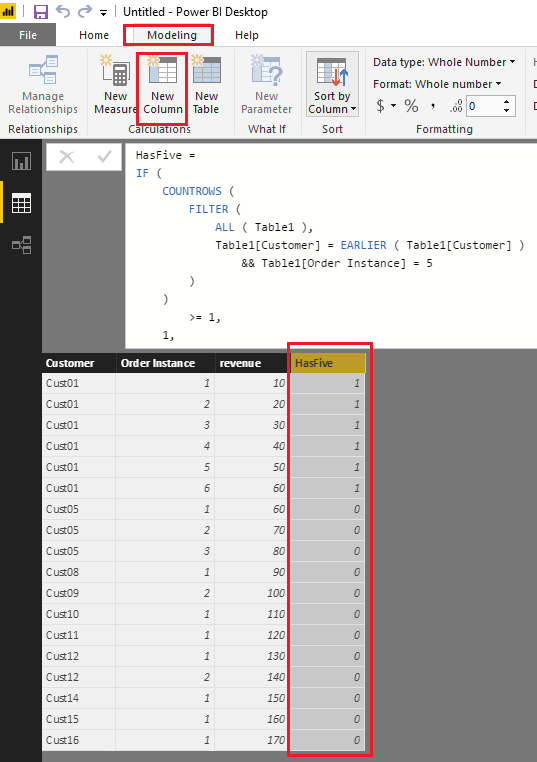
Based on my test, you can firstly use the formula below to create a new calculate column in your table to indicate if a customer has order instance as 5.
HasFive =
IF (
COUNTROWS (
FILTER (
ALL ( Table1 ),
Table1[Customer] = EARLIER ( Table1[Customer] )
&& Table1[Order Instance] = 5
)
)
>= 1,
1,
0
)
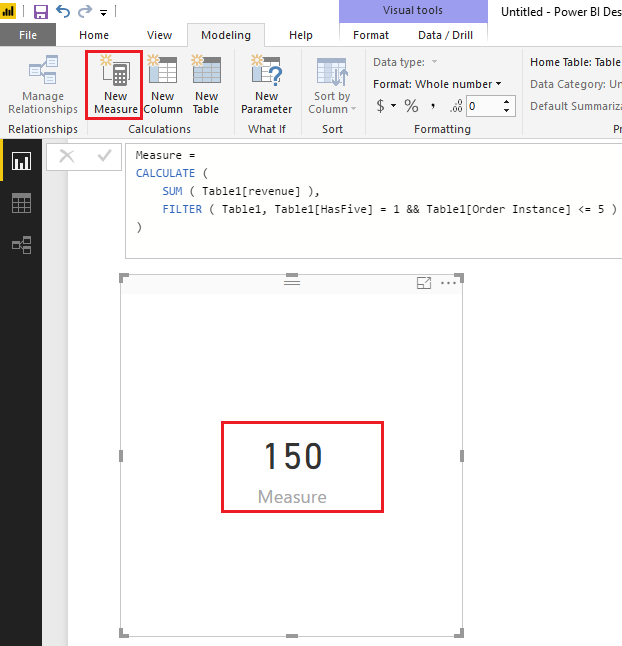
Then you should be able to use the formula below to create a measure to calculate sum of the revenue of those customers only but revenue should be summed for all the order instance till 5.
Measure =
CALCULATE (
SUM ( Table1[revenue] ),
FILTER ( Table1, Table1[HasFive] = 1 && Table1[Order Instance] <= 5 )
)
Here is the sample pbix file for your reference. ![]()
Regards
Hi @Anonymous,
Based on my test, you can firstly use the formula below to create a new calculate column in your table to indicate if a customer has order instance as 5.
HasFive =
IF (
COUNTROWS (
FILTER (
ALL ( Table1 ),
Table1[Customer] = EARLIER ( Table1[Customer] )
&& Table1[Order Instance] = 5
)
)
>= 1,
1,
0
)
Then you should be able to use the formula below to create a measure to calculate sum of the revenue of those customers only but revenue should be summed for all the order instance till 5.
Measure =
CALCULATE (
SUM ( Table1[revenue] ),
FILTER ( Table1, Table1[HasFive] = 1 && Table1[Order Instance] <= 5 )
)
Here is the sample pbix file for your reference. ![]()
Regards
it worked with bit work around, thank you
Share feedback directly with Fabric product managers, participate in targeted research studies and influence the Fabric roadmap.
Check out the February 2026 Power BI update to learn about new features.
| User | Count |
|---|---|
| 54 | |
| 47 | |
| 39 | |
| 16 | |
| 15 |
| User | Count |
|---|---|
| 83 | |
| 70 | |
| 38 | |
| 28 | |
| 26 |