cancel
Showing results for 
Search instead for 
Did you mean: 

View all the Fabric Data Days sessions on demand. View schedule

Reply
mh2587
Super User
Super User

Needs to convert all visuals to images into slides to share these slides to non Power BI users.

I have a powerbi report published on app.
I need to export all visuals and slicers in PowerPoint slides for a credit analyst he has access to view reports.
He will update visuals with the slicers and then he needs to convert all visuals to images to share these slides to non powerbi users.

I have used VBA scripts to automate that process, I am facing two issues one slicers are affecting other visuals which are not on the same page.
Second one visual is converted to image, it cannot be reverted to interactive visual.
I need your suggestions how I can achieve this functionality with this scenario.


Did I answer your question? If so, please mark my post as a solution!


Proud to be a Super User!


LinkedIn Icon
Muhammad Hasnain


1 REPLY 1
Anonymous
Not applicable

Hi @mh2587 ,

1. 
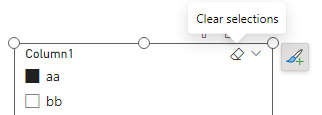
This should be due to the synchronized slicer. You can try exporting one page and then clearing the slicer selection before exporting the next page or turn off the sync slicer.

vcgaomsft_0-1707968860471.png
Slicers in Power BI - Power BI | Microsoft Learn

2. Yes, the interactivity will be lost when exporting to images. This is a limitation imposed by the image format itself.

If no interaction is required, you may also want to consider using Freeze the current view when sharing slideshows with non-power bi users.
View and present live Power BI data in PowerPoint - Power BI | Microsoft Learn

Best Regards,
Gao

Community Support Team


If there is any post helps, then please consider Accept it as the solution  to help the other members find it more quickly.
If I misunderstand your needs or you still have problems on it, please feel free to let us know. Thanks a lot!

How to get your questions answered quickly --  How to provide sample data in the Power BI Forum -- China Power BI User Group

Helpful resources

Announcements
November Power BI Update Carousel

Power BI Monthly Update - November 2025

Check out the November 2025 Power BI update to learn about new features.

Fabric Data Days Carousel

Fabric Data Days

Advance your Data & AI career with 50 days of live learning, contests, hands-on challenges, study groups & certifications and more!

FabCon Atlanta 2026 carousel

FabCon Atlanta 2026

Join us at FabCon Atlanta, March 16-20, for the ultimate Fabric, Power BI, AI and SQL community-led event. Save $200 with code FABCOMM.

Top Solution Authors
Top Kudoed Authors