Get certified for free when you join Fabric Data Days 2026 and dive into Fabric, Power BI, SQL, AI, and other essential data skills.
Join nowTry your skills in the Power BI Dataviz World Championship! Round one ends June 26. Join now
Hi All,
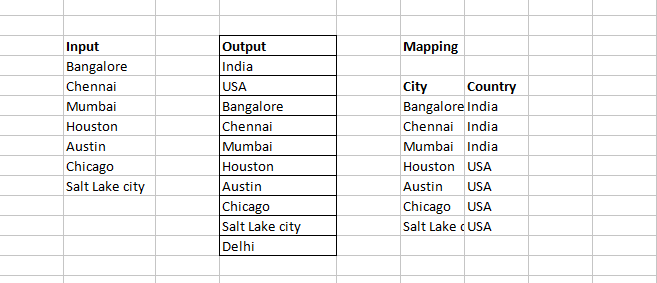
I have the data in the below format... Now i have to create a Drop down slicer with "output " format. when i click the dropdown, it should show whats therer in the output.
Is it possible in power bi?. when i used "grouping", only india and USA is there.. but i want both country and city together in the same drop down
Solved! Go to Solution.
You may select Unpivot Columns in the Query Editor or use UNION Function in DAX.
| User | Count |
|---|---|
| 23 | |
| 22 | |
| 21 | |
| 18 | |
| 11 |
| User | Count |
|---|---|
| 56 | |
| 54 | |
| 43 | |
| 36 | |
| 34 |