Join us at FabCon Atlanta from March 16 - 20, 2026, for the ultimate Fabric, Power BI, AI and SQL community-led event. Save $200 with code FABCOMM.
Register now!The Power BI Data Visualization World Championships is back! It's time to submit your entry. Live now!
Hi
I need to create a DAX measure based on a condition
I have two tables HData, Contractdata where i need to calcuate count(UniqueID) based on a condition (> ) with two differnt tables.
How to write the below conditions with two differnt tables
Solved! Go to Solution.
Hi @ramshoney1225 ,
You can create a measure as below:
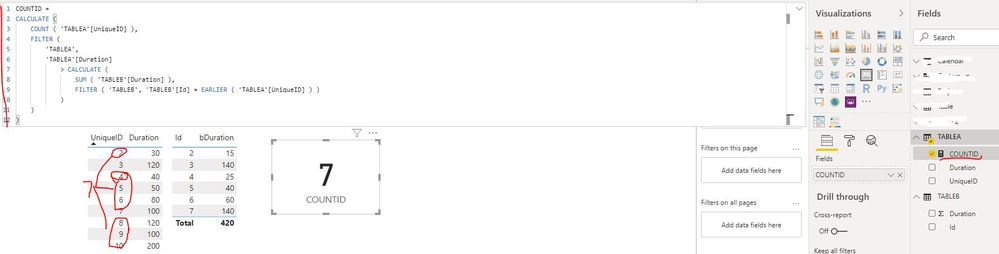
COUNTID =
CALCULATE (
COUNT ( 'TABLEA'[UniqueID] ),
FILTER (
'TABLEA',
'TABLEA'[Duration]
> CALCULATE (
SUM ( 'TABLEB'[Duration] ),
FILTER ( 'TABLEB', 'TABLEB'[Id] = EARLIER ( 'TABLEA'[UniqueID] ) )
)
)
)Best Regards
Rena
Does not seem right. Can you share sample data and sample output.
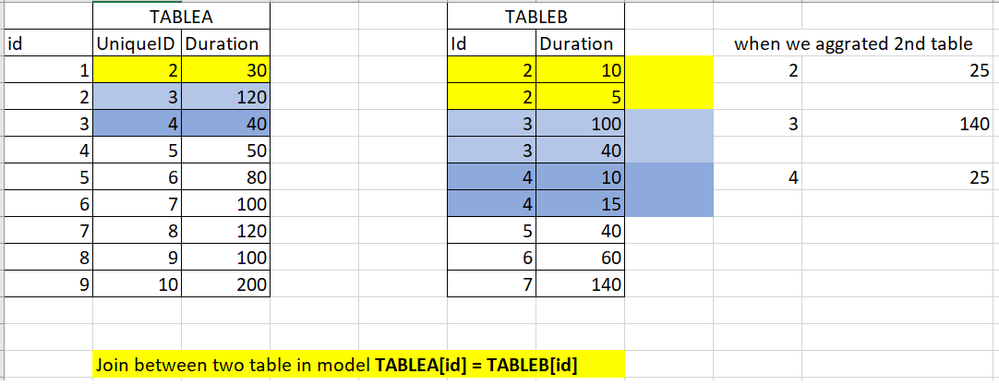
Hi please find the below screenshot for requirment.
i need to create a measures as below ;;
Unique id count =
calculate(
count(tablea[uniqueid),
filter( tablea(duration) > tableb(duration)
)
I'm unable to write the DAX , i'm aware of wirting of DAX with if two columns available in same table then we can write as below
COUNTID =
CALCULATE
(COUNT(TABLEA[UNIQUEID],
FILTER(TABLEA, TABLEA[DURATION1] > TABLEA[DURATION2]
)
but in my case the condtion which i ned to write each colum is avaialbe in differnt table and need to write as
Based on this condtion tablea(duration) > tableb(duration) i need to calculate count in one table.
Hi @ramshoney1225 ,
You can create a measure as below:
COUNTID =
CALCULATE (
COUNT ( 'TABLEA'[UniqueID] ),
FILTER (
'TABLEA',
'TABLEA'[Duration]
> CALCULATE (
SUM ( 'TABLEB'[Duration] ),
FILTER ( 'TABLEB', 'TABLEB'[Id] = EARLIER ( 'TABLEA'[UniqueID] ) )
)
)
)Best Regards
Rena
Difficult to say. Please see this post regarding How to Get Your Question Answered Quickly: https://community.powerbi.com/t5/Community-Blog/How-to-Get-Your-Question-Answered-Quickly/ba-p/38490
The Power BI Data Visualization World Championships is back! It's time to submit your entry.
Check out the January 2026 Power BI update to learn about new features.
| User | Count |
|---|---|
| 60 | |
| 49 | |
| 30 | |
| 25 | |
| 23 |
| User | Count |
|---|---|
| 128 | |
| 102 | |
| 57 | |
| 39 | |
| 31 |