cancel
Showing results for 
Search instead for 
Did you mean: 

The Power BI Data Visualization World Championships is back! Get ahead of the game and start preparing now! Learn more

Reply
leroy773
Helper II
Helper II

Need to create hyperlink in power bi, i have a unique record id but need to add the URL

All,


I would like to add hyperlink to a report and dashboard.  Unfortunately my data set only has the record id and not the complete url.  How should I go about adding the starting portion of the URL to the record id in the data set? 


ex


xx00u9663ids


URL


https://salesforce.com/ + SFDC record ID

1 ACCEPTED SOLUTION
Vvelarde
Community Champion
Community Champion

hi @leroy773


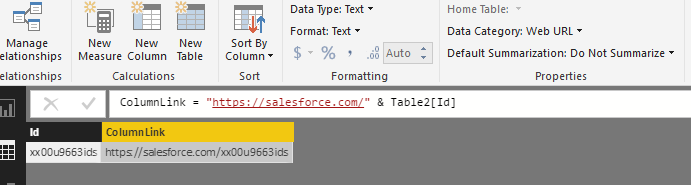
Create a calculated column to concatenate "Sales force URL" and your ID column


Change Data Category to WebURL


newcolumnLink.png


Lima - Peru

View solution in original post

5 REPLIES 5
Vvelarde
Community Champion
Community Champion

hi @leroy773


Create a calculated column to concatenate "Sales force URL" and your ID column


Change Data Category to WebURL


newcolumnLink.png


Lima - Peru

Hi @Vvelarde, I have another question. If I only want to show ID in that field but it actually includes the url, for example when I click ID 001 it will go to http://salesforce.com/001. Thank you.

Hi @kimzhao ,


Did you find a solution to your question ..?

Hi,


Does it have a solution?


BR

Hi,


That's exactly what I need
Have you got a solution for this?

Helpful resources

Announcements
November Power BI Update Carousel

Power BI Monthly Update - November 2025

Check out the November 2025 Power BI update to learn about new features.

Fabric Data Days Carousel

Fabric Data Days

Advance your Data & AI career with 50 days of live learning, contests, hands-on challenges, study groups & certifications and more!

FabCon Atlanta 2026 carousel

FabCon Atlanta 2026

Join us at FabCon Atlanta, March 16-20, for the ultimate Fabric, Power BI, AI and SQL community-led event. Save $200 with code FABCOMM.