Join us at FabCon Atlanta from March 16 - 20, 2026, for the ultimate Fabric, Power BI, AI and SQL community-led event. Save $200 with code FABCOMM.
Register now!The Power BI Data Visualization World Championships is back! Get ahead of the game and start preparing now! Learn more
Hi,
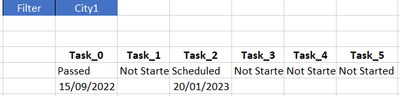
If i have the below Database, and I need to make a report where i can have a filter per City, which means if I filter for CIty 1, he will give me the 2nd View:
Database:
View 2:
Xls Tbl:
| City Id | Task | Status | Date |
| City1 | Task_0 | Passed | 15/09/2022 |
| City1 | Task_1 | Not Started | |
| City1 | Task_2 | Scheduled | 20/01/2023 |
| City1 | Task_3 | Not Started | |
| City1 | Task_4 | Not Started | |
| City1 | Task_5 | Not Started | |
| City2 | Task_0 | Not Started | |
| City2 | Task_1 | Not Started | |
| City2 | Task_2 | Passed | 01/01/2023 |
| City2 | Task_3 | Passed | 05/01/2023 |
I need to use card instead of Matrix.
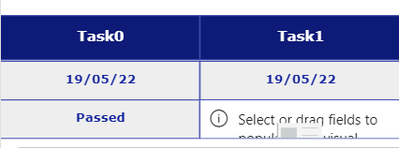
@Zakaria_1980 it's simple, you need to use the city id column as a filter. Below for your reference. Hope it helps.
can you send the PBI rpeort for this case please.
The Power BI Data Visualization World Championships is back! Get ahead of the game and start preparing now!
| User | Count |
|---|---|
| 39 | |
| 37 | |
| 33 | |
| 33 | |
| 29 |
| User | Count |
|---|---|
| 134 | |
| 96 | |
| 78 | |
| 67 | |
| 65 |