
Join us at FabCon Atlanta from March 16 - 20, 2026, for the ultimate Fabric, Power BI, AI and SQL community-led event. Save $200 with code FABCOMM.
Register now!The Power BI Data Visualization World Championships is back! Get ahead of the game and start preparing now! Learn more
Hello -
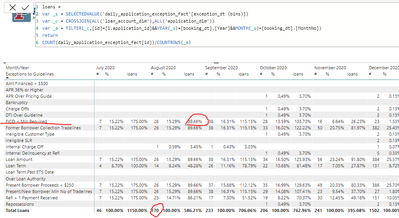
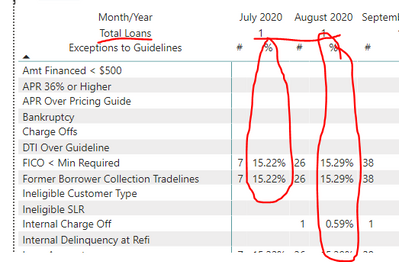
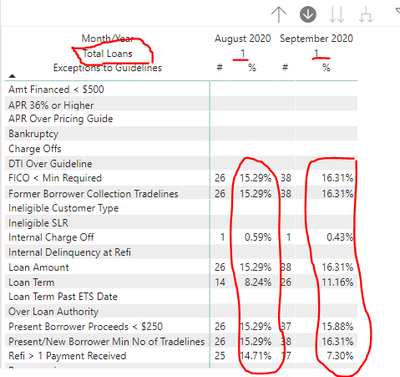
Req. screenshot to add Total Loans:-
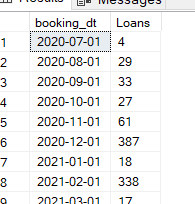
SQL code for each month values are here:-
SELECT CAST(DATEADD(m, DATEDIFF(m, 0, loandim.[booking_dt]), 0) AS date) AS [booking_dt], COUNT(*) AS [Loans] FROM [dbo].[loan_account_dim] AS loandim INNER JOIN [dbo].[application_dim] AS appdim ON appdim.[id] = loandim.[application_id] GROUP BY CAST(DATEADD(m, DATEDIFF(m, 0, loandim.[booking_dt]), 0) AS date) ORDER BY CAST(DATEADD(m, DATEDIFF(m, 0, loandim.[booking_dt]), 0) AS date)
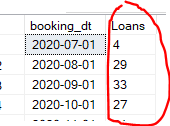
Above query values are here:-
Thank You
gk03
Solved! Go to Solution.
Hi @kaumil2001
Didn't you already get the results, I see total in the pbix file you provided, at the bottom.
I'm not sure if I'm understanding you correctly.
I put the pbix file in the end you can reference.
Best Regards
Community Support Team _ chenwu zhu
If this post helps, then please consider Accept it as the solution to help the other members find it more quickly.
Hi @kaumil2001
Didn't you already get the results, I see total in the pbix file you provided, at the bottom.
I'm not sure if I'm understanding you correctly.
I put the pbix file in the end you can reference.
Best Regards
Community Support Team _ chenwu zhu
If this post helps, then please consider Accept it as the solution to help the other members find it more quickly.
Here is the .pbix file
https://www.dropbox.com/s/a4f36s8vsu0tben/Exceptions.pbix?dl=0
@kaumil2001 , I doubt you can get the display you want. There is an option - Show on row. That move measures on row. But this is different from that
We usually use a hybrid table workaround. But I doubt in this case
if you are looking for a Hybrid display with Matrix Column and measure
https://community.powerbi.com/t5/Community-Blog/Creating-a-custom-or-hybrid-matrix-in-PowerBI/ba-p/1...
https://community.powerbi.com/t5/Quick-Measures-Gallery/The-New-Hotness-Custom-Matrix-Hierarchy/m-p/...
vote for Hybrid Table
https://ideas.powerbi.com/ideas/idea/?ideaid=9bc32b23-1eb1-4e74-8b34-349887b37ebc
@amitchandak
I'm able to display "Total Loans" in the .pbix file below but I'm not sure how to display the values correctly,
Values I'm looking are from the below SQL query:-
SELECT CAST(DATEADD(m, DATEDIFF(m, 0, loandim.[booking_dt]), 0) AS date) AS [booking_dt],
COUNT(*) AS [Loans]
FROM [dbo].[loan_account_dim] AS loandim
INNER JOIN [dbo].[application_dim] AS appdim ON appdim.[id] = loandim.[application_id]
GROUP BY CAST(DATEADD(m, DATEDIFF(m, 0, loandim.[booking_dt]), 0) AS date)
ORDER BY CAST(DATEADD(m, DATEDIFF(m, 0, loandim.[booking_dt]), 0) AS date)
Once correct Total Loans values are displayed I need to use as denomater for the % column in the above screenshot, eg. for Aug 2020 month for "FICO < Min Required" % column will be 26/29 = 89.66%
Hope it makes sense, let me know how to achieve it?
Hello again,
1. Based on my above SQL query, I was trying to display 29 & 33 for Total Rows Matrix Column for Aug 2020 & Sep 2020 month.
2. Also, I was trying display % Matrix Values by calulation as # / Total Loans for all the exception rules.
Thanks in advance
The Power BI Data Visualization World Championships is back! Get ahead of the game and start preparing now!
Check out the November 2025 Power BI update to learn about new features.
| User | Count |
|---|---|
| 59 | |
| 46 | |
| 42 | |
| 23 | |
| 17 |
| User | Count |
|---|---|
| 190 | |
| 122 | |
| 96 | |
| 66 | |
| 47 |