cancel
Showing results for 
Search instead for 
Did you mean: 

Level up your Power BI skills this month - build one visual each week and tell better stories with data! Get started

Reply
Anonymous
Not applicable

Need help

Hi All,

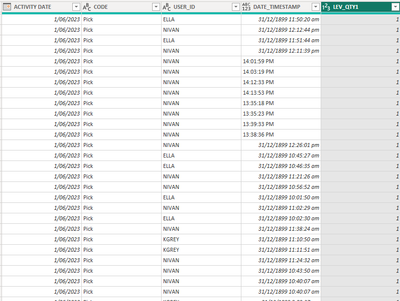
I want to calculate time spent in mm: ss on a specific task (code col) by a specific individual (user id col) and get the sum of the quantity per hour per individual per task.


RAV_RAV_0-1686281523249.png


Thanks in advance

7 REPLIES 7
lbendlin
Super User
Super User

Please provide sample data (with sensitive information removed) that covers your issue or question completely, in a usable format (not as a screenshot).
https://community.fabric.microsoft.com/t5/Community-Blog/How-to-provide-sample-data-in-the-Power-BI-...
Please show the expected outcome based on the sample data you provided.

https://community.fabric.microsoft.com/t5/Desktop/How-to-Get-Your-Question-Answered-Quickly/m-p/1447...

Anonymous
Not applicable

Hi, I have uploaded the table below - the result I am expecting to see the (QTY) productivity of different users based on the time stamp for various activities (CODE COL) for specific dates and weeks and QTR, and also want to calculate the KPI percentage based on the QTY target of 130 per hour.

please try again - nothing attached.

Anonymous
Not applicable

ACTIVITY DATECODEUSER_IDDATE_TIMESTAMPQTY
1/06/2023PickELLA8:47:45 am1
1/06/2023PickELLA8:48:54 am1
1/06/2023PickELLA8:49:18 am1
1/06/2023PickKGREY9:46:33 am1
1/06/2023PickELLA9:55:12 am1
1/06/2023PickELLA9:56:08 am1
1/06/2023PickELLA9:58:13 am1
1/06/2023PickELLA9:59:21 am1
1/06/2023PickELLA10:00:09 am1
1/06/2023ReceiptKGREY13:58:32 PM35
1/06/2023ReceiptKGREY13:58:44 PM38
1/06/2023PutawayKGREY13:59:10 PM15
1/06/2023PutawayKGREY13:59:22 PM26
1/06/2023PutawayKGREY13:59:26 PM35
1/06/2023PutawayKGREY13:59:38 PM38
1/06/2023PutawayKGREY13:59:47 PM26
1/06/2023PickNIVAN14:01:59 PM1
1/06/2023PickNIVAN14:03:15 PM1
1/06/2023PickNIVAN14:04:07 PM1
1/06/2023PickNIVAN14:04:39 PM1
1/06/2023PickNIVAN14:08:52 PM1
1/06/2023PickNIVAN14:09:52 PM1
1/06/2023PutawayELLA14:14:38 PM2
1/06/2023PutawayELLA14:15:14 PM4
1/06/2023PickNIVAN14:22:46 PM1
1/06/2023PickNIVAN14:24:23 PM1
1/06/2023ReceiptNIVAN14:24:56 PM1
1/06/2023ReceiptNIVAN14:27:25 PM6
1/06/2023PutawayKGREY14:33:12 PM21
1/06/2023PutawayKGREY14:33:20 PM33
1/06/2023PickNIVAN14:33:28 PM1
1/06/2023PutawayKGREY14:33:28 PM30
2/06/2023PutawayEPEV6:54:17 am2
2/06/2023PutawayEPEV6:54:30 am2
2/06/2023PutawayEPEV6:56:22 am6
2/06/2023PutawayEPEV6:57:10 am3
2/06/2023PutawayEPEV6:57:14 am1
2/06/2023PickELLA6:57:58 am1
2/06/2023PickELLA6:59:30 am1
2/06/2023PickKGREY6:59:46 am2
2/06/2023PickKGREY7:00:02 am3
2/06/2023PickELLA7:26:01 am1
2/06/2023PickELLA7:56:29 am1
2/06/2023PickKGREY7:56:37 am2
2/06/2023PickKGREY7:56:57 am1
2/06/2023PickELLA7:57:33 am1
2/06/2023PickKGREY7:57:53 am1
2/06/2023PickELLA8:48:29 am1
2/06/2023PickKGREY8:49:17 am1
2/06/2023PickKGREY8:49:53 am1
2/06/2023PickELLA8:50:29 am1
2/06/2023PickELLA8:58:04 am1
2/06/2023PickKGREY8:58:28 am1
2/06/2023ReceiptKGREY10:42:43 am6
2/06/2023ReceiptKGREY10:49:07 am18
2/06/2023ReceiptKGREY10:49:30 am18
2/06/2023ReceiptKGREY10:49:50 am18
2/06/2023ReceiptKGREY10:50:03 am30
2/06/2023ReceiptKGREY10:50:22 am42
2/06/2023ReceiptKGREY10:50:37 am72
2/06/2023ReceiptKGREY10:50:53 am84
2/06/2023ReceiptKGREY10:51:08 am120
2/06/2023ReceiptKGREY10:51:30 am186
2/06/2023PutawayKGREY11:03:18 am18
2/06/2023PutawayKGREY11:03:30 am72
2/06/2023PutawayKGREY11:03:34 am120
2/06/2023PutawayKGREY11:04:54 am6
2/06/2023ReceiptELLA11:35:51 am18

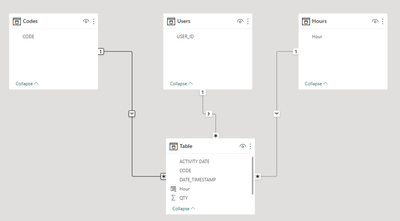
Create a couple of dimensions from your data to build a suitable data model


lbendlin_0-1686612438477.png


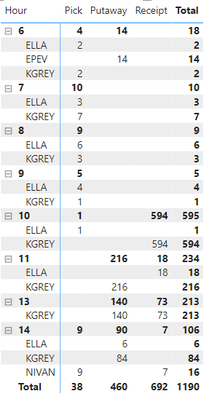
Then the report writes itself.

lbendlin_1-1686612528858.png

see attached


Anonymous
Not applicable

i get that thanks, how can i calculate the weekly, daily,monthly averages for individuals and for all the users combined? Also, in percentage considering the target is 130 per hour.

You need to provide better sample data for that. 

Helpful resources

Announcements
April Power BI Update Carousel

Power BI Monthly Update - April 2026

Check out the April 2026 Power BI update to learn about new features.

Fabric SQL PBI Data Days

Data Days 2026 coming soon!

Sign up to receive a private message when registration opens and key events begin.

New to Fabric survey Carousel

New to Fabric Survey

If you have recently started exploring Fabric, we'd love to hear how it's going. Your feedback can help with product improvements.

Power BI DataViz World Championships carousel

Power BI DataViz World Championships - June 2026

A new Power BI DataViz World Championship is coming this June! Don't miss out on submitting your entry.