
Join us at FabCon Atlanta from March 16 - 20, 2026, for the ultimate Fabric, Power BI, AI and SQL community-led event. Save $200 with code FABCOMM.
Register now!Learn from the best! Meet the four finalists headed to the FINALS of the Power BI Dataviz World Championships! Register now
I have a matrix visual in a report that has dates as the column headers, and I want them to sort in order by date. Note they currently sort numerically. Can you point me in the rght direction?
Hi@charbaugh,
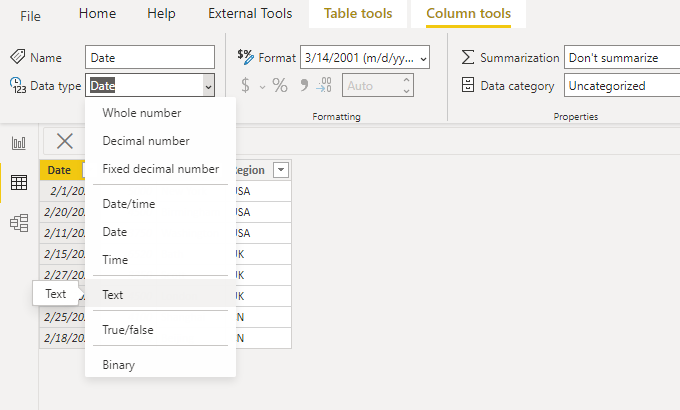
Please check the data type of the date column, in which case it is most likely the text type.
You can also sort the column in query editor.
Hope it helps.
Best Regards,
Caitlyn Yan
If this post helps then please consider Accept it as the solution to help the other members find it more quickly.
@charbaugh , They are sort Ascending and you want sort descending ?
Create following columns
Date 1 = [date]
Date Rank = rankx(all(Table), [Date])
Sort date1 on date Rank and use it
https://docs.microsoft.com/en-us/power-bi/desktop-sort-by-column
refer my video on this
No. The row that has the dates in it are sorting numerically, so 2/1/20201 2/10/2020 2/11/2021 instead of 2/1/2021 2/2/2021 2/3/2021. I need to sort that row to display in chronological order.
Share feedback directly with Fabric product managers, participate in targeted research studies and influence the Fabric roadmap.
Check out the February 2026 Power BI update to learn about new features.
| User | Count |
|---|---|
| 61 | |
| 58 | |
| 42 | |
| 18 | |
| 15 |
| User | Count |
|---|---|
| 105 | |
| 99 | |
| 38 | |
| 29 | |
| 29 |