Get Fabric or SQL Certified for Free.
Get certified for free when you join Fabric Data Days 2026 and dive into Fabric, Power BI, SQL, AI, and other essential data skills.
Join now- Power BI forums
- Get Help with Power BI
- Desktop
- Service
- Report Server
- Power Query
- Mobile Apps
- Developer
- DAX Commands and Tips
- Custom Visuals Development Discussion
- Health and Life Sciences
- Power BI Spanish forums
- Translated Spanish Desktop
- Training and Consulting
- Instructor Led Training
- Dashboard in a Day for Women, by Women
- Galleries
- Data Stories Gallery
- Themes Gallery
- Contests Gallery
- QuickViz Gallery
- Quick Measures Gallery
- Visual Calculations Gallery
- Fabric Apps Gallery
- Notebook Gallery
- Translytical Task Flow Gallery
- TMDL Gallery
- R Script Showcase
- Webinars and Video Gallery
- Ideas
- Custom Visuals Ideas (read-only)
- Issues
- Issues
- Events
- Upcoming Events
July 7 - July 17 | Round 2 of the Power BI Dataviz World Championships. Don't miss your chance! Learn more
- Power BI forums
- Forums
- Get Help with Power BI
- Desktop
- Re: Need help with parameter in SQL statement
- Subscribe to RSS Feed
- Mark Topic as New
- Mark Topic as Read
- Float this Topic for Current User
- Bookmark
- Subscribe
- Printer Friendly Page


- Mark as New
- Bookmark
- Subscribe
- Mute
- Subscribe to RSS Feed
- Permalink
- Report Inappropriate Content
Need help with parameter in SQL statement
Hi everybody,
I have a simple statement. In the statement below Search is the parameter I made. When I fill custom criteria the statement works fine. When I change the custom criteria it also works fine. But when I enter the parameter search, nothing happings. Tried a lot of solutions, youtube, forums etc. but i can't simply figured out what i'm doing wrong.
SELECT [PointName]
,[PointID]
,[PointSliceID]
,[UTCDateTime]
,[ActualValue]
FROM [DataBase].[dbo].[RawAnalog]
WHERE UTCDateTime > DATEADD(MONTH, -1, GETDATE())
AND PointName LIKE '%Search%'
Solved! Go to Solution.


- Mark as New
- Bookmark
- Subscribe
- Mute
- Subscribe to RSS Feed
- Permalink
- Report Inappropriate Content
I think these details already @Greg_Deckler has provided. these are a couple of link for the same
https://docs.microsoft.com/en-us/power-query/power-query-query-parameters
https://community.powerbi.com/t5/Desktop/How-do-I-pass-parameters-to-my-SQL-statement/td-p/118716


- Mark as New
- Bookmark
- Subscribe
- Mute
- Subscribe to RSS Feed
- Permalink
- Report Inappropriate Content
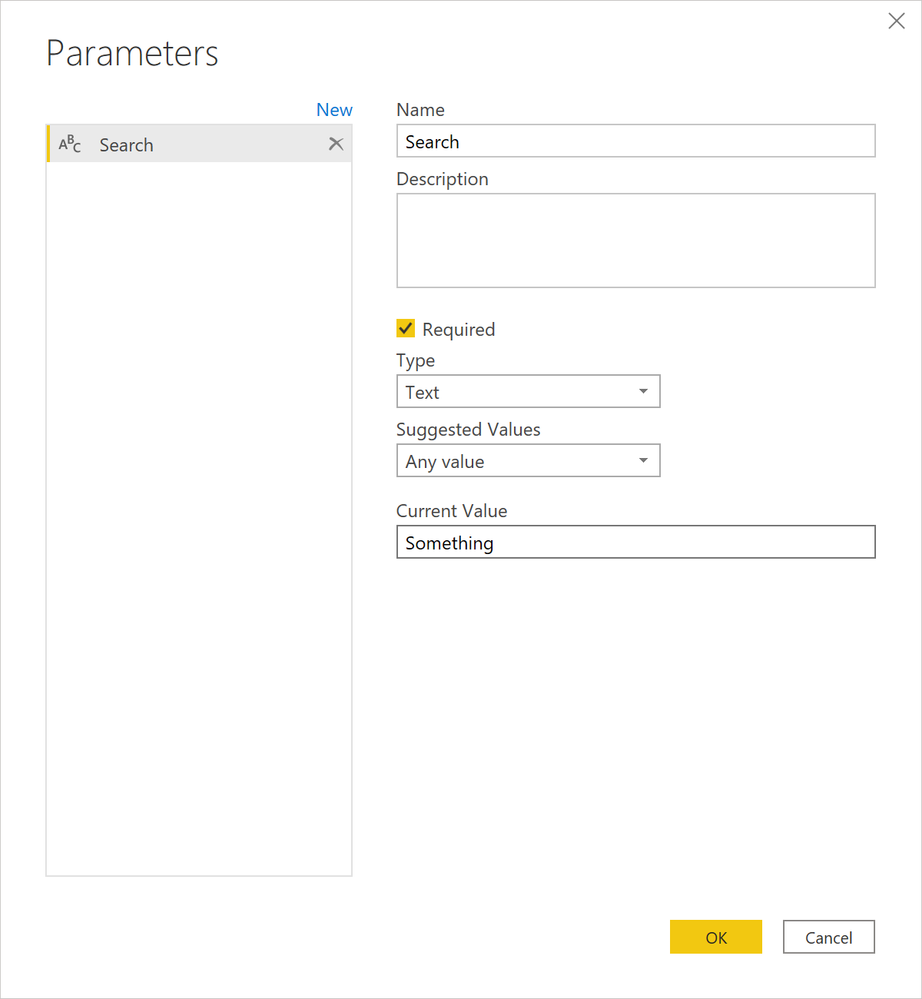
So you have a Query Editor parameter setup like the screen shot below?
Follow on LinkedIn
@ me in replies or I'll lose your thread!!!
Instead of a Kudo, please vote for this idea
Become an expert!: Enterprise DNA
External Tools: MSHGQM
YouTube Channel!: Microsoft Hates Greg
Latest book!: DAX For Humans
DAX is easy, CALCULATE makes DAX hard...
- Mark as New
- Bookmark
- Subscribe
- Mute
- Subscribe to RSS Feed
- Permalink
- Report Inappropriate Content
Following is what I have;
SELECT [PointName]
,[PointID]
,[PointSliceID]
,[UTCDateTime]
,[ActualValue]
FROM [JCIHistorianDB].[dbo].[RawAnalog]
WHERE UTCDateTime > DATEADD(MONTH, -1, GETDATE())
AND PointName LIKE '%NCE26%'
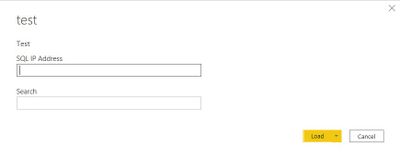
This works fine (with the parameter SQL IP Address, but the NCE26 It must be replaced by a parameter. When connecting to the database the follwing screen appears. (Search is the name of the parameter)
- Mark as New
- Bookmark
- Subscribe
- Mute
- Subscribe to RSS Feed
- Permalink
- Report Inappropriate Content
I think these details already @Greg_Deckler has provided. these are a couple of link for the same
https://docs.microsoft.com/en-us/power-query/power-query-query-parameters
https://community.powerbi.com/t5/Desktop/How-do-I-pass-parameters-to-my-SQL-statement/td-p/118716
- Mark as New
- Bookmark
- Subscribe
- Mute
- Subscribe to RSS Feed
- Permalink
- Report Inappropriate Content
Just had to change the Power Query M code. Thanks for sharing the posts, the red-gate link gives me the solution!
- Mark as New
- Bookmark
- Subscribe
- Mute
- Subscribe to RSS Feed
- Permalink
- Report Inappropriate Content
Right, you should have just had to change the code to:
let
Source = Sql.Database(#"SQL IP Address", "JCIHistorianDB", [Query="SELECT [PointName]#(lf) ,[PointID]#(lf) ,[PointSliceID]#(lf) ,[UTCDateTime]#(lf) ,[ActualValue]#(lf) FROM [JCIHistorianDB].[dbo].[RawAnalog]#(lf) WHERE UTCDateTime > DATEADD(MONTH, -1, GETDATE())#(lf) AND PointName LIKE '%Search%'"])
in
Follow on LinkedIn
@ me in replies or I'll lose your thread!!!
Instead of a Kudo, please vote for this idea
Become an expert!: Enterprise DNA
External Tools: MSHGQM
YouTube Channel!: Microsoft Hates Greg
Latest book!: DAX For Humans
DAX is easy, CALCULATE makes DAX hard...
- Mark as New
- Bookmark
- Subscribe
- Mute
- Subscribe to RSS Feed
- Permalink
- Report Inappropriate Content
OK, assuming you have the parameter setup correctly, can you share at least the first few lines of your Power Query M code? Used Advanced Editor in Power Query, I mainly need to see your Source line.
Follow on LinkedIn
@ me in replies or I'll lose your thread!!!
Instead of a Kudo, please vote for this idea
Become an expert!: Enterprise DNA
External Tools: MSHGQM
YouTube Channel!: Microsoft Hates Greg
Latest book!: DAX For Humans
DAX is easy, CALCULATE makes DAX hard...
- Mark as New
- Bookmark
- Subscribe
- Mute
- Subscribe to RSS Feed
- Permalink
- Report Inappropriate Content
let
Source = Sql.Database(#"SQL IP Address", "JCIHistorianDB", [Query="SELECT [PointName]#(lf) ,[PointID]#(lf) ,[PointSliceID]#(lf) ,[UTCDateTime]#(lf) ,[ActualValue]#(lf) FROM [JCIHistorianDB].[dbo].[RawAnalog]#(lf) WHERE UTCDateTime > DATEADD(MONTH, -1, GETDATE())#(lf) AND PointName LIKE '%NCE26%'"])
in
Source
Complete copy of the source line
- Mark as New
- Bookmark
- Subscribe
- Mute
- Subscribe to RSS Feed
- Permalink
- Report Inappropriate Content
Create a measure like this and add it to table or matrix along with [PointName],[PointID],[PointSliceID],[UTCDateTime]
new ActualValue =
calculate(sum(RawAnalog[ActualValue]),RawAnalog[UTCDateTime] >= date(year(today())month(today())-1,day(today())),
		search("Search",RawAnalog[PointName] ,1,0)>0)
- Mark as New
- Bookmark
- Subscribe
- Mute
- Subscribe to RSS Feed
- Permalink
- Report Inappropriate Content
Thanks for your reply, maybe I am not clear enough. The meaning is to import only the data that is needed, so search must contains some characters from Pointname. When search contains '%United States%' only pointnames with United States must be imported. All this in a template. When I only use the IP address as a parameter all works fine, by adding the second parameter (Search) it shows up by making a connection but doesn't do the job well.

Helpful resources

FabCon & SQLCon – Barcelona 2026
Join us in Barcelona for FabCon and SQLCon, the Fabric, Power BI, SQL, and AI community event. Save €200 with code FABCMTY200.

Power BI Monthly Update - July 2026
Check out the July 2026 Power BI update to learn about new features.

Data Days 2026
Join Data Days 2026: 60 days of free live/on-demand sessions, challenges, study groups, and certification opportunities.

Power BI DataViz World Championships - June 2026
A new Power BI DataViz World Championship is coming this June! Don't miss out on submitting your entry.

| User | Count |
|---|---|
| 30 | |
| 25 | |
| 23 | |
| 22 | |
| 13 |


| User | Count |
|---|---|
| 50 | |
| 33 | |
| 21 | |
| 20 | |
| 17 |


