cancel
Showing results for 
Search instead for 
Did you mean: 

The Power BI Data Visualization World Championships is back! Get ahead of the game and start preparing now! Learn more

Reply
christianfcbmx
Post Patron
Post Patron

Need help with my formula

I have a power BI formula which I have in excel working correctly but in PBI is not getting right results: what this formula needs to do is to count working hours between 2 dates with 2 restrictions "1: considering working hours (08:00:00 to 18:00:00) and 2: let weekends and holidays out of the counting: This is what I expected to have as a result:


pbix file: https://www.dropbox.com/s/h0d1lhzq5r903if/time%20difference%20workhours.pbix?dl=0


07-03-2016 08:00:00        07-03-2016 18:00:00 =     10,00

07-03-2016 10:00:00        07-03-2016 19:00:00 =     8,00

07-03-2016 11:00:00        07-03-2016 19:00:00 =     7,00

07-03-2016 12:00:00        07-03-2016 19:00:00 =     6,00

07-03-2016 01:00:00        07-03-2016 04:00:00 = 0,00

07-03-2016 01:00:00        07-03-2016 04:30:00 = 0,00

07-03-2016 23:00:00        08-03-2016 09:30:00 = 1,50

07-03-2016 01:00:00        17-03-2016 11:00:00 = 90,00

04-03-2016 17:30:00        09-03-2016 20:30:00 = 30,50

07-03-2016 18:00:00        07-03-2016 19:30:00 = 0,00

07-03-2016 17:59:00        07-03-2016 18:00:00 = 0,02

07-03-2016 00:00:00        07-03-2016 03:00:00 = 0,00

07-03-2016 00:00:00        07-03-2016 03:30:00 = 0,00

07-03-2016 00:00:00        07-03-2016 04:00:00 = 0,00

07-03-2016 23:00:00        08-03-2016 09:30:00 = 1,50

07-03-2016 23:00:00        08-03-2016 10:00:00 = 2,00

07-03-2016 23:00:00        08-03-2016 10:30:00 = 2,50

1 ACCEPTED SOLUTION
Zubair_Muhammad
Community Champion
Community Champion

@christianfcbmx


Try this Calculated Column


Calculated Column =
VAR MyStartDate =
    IF (
        HOUR ( TableName[Start] ) < 8,
        INT ( TableName[Start] )
            + 8 / 24,
        TableName[Start]
    )
VAR MyEndDate =
    IF (
        HOUR ( TableName[End] ) > 18,
        INT ( TableName[End] )
            + 18 / 24,
        TableName[End]
    )
VAR MyDates =
    ADDCOLUMNS (
        GENERATESERIES ( MyStartDate, MyEndDate ),
        "Day", WEEKDAY ( [Value], 2 )
    )
VAR StartTime =
    IF (
        HOUR ( MyStartDate ) <= 18,
        HOUR ( MyStartDate )
            + MINUTE ( MyStartDate ) / 60
            - 8
    )
VAR EndTime =
    IF (
        HOUR ( MyEndDate ) > 8,
        HOUR ( MyEndDate )
            + MINUTE ( MyEndDate ) / 60
            - 8,
        10
    )
VAR Result =
    10
        * (
            COUNTROWS ( FILTER ( mydates, [Day] <= 5 ) )
                - 1
        )
        - StartTime
        + EndTime
RETURN
    IF ( EndTime < StartTime, Result + 10, Result )

View solution in original post

3 REPLIES 3
Zubair_Muhammad
Community Champion
Community Champion

@christianfcbmx


Try this Calculated Column


Calculated Column =
VAR MyStartDate =
    IF (
        HOUR ( TableName[Start] ) < 8,
        INT ( TableName[Start] )
            + 8 / 24,
        TableName[Start]
    )
VAR MyEndDate =
    IF (
        HOUR ( TableName[End] ) > 18,
        INT ( TableName[End] )
            + 18 / 24,
        TableName[End]
    )
VAR MyDates =
    ADDCOLUMNS (
        GENERATESERIES ( MyStartDate, MyEndDate ),
        "Day", WEEKDAY ( [Value], 2 )
    )
VAR StartTime =
    IF (
        HOUR ( MyStartDate ) <= 18,
        HOUR ( MyStartDate )
            + MINUTE ( MyStartDate ) / 60
            - 8
    )
VAR EndTime =
    IF (
        HOUR ( MyEndDate ) > 8,
        HOUR ( MyEndDate )
            + MINUTE ( MyEndDate ) / 60
            - 8,
        10
    )
VAR Result =
    10
        * (
            COUNTROWS ( FILTER ( mydates, [Day] <= 5 ) )
                - 1
        )
        - StartTime
        + EndTime
RETURN
    IF ( EndTime < StartTime, Result + 10, Result )

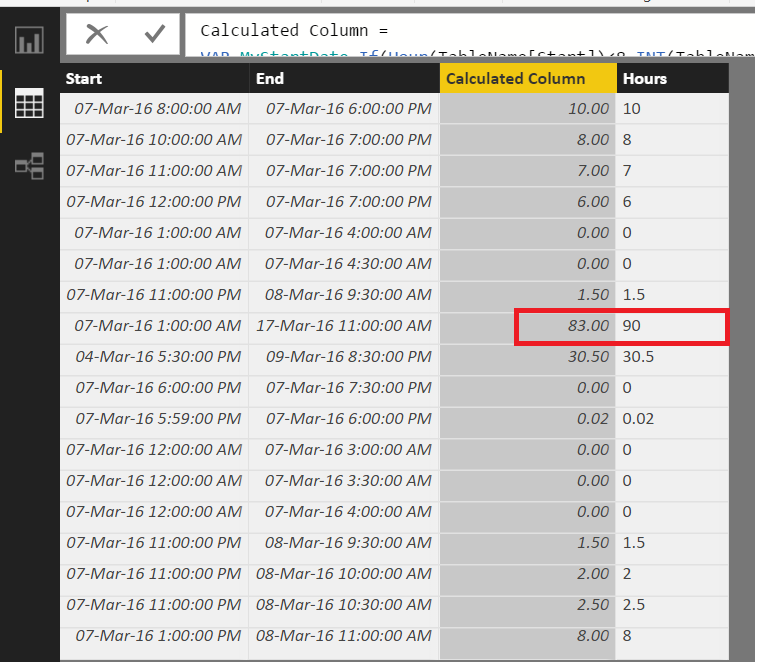
@christianfcbmx


It gives me correct results Except for 1 row.

See the pic below


CountMinutes.png


Helpful resources

Announcements
Power BI DataViz World Championships

Power BI Dataviz World Championships

The Power BI Data Visualization World Championships is back! Get ahead of the game and start preparing now!

December 2025 Power BI Update Carousel

Power BI Monthly Update - December 2025

Check out the December 2025 Power BI Holiday Recap!

FabCon Atlanta 2026 carousel

FabCon Atlanta 2026

Join us at FabCon Atlanta, March 16-20, for the ultimate Fabric, Power BI, AI and SQL community-led event. Save $200 with code FABCOMM.

Users online (4,217)