cancel
Showing results for 
Search instead for 
Did you mean: 

The Power BI Data Visualization World Championships is back! Get ahead of the game and start preparing now! Learn more

Reply
awff
Helper III
Helper III

Need help with loyal and reactivated DAX!

Hello fellow PBI'ers


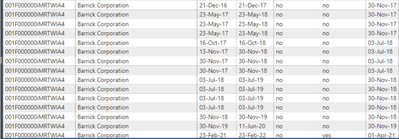
I'm trying to find the next latest date based on two columns. Basically, the Islost2 column should show the next LATEST start date greater than the previous end date and if next latest start date = end date , then return that start date. Essentially opposite of the function - EARLIER(). 
 

awff_1-1647846873405.png

The results should be as below (simplified for this post):


Start DateEnd dateResult

21-Dec-16

21-Dec-1703-Jul-18
23-May-1723-May-1803-Jul-18
16-Oct-1716-Oct-1830-Nov-18
13-Nov-1730-Nov-1830-Nov-18
03-Jul-1803-Jul-1930-Nov-19
30-Nov-1830-Nov-1930-Nov-19
30-Nov-1911-Jun-2023-Feb-21
23-Feb-2123-Feb-2201-Apr-21
01-Apr-2123-Feb-22 


Below is the DAX used for "Islost2" which i know is incorrect as it is similar to the EARLIER() fuction; and hoping i could get some assistance tweaking it.


Islost2 = 
var Acc_Id = '_fact (Quote)'[AccountID]
var End_date = '_fact (Quote)'[End_Date__c]
var _current=
'_fact (Quote)'[End_Date__c]
var _next= 
CALCULATE(
    MAX('_fact (Quote)'[Start_Date__c]),
    FILTER(
        ALL('_fact (Quote)'),
        '_fact (Quote)'[QuoteStatus (invoiceRequested)] = "Invoiced" &&
        '_fact (Quote)'[AccountID] = Acc_Id &&
       '_fact (Quote)'[start_Date__c] < End_date))
return
_next


Hopefully this makes sense...


Thank you in advance!


3 REPLIES 3
awff
Helper III
Helper III

Hi @amitchandak 

Is there a way where if there is no longer a start date greater than the end date, instead of the blanks, it returns the latest end date? In this case 23-Feb-22 instead of blank?


This would allow me to use SWITCH(TRUE() function to determine lost customers is greater than 365 days between the end date and next start date or of the last end date is greater than today().

awff_0-1647903361842.png


amitchandak
Super User
Super User

@awff , Based on what I got, Try like


Islost2 =
var Acc_Id = '_fact (Quote)'[AccountID]
var End_date = '_fact (Quote)'[End_Date__c]
var _current=
'_fact (Quote)'[End_Date__c]
var _next=
CALCULATE(
Min('_fact (Quote)'[Start_Date__c]),
FILTER(
ALL('_fact (Quote)'),
'_fact (Quote)'[QuoteStatus (invoiceRequested)] = "Invoiced" &&
'_fact (Quote)'[AccountID] = Acc_Id &&
'_fact (Quote)'[start_Date__c] > End_date))
return
_next


or


Islost2 =
var Acc_Id = '_fact (Quote)'[AccountID]
var End_date = '_fact (Quote)'[End_Date__c]
var _current=
'_fact (Quote)'[End_Date__c]
var _next=
CALCULATE(
Min('_fact (Quote)'[Start_Date__c]),
FILTER(
ALL('_fact (Quote)'),
'_fact (Quote)'[QuoteStatus (invoiceRequested)] = "Invoiced" &&
'_fact (Quote)'[AccountID] = Acc_Id &&
'_fact (Quote)'[start_Date__c] >= End_date))
return
_next

Share with Power BI Enthusiasts: Full Power BI Video (20 Hours) YouTube
Microsoft Fabric Series 60+ Videos YouTube
Microsoft Fabric Hindi End to End YouTube

Knew it was close! Helpful as always thank you.

Helpful resources

Announcements
Power BI DataViz World Championships

Power BI Dataviz World Championships

The Power BI Data Visualization World Championships is back! Get ahead of the game and start preparing now!

December 2025 Power BI Update Carousel

Power BI Monthly Update - December 2025

Check out the December 2025 Power BI Holiday Recap!

FabCon Atlanta 2026 carousel

FabCon Atlanta 2026

Join us at FabCon Atlanta, March 16-20, for the ultimate Fabric, Power BI, AI and SQL community-led event. Save $200 with code FABCOMM.