This time we’re going bigger than ever. Fabric, Power BI, SQL, AI and more. We're covering it all. You won't want to miss it.
Learn moreDid you hear? There's a new SQL AI Developer certification (DP-800). Start preparing now and be one of the first to get certified. Register now
Hi all,
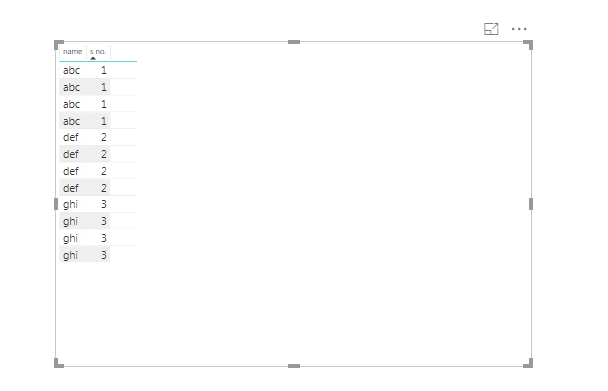
So I have this table and I want to highlight the first 'def' value because it's different from the one right above. Then I want to highlight the first 'ghi' for the same reason. Is this possible some way in Power BI?
The different values just need to stand out.
Thanks.
Solved! Go to Solution.
Hi @Anonymous ,
One sample for your reference. Please check the following steps as below.
1. Insert an index column in power query.
2. To create a measure as below and set conditional formatting based on the measure.
Measure =
VAR ind =
MAX ( Table1[Index] ) + 1
VAR cal =
CALCULATE (
MAX ( Table1[name] ),
FILTER ( ALL ( Table1 ), Table1[Index] = ind )
)
RETURN
IF ( MAX ( Table1[name] ) = cal && ind <> 2, "#01B8AA", "#000000" )
Pbix as attached.
Hi @Anonymous ,
One sample for your reference. Please check the following steps as below.
1. Insert an index column in power query.
2. To create a measure as below and set conditional formatting based on the measure.
Measure =
VAR ind =
MAX ( Table1[Index] ) + 1
VAR cal =
CALCULATE (
MAX ( Table1[name] ),
FILTER ( ALL ( Table1 ), Table1[Index] = ind )
)
RETURN
IF ( MAX ( Table1[name] ) = cal && ind <> 2, "#01B8AA", "#000000" )
Pbix as attached.
If the value of "name" at index 2 is different from the value of "name"at index 1, then change color of "name" at index 2,
If the value of "name" at index 3 is different from the value of "name"at index 2, then change color of "name" at index 3,
If the value of "name" at index 4 is different from the value of "name"at index 3, then change color of "name" at index 4.
This will be the simple logic. But I don't know how to write it in PBI, Measures language.So if you can help with that, that'd be great.
Thank you for your help.
However, I get this result when I apply your code. Can you help me modify it so that only the first "def" is highlighted, and not the rest?
Keeping in mind that if my data looked like this:
abc
def *
def
ghi *
def *
ghi *
Then I will need all the ones with the * highlighted as they are different from the one above them.
@Anonymous it is not clear what you want to highlight when change what
does you want to highlight def as previous row it was abc, or you want to highlight 2 becuase it is changed from 1.
what if the value within same name changes?
read this post to get your answer quickly
https://community.powerbi.com/t5/Community-Blog/How-to-Get-Your-Question-Answered-Quickly/ba-p/38490
Subscribe to the @PowerBIHowTo YT channel for an upcoming video on List and Record functions in Power Query!!
Learn Power BI and Fabric - subscribe to our YT channel - Click here: @PowerBIHowTo
If my solution proved useful, I'd be delighted to receive Kudos. When you put effort into asking a question, it's equally thoughtful to acknowledge and give Kudos to the individual who helped you solve the problem. It's a small gesture that shows appreciation and encouragement! ❤
Did I answer your question? Mark my post as a solution. Proud to be a Super User! Appreciate your Kudos 🙂
Feel free to email me with any of your BI needs.
I need to do this for each column. or each row. whatever works.
I need 'def' to be highlighted because it was 'abc' in the row right above it, and then I also need '2' to be highlighted as it was '1' in the row right above it.
So if this formatting is applied row-wise, meaning rowsare compared to each other and different values are highlighted, then that is good enough for me too.
Check out the April 2026 Power BI update to learn about new features.
Sign up to receive a private message when registration opens and key events begin.
If you have recently started exploring Fabric, we'd love to hear how it's going. Your feedback can help with product improvements.
| User | Count |
|---|---|
| 34 | |
| 31 | |
| 30 | |
| 21 | |
| 16 |
| User | Count |
|---|---|
| 63 | |
| 53 | |
| 31 | |
| 23 | |
| 23 |