FabCon is coming to Atlanta
Join us at FabCon Atlanta from March 16 - 20, 2026, for the ultimate Fabric, Power BI, AI and SQL community-led event. Save $200 with code FABCOMM.
Register now!- Power BI forums
- Get Help with Power BI
- Desktop
- Service
- Report Server
- Power Query
- Mobile Apps
- Developer
- DAX Commands and Tips
- Custom Visuals Development Discussion
- Health and Life Sciences
- Power BI Spanish forums
- Translated Spanish Desktop
- Training and Consulting
- Instructor Led Training
- Dashboard in a Day for Women, by Women
- Galleries
- Data Stories Gallery
- Themes Gallery
- Contests Gallery
- QuickViz Gallery
- Quick Measures Gallery
- Visual Calculations Gallery
- Notebook Gallery
- Translytical Task Flow Gallery
- TMDL Gallery
- R Script Showcase
- Webinars and Video Gallery
- Ideas
- Custom Visuals Ideas (read-only)
- Issues
- Issues
- Events
- Upcoming Events
The Power BI Data Visualization World Championships is back! Get ahead of the game and start preparing now! Learn more
- Power BI forums
- Forums
- Get Help with Power BI
- Desktop
- Re: Need help with a measure: iterating through ti...
- Subscribe to RSS Feed
- Mark Topic as New
- Mark Topic as Read
- Float this Topic for Current User
- Bookmark
- Subscribe
- Printer Friendly Page


- Mark as New
- Bookmark
- Subscribe
- Mute
- Subscribe to RSS Feed
- Permalink
- Report Inappropriate Content
Need help with a measure: iterating through times
Hi all,
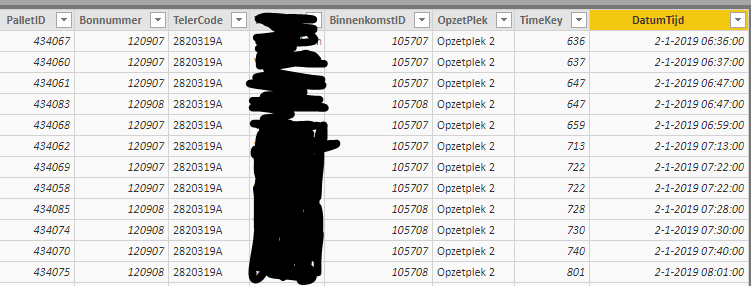
I have one fact table (first image) and a dimension time including duration per shift (dag=day and avond=evening).
For each line in the fact table (first image) I want a calculated column that calculates whether the shift is day or evening (based on the shifts in the second image).
All help is greatly appreciated

Solved! Go to Solution.


- Mark as New
- Bookmark
- Subscribe
- Mute
- Subscribe to RSS Feed
- Permalink
- Report Inappropriate Content
Sorry, it's missing the VALUES( )
WhatShift =
CALCULATE (
    VALUES(DimDate[Shift]),
    FILTER (
        DimDate,
        DimDate[Datum] = FactTable[DatumTijd].[Date]
            && FactTable[DatumTijd] >= DimDate[StartTijd]
            && (
                FactTable[DatumTijd] <= DimDate[EindTijd]
                    || DimDate[EindTijd] = BLANK ()
            )
    )
)
- Mark as New
- Bookmark
- Subscribe
- Mute
- Subscribe to RSS Feed
- Permalink
- Report Inappropriate Content
Try this for your calculated column:
WhatShift =
CALCULATE (
    DimDate[Shift],
    FILTER (
        DimDate,
        DimDate[Datum] = FactTable[DatumTijd].[Date]
            && FactTable[DatumTijd] >= DimDate[StartTijd]
            && (
                FactTable[DatumTijd] <= DimDate[EindTijd]
                    || DimDate[EindTijd] = BLANK ()
            )
    )
)
I see that there's a blank for one of the [EindTijd] values. The code assumes that's equivalent to the end of the day.
- Mark as New
- Bookmark
- Subscribe
- Mute
- Subscribe to RSS Feed
- Permalink
- Report Inappropriate Content
Hi @AlB,
After calculate it's impossible to put DimDate[Shift], any idea how to resolve? Proper connections have been made in the data model so that's not hte issue
- Mark as New
- Bookmark
- Subscribe
- Mute
- Subscribe to RSS Feed
- Permalink
- Report Inappropriate Content
Sorry, it's missing the VALUES( )
WhatShift =
CALCULATE (
    VALUES(DimDate[Shift]),
    FILTER (
        DimDate,
        DimDate[Datum] = FactTable[DatumTijd].[Date]
            && FactTable[DatumTijd] >= DimDate[StartTijd]
            && (
                FactTable[DatumTijd] <= DimDate[EindTijd]
                    || DimDate[EindTijd] = BLANK ()
            )
    )
)
- Mark as New
- Bookmark
- Subscribe
- Mute
- Subscribe to RSS Feed
- Permalink
- Report Inappropriate Content
- Mark as New
- Bookmark
- Subscribe
- Mute
- Subscribe to RSS Feed
- Permalink
- Report Inappropriate Content
Hi @Luukvv93
You mean you want to take the Date/Time value in your first table in column 'DatumTijd' and check where that value falls in the second table, i.e. between what StartTijd and EindTijd and from there determine whether it is Avond or Dag?
- Mark as New
- Bookmark
- Subscribe
- Mute
- Subscribe to RSS Feed
- Permalink
- Report Inappropriate Content

Helpful resources

Power BI Monthly Update - November 2025
Check out the November 2025 Power BI update to learn about new features.

Fabric Data Days
Advance your Data & AI career with 50 days of live learning, contests, hands-on challenges, study groups & certifications and more!

FabCon Atlanta 2026
Join us at FabCon Atlanta, March 16-20, for the ultimate Fabric, Power BI, AI and SQL community-led event. Save $200 with code FABCOMM.


