Learn from the best! Meet the four finalists headed to the FINALS of the Power BI Dataviz World Championships! Register now
I want to numerically rank an amount within a specific date. Say my data is this.
Person Sales Date Bob 10 January Jeff 20 January Steve 30 January Bob 50 February Jeff 40 February Steve 30 February Bob 20 March Jeff 30 March Steve 10 March
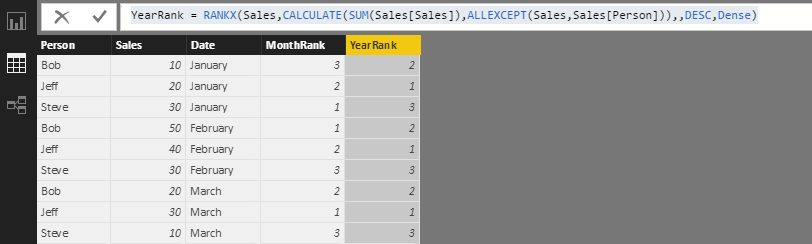
I want to be able to see their ranks with a month and also for the entire year. Like this.
Person Sales Date Month Rank Year Rank Bob 10 January 3 2 Jeff 20 January 2 1 Steve 30 January 1 3 Bob 50 February 1 2 Jeff 40 February 2 1 Steve 30 February 3 3 Bob 20 March 2 2 Jeff 30 March 1 1 Steve 10 March 3 3
I'm having difficulty getting the ranks within the months. It ranks each record individually so in this case it shows ranks 1-9.
Thanks!
Solved! Go to Solution.
MonthRank = RANKX(FILTER(Sales,Sales[Date]=EARLIER(Sales[Date])),Sales[Sales],,DESC)
YearRank = RANKX(Sales,CALCULATE(SUM(Sales[Sales]),ALLEXCEPT(Sales,Sales[Person])),,DESC,Dense)
Regards,
Charlie Liao
MonthRank = RANKX(FILTER(Sales,Sales[Date]=EARLIER(Sales[Date])),Sales[Sales],,DESC)
YearRank = RANKX(Sales,CALCULATE(SUM(Sales[Sales]),ALLEXCEPT(Sales,Sales[Person])),,DESC,Dense)
Regards,
Charlie Liao
A new Power BI DataViz World Championship is coming this June! Don't miss out on submitting your entry.
Share feedback directly with Fabric product managers, participate in targeted research studies and influence the Fabric roadmap.
| User | Count |
|---|---|
| 56 | |
| 33 | |
| 33 | |
| 18 | |
| 16 |
| User | Count |
|---|---|
| 68 | |
| 67 | |
| 45 | |
| 30 | |
| 26 |