Don't miss your chance to take the Fabric Data Engineer (DP-600) exam for FREE! Find out how by attending the DP-600 session on April 23rd (pacific time), live or on-demand.
Learn moreNext up in the FabCon + SQLCon recap series: The roadmap for Microsoft SQL and Maximizing Developer experiences in Fabric. All sessions are available on-demand after the live show. Register now
Hi
Looking for an expert help to build a map based powerbi report with slider
What I have as raw excel data are:
In the column headings, the asset name, the location ie postal code, month (i.e. Jan-21, Feb-21, etc)
In the rows are the various assets
An example is:
| Asset Name | Location | Jan-21 | Feb-21 |
| A | Singapore 2222 | 10% | 25% |
| B | Singapore 1111 | 20% | 15% |
How can I create a map whereby there is a slider to show the monthly performance i.e. On Jan-21 it shows both assets performance in bubbles then sliding to see Feb-21 data in a different bubble size depending on the performance?
Thank you
Solved! Go to Solution.
Hi, @Anonymous
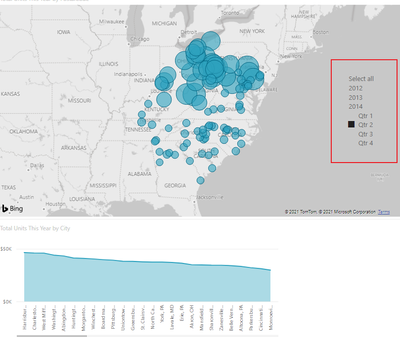
I'm not sure I understand you very well, do you want to create a date slicer like this?
if so then just create a slicer visual object.
Best Regards,
Community Support Team _ Zeon Zheng
If this post helps, then please consider Accept it as the solution to help the other members find it more quickly.
Hi, @Anonymous
I'm not sure I understand you very well, do you want to create a date slicer like this?
if so then just create a slicer visual object.
Best Regards,
Community Support Team _ Zeon Zheng
If this post helps, then please consider Accept it as the solution to help the other members find it more quickly.
Thanks Zeon but sorry doesnt seem to work for me. The columns Jan-2021, Feb 2021 appears to become independent variables in powerbi rather than calendar months which runs along. Not sure if I need to do something in the columns to adjust.
If you have recently started exploring Fabric, we'd love to hear how it's going. Your feedback can help with product improvements.
A new Power BI DataViz World Championship is coming this June! Don't miss out on submitting your entry.
Share feedback directly with Fabric product managers, participate in targeted research studies and influence the Fabric roadmap.
| User | Count |
|---|---|
| 44 | |
| 43 | |
| 38 | |
| 18 | |
| 16 |
| User | Count |
|---|---|
| 67 | |
| 63 | |
| 30 | |
| 30 | |
| 23 |