
cancel
Showing results for 
Search instead for 
Did you mean: 

The Power BI Data Visualization World Championships is back! Get ahead of the game and start preparing now! Learn more

Reply
Nsimpson
Frequent Visitor

Need help to create a column that shows the first working day of each month on a date table.

I am a begginner when it comes to Power BI.  This might be a simple question but I need to create a column within a date table that identifies the first working day of each month.  I have already created a column that shows 1 for a working day and 0 for weekends and holidays.  I just need the next step of created a column that shows 1 for the first working day of each month and for it to move to the next working day if the 1st of the month is a weekend or holiday.


The code I used for Working Days is this: 

.IsWorkingDay = IF (NOT('Calendar'[DayOfWeek] = "Saturday" || ('Calendar'[DayOfWeek] = "Sunday")) && COUNTX(RELATEDTABLE('FEI Holidays'),1)<1,1,0)


Can you help?


Thanks!

1 ACCEPTED SOLUTION
v-juanli-msft
Community Support
Community Support

Hi @Nsimpson 

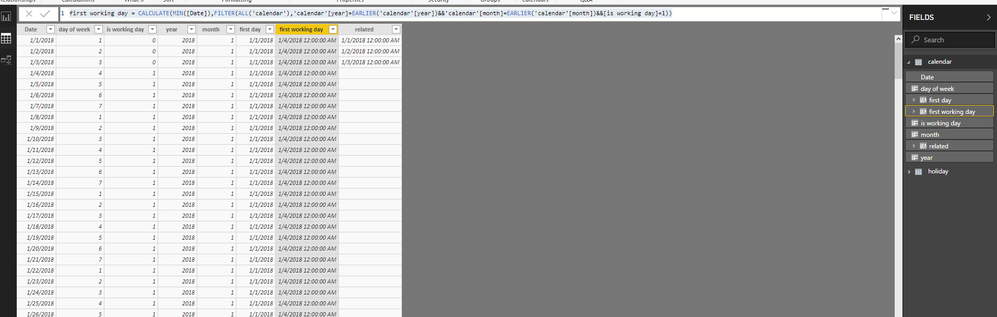
In my test, i create "holiday" table with the holiday date

assume my holiday date is 2018/1/1,2018/1/2,2018/1/3

then i create a related column in "calendar" table,

related = RELATED(holiday[Date])

Then i create the column

is working day = IF(NOT([day of week]=6&&[day of week]=7)&&'calendar'[Date]<>[related],1,0)
first working day = CALCULATE(MIN([Date]),FILTER(ALL('calendar'),'calendar'[year]=EARLIER('calendar'[year])&&'calendar'[month]=EARLIER('calendar'[month])&&[is working day]=1))

5.png


Best Regards

Maggie


Community Support Team _ Maggie Li
If this post helps, then please consider Accept it as the solution to help the other members find it more quickly.

View solution in original post

4 REPLIES 4
v-juanli-msft
Community Support
Community Support

Hi @Nsimpson 

In my test, i create "holiday" table with the holiday date

assume my holiday date is 2018/1/1,2018/1/2,2018/1/3

then i create a related column in "calendar" table,

related = RELATED(holiday[Date])

Then i create the column

is working day = IF(NOT([day of week]=6&&[day of week]=7)&&'calendar'[Date]<>[related],1,0)
first working day = CALCULATE(MIN([Date]),FILTER(ALL('calendar'),'calendar'[year]=EARLIER('calendar'[year])&&'calendar'[month]=EARLIER('calendar'[month])&&[is working day]=1))

5.png


Best Regards

Maggie


Community Support Team _ Maggie Li
If this post helps, then please consider Accept it as the solution to help the other members find it more quickly.

v-juanli-msft
Community Support
Community Support

Hi @Nsimpson 

Create calculated columns

year = YEAR([Date])

month = MONTH([Date])

month = MONTH([Date])

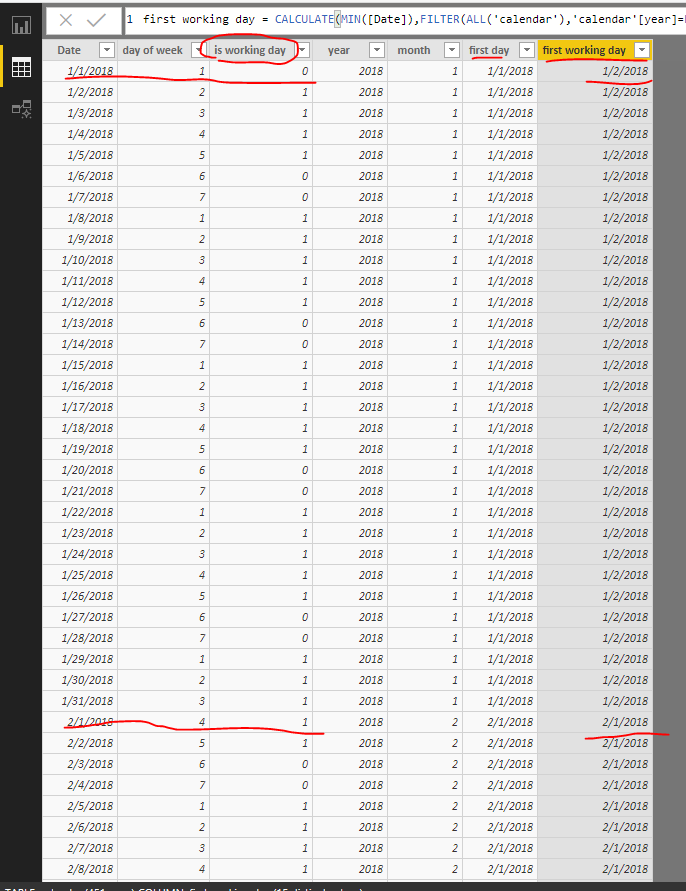
first working day = CALCULATE(MIN([Date]),FILTER(ALL('calendar'),'calendar'[year]=EARLIER('calendar'[year])&&'calendar'[month]=EARLIER('calendar'[month])&&'calendar'[is working day]=1))

In my test, assume 2018/1/1, 2019/1/1 are holiday,

then for 2018/1, the firt working day is 2018/1/2

10.png

If you want to get 1/0 column to identify the first working day of each month,

create a column

Column = IF([first working day]=[Date],1,0)

Best Regards

Maggie


Community Support Team _ Maggie Li
If this post helps, then please consider Accept it as the solution to help the other members find it more quickly.

This might work but I am receiving the circular dependency error when I try to create the First Working Day calc.


Capture.JPG


It has an issue with my .IsWorkingDay calulated column.  Any suggestions to resolve this?


Thanks!

Nsimpson
Frequent Visitor

I also have the below measure and a holiday table.  Not sure how I would add to skip over Holidays in the below code.


First WorkingDay of Month = VAR _current =
SELECTEDVALUE ( 'Date'[Date] )
VAR _firstWeekDay =
MINX (
FILTER (
ADDCOLUMNS (
CALENDAR (
DATE ( YEAR ( _current ), MONTH ( _current ), 1 ),
DATE ( YEAR ( _current ), MONTH ( _current ) + 1, 1 )
- 1
),
"Day of Week", WEEKDAY ( [Date], 1 )
),
[Day of Week] <> 1
&& [Day of Week] <> 7
),
[Date]
)
RETURN
IF (
_current IN ALLSELECTED ( 'Date'[Date] ),
IF ( _current = _firstWeekDay, 1, 0 ),
0
)

Helpful resources

Announcements
Power BI DataViz World Championships

Power BI Dataviz World Championships

The Power BI Data Visualization World Championships is back! Get ahead of the game and start preparing now!

November Power BI Update Carousel

Power BI Monthly Update - November 2025

Check out the November 2025 Power BI update to learn about new features.

FabCon Atlanta 2026 carousel

FabCon Atlanta 2026

Join us at FabCon Atlanta, March 16-20, for the ultimate Fabric, Power BI, AI and SQL community-led event. Save $200 with code FABCOMM.