Learn from the best! Meet the four finalists headed to the FINALS of the Power BI Dataviz World Championships! Register now
Excel To HTML using codebeautify.org Sheet Name :- Sheet1
Hi all,
i have data like below table when i select Date: 12/24/2018 by using date filter
i want to show created Ticket details and clocked ticket details in seperate table
how can i achive this logic?
| Ticket ID | Created Date | Status | Status Date |
| ID1 | 12-24-18 | Closed | 12-24-18 |
| ID2 | 12-24-18 | Inprogress | 12-24-18 |
| ID3 | 12-24-18 | Hold | 12-24-18 |
| ID4 | 12-24-18 | Closed | 12-24-18 |
| ID5 | 12-24-18 | Closed | 12-24-18 |
| ID6 | 12-23-18 | Closed | 12-23-18 |
| ID7 | 12-23-18 | Closed | 12-23-18 |
| ID8 | 12-23-18 | Closed | 12-24-18 |
| ID9 | 12-23-18 | Closed | 12-24-18 |
| ID10 | 12-23-18 | Inprogress | 12-24-18 |
| ID11 | 12-23-18 | Hold | 12-23-18 |
Solved! Go to Solution.
hi, @Anonymous
Based on my test, you could try this way as below:
Step1:
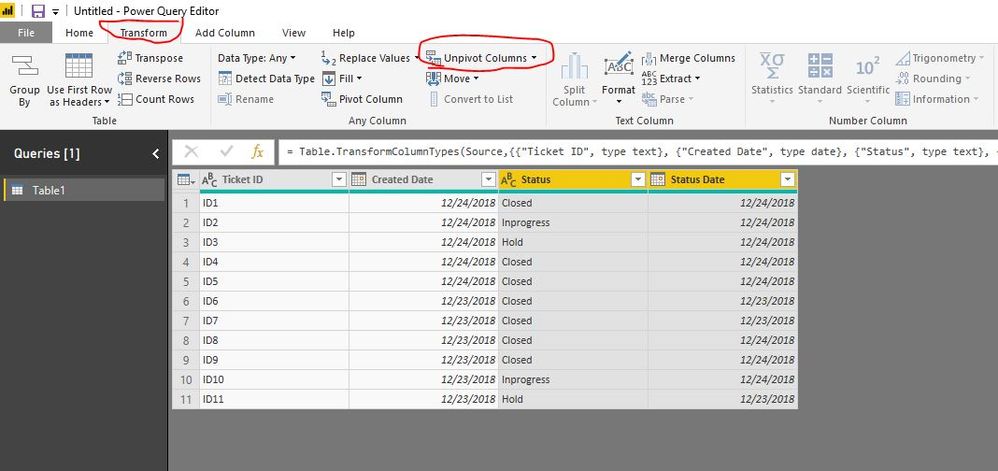
In Edit Queries, select Created Date column and Status Date column, then click Transform->Unpivot Columns
Step2:
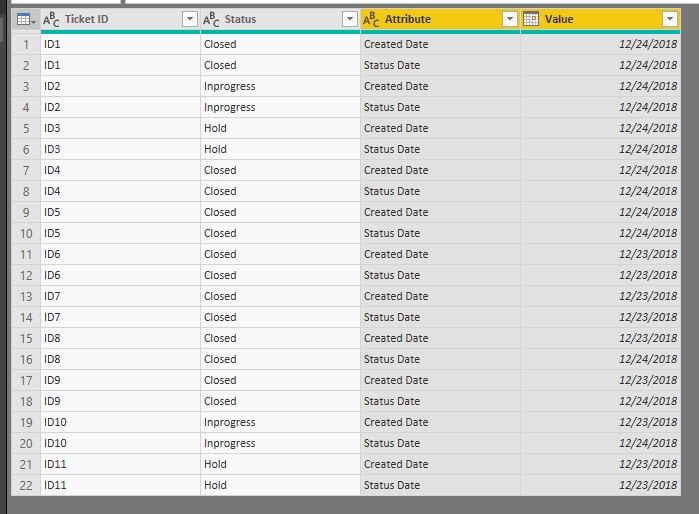
Apply&Close
Step3:
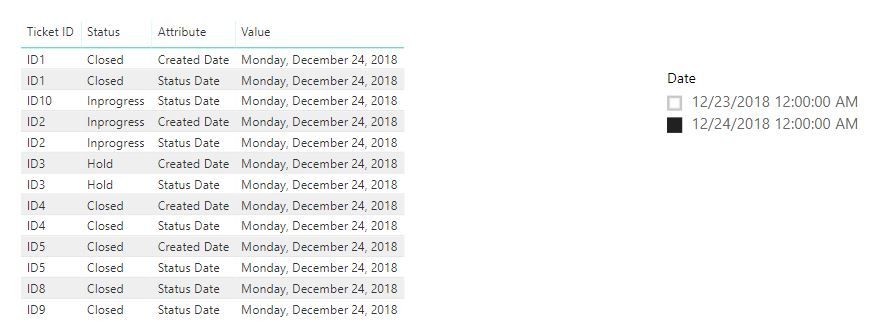
Create a relationship with date table by Value
Result:
Best Regards,
Lin
hi, @Anonymous
Based on my test, you could try this way as below:
Step1:
In Edit Queries, select Created Date column and Status Date column, then click Transform->Unpivot Columns
Step2:
Apply&Close
Step3:
Create a relationship with date table by Value
Result:
Best Regards,
Lin
I'm not understanding the dilemma here exactly. What end result are you looking for?
Take a look at these two Quick Measures as I think you want something like them??
https://community.powerbi.com/t5/Quick-Measures-Gallery/Open-Tickets/m-p/409364
https://community.powerbi.com/t5/Quick-Measures-Gallery/Periodic-Billing/m-p/409365
| User | Count |
|---|---|
| 51 | |
| 35 | |
| 29 | |
| 17 | |
| 17 |
| User | Count |
|---|---|
| 66 | |
| 57 | |
| 39 | |
| 22 | |
| 21 |