This time we’re going bigger than ever. Fabric, Power BI, SQL, AI and more. We're covering it all. You won't want to miss it.
Learn moreDid you hear? There's a new SQL AI Developer certification (DP-800). Start preparing now and be one of the first to get certified. Register now
Hello everyone,
I have two tables, one contains all the file IDs and decision code (this table contains unique entries) and the other contains the rules that were applied to it (this one contains duplicate entries on rules and file IDs).
The two tables are linked by the file ID on which a one-to-many relationship has been established.
The second table contains duplicate entries on rules and file ID, i.e. different rules or a single rule can be applied to an ID.
I posted an example of my two tables to give you an idea.
What I want to do now is to get this snapshot:
I would like to count every file ID that has had one of the listed rules applied to it and has a decision code of A or R.
Please note that the rules are not static, they may change as they are updated.
| # rules | #file ID which one of the listed rules have been applied and have the decision code A | #file ID which one of the listed rules have been applied and have the decision code B |
| R022 | ||
| R028 | ||
| R033 | ||
| R007 | ||
| R025 | ||
| R023 | ||
| R029 | ||
| R001 | ||
| R011 | ||
| E004 | ||
| E001 | ||
| R010 |
Table#1 (All file ID and decision code)
| File ID | Decision code |
| 4607 | A |
| 4606 | A |
| 4593 | A |
| 4590 | A |
| 4587 | A |
| 4586 | A |
| 4582 | A |
| 4563 | A |
| 4561 | A |
| 4555 | A |
| 4551 | A |
| 4549 | R |
| 4542 | A |
| 4532 | R |
| 4516 | A |
Table#2 (Duplicate entries)
| File ID | Rules |
| 4607 | R028 |
| 4606 | R022 |
| 4606 | R007 |
| 4593 | R022 |
| 4590 | R023 |
| 4587 | R022 |
| 4586 | R025 |
| 4582 | R022 |
| 4563 | R028 |
| 4563 | R033 |
| 4561 | R022 |
| 4561 | R033 |
| 4561 | R007 |
| 4561 | R025 |
| 4555 | R025 |
| 4551 | R022 |
| 4551 | R028 |
I tried all the possibilities that I know of DAX but I had no solutions.
Thank you in advance for your precious help.
Solved! Go to Solution.
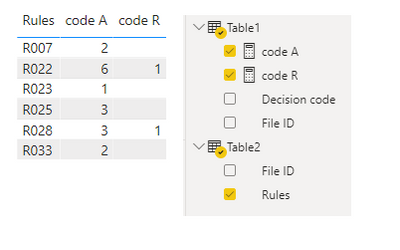
If you want to use matrix to display the count, you can take the method mentioned by AlexisOlson, it's the fastest way.
If you don't want to use matrix or you just want to know how to calculate the count by DAX, try measures bellow,
code A =
var _t0=SUMMARIZE(FILTER(ALL(Table2),Table2[Rules]=MIN(Table2[Rules])),[File ID])
var _t1=SUMMARIZE(FILTER(ALL(Table1),Table1[Decision code] ="A"),[File ID])
var _t2=INTERSECT(_t1,_t0)
return COUNTROWS(_t2)code R =
var _t0=SUMMARIZE(FILTER(ALL(Table2),Table2[Rules]=MIN(Table2[Rules])),[File ID])
var _t1=SUMMARIZE(FILTER(ALL(Table1),Table1[Decision code] ="R"),[File ID])
var _t2=INTERSECT(_t1,_t0)
return COUNTROWS(_t2)
result
Best Regards,
Community Support Team _Tang
If this post helps, please consider Accept it as the solution to help the other members find it more quickly.
If you want to use matrix to display the count, you can take the method mentioned by AlexisOlson, it's the fastest way.
If you don't want to use matrix or you just want to know how to calculate the count by DAX, try measures bellow,
code A =
var _t0=SUMMARIZE(FILTER(ALL(Table2),Table2[Rules]=MIN(Table2[Rules])),[File ID])
var _t1=SUMMARIZE(FILTER(ALL(Table1),Table1[Decision code] ="A"),[File ID])
var _t2=INTERSECT(_t1,_t0)
return COUNTROWS(_t2)code R =
var _t0=SUMMARIZE(FILTER(ALL(Table2),Table2[Rules]=MIN(Table2[Rules])),[File ID])
var _t1=SUMMARIZE(FILTER(ALL(Table1),Table1[Decision code] ="R"),[File ID])
var _t2=INTERSECT(_t1,_t0)
return COUNTROWS(_t2)
result
Best Regards,
Community Support Team _Tang
If this post helps, please consider Accept it as the solution to help the other members find it more quickly.
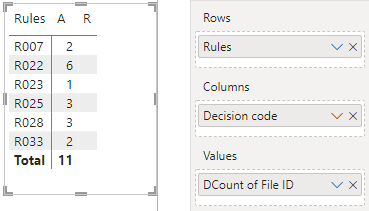
It seems like you can put it in a matrix with Rules on Rows and Decision Code on column and take the distinct count of File ID for the measure:
If you had something else in mind, please share what your expected result should be.
Sooorry guys if I mentioned you 🙏
Check out the April 2026 Power BI update to learn about new features.
Sign up to receive a private message when registration opens and key events begin.
If you have recently started exploring Fabric, we'd love to hear how it's going. Your feedback can help with product improvements.
| User | Count |
|---|---|
| 34 | |
| 31 | |
| 25 | |
| 20 | |
| 16 |
| User | Count |
|---|---|
| 60 | |
| 48 | |
| 29 | |
| 23 | |
| 23 |