cancel
Showing results for 
Search instead for 
Did you mean: 

The Power BI Data Visualization World Championships is back! Get ahead of the game and start preparing now! Learn more

Reply
Anonymous
Not applicable

Need help regarding one of the custom column created to calculate time!

Hello PowerBI Community,


I have been working on one of the projects where I am supposed to calculate time difference for each entry of log data to find out how long a demand stayed in one status.


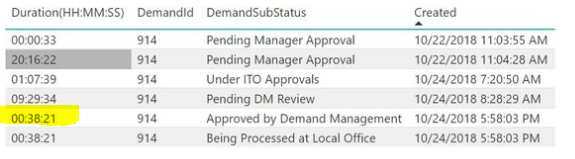
Below is my formula which was working fine until I got a record where two records are created at exactly the same time(could be due to system error) and the result should reflect 00:00:00 but it is not the case.


Below is my formula to calculate time:


Duration(HH:MM:SS) = if(ISBLANK(CALCULATE(MIN(Data[Created]),FILTER(Data,Data[Created]>EARLIER(Data[Created])&&Data[DemandId]=EARLIER(Data[DemandId])))),NOW()-[Created],CALCULATE(MIN(Data[Created]),FILTER(Data,Data[Created]>EARLIER(Data[Created])&&Data[DemandId]=EARLIER(Data[DemandId])))-[Created])


Please find snapshot of the dataset for your reference.


Capture.JPG


As you can see the second last record shows duration as 00 hours 38 minutes and 21 seconds when it should be 00:00:00 as the status for demand was changed right away to "Being Processed at Local Office".

Is there something wrong with my formula? Will really appreciate if someone can help me on this!

The link to the csv file is below

https://www.dropbox.com/s/vjx7nby0d9gzujv/data.csv?dl=0

Will really appreciate some help on this!

1 ACCEPTED SOLUTION
v-yulgu-msft
Microsoft Employee
Microsoft Employee

Hi @Anonymous,


Do you want the highlighted value to be 00:00:00?

1.PNG

 If so, you could add an index column in Query Editor mode first. Then, please modify the formula as below:

Duration2(HH:MMSmiley FrustratedS) =
VAR nextStatus =
    CALCULATE (
        FIRSTNONBLANK ( data[DemandSubStatus], 1 ),
        FILTER (
            Data,
            data[Index]
                = EARLIER ( data[Index] ) + 1
                && data[DemandId] = EARLIER ( Data[DemandId] )
        )
    )
VAR nextCreatedTime =
    CALCULATE (
        MIN ( Data[Created] ),
        FILTER (
            Data,
            Data[Created] > EARLIER ( Data[Created] )
                && Data[DemandId] = EARLIER ( Data[DemandId] )
        )
    )
RETURN
    IF (
        nextStatus = "Being Processed at Local Office",
        IF (
            ISBLANK ( nextCreatedTime ),
            NOW () - [Created],
            nextCreatedTime - [Created]
        ),
        TIME ( 0, 0, 0 )
    )

Best regards,

Yuliana Gu

Community Support Team _ Yuliana Gu
If this post helps, then please consider Accept it as the solution to help the other members find it more quickly.

View solution in original post

4 REPLIES 4
v-yulgu-msft
Microsoft Employee
Microsoft Employee

Hi @Anonymous,


Do you want the highlighted value to be 00:00:00?

1.PNG

 If so, you could add an index column in Query Editor mode first. Then, please modify the formula as below:

Duration2(HH:MMSmiley FrustratedS) =
VAR nextStatus =
    CALCULATE (
        FIRSTNONBLANK ( data[DemandSubStatus], 1 ),
        FILTER (
            Data,
            data[Index]
                = EARLIER ( data[Index] ) + 1
                && data[DemandId] = EARLIER ( Data[DemandId] )
        )
    )
VAR nextCreatedTime =
    CALCULATE (
        MIN ( Data[Created] ),
        FILTER (
            Data,
            Data[Created] > EARLIER ( Data[Created] )
                && Data[DemandId] = EARLIER ( Data[DemandId] )
        )
    )
RETURN
    IF (
        nextStatus = "Being Processed at Local Office",
        IF (
            ISBLANK ( nextCreatedTime ),
            NOW () - [Created],
            nextCreatedTime - [Created]
        ),
        TIME ( 0, 0, 0 )
    )

Best regards,

Yuliana Gu

Community Support Team _ Yuliana Gu
If this post helps, then please consider Accept it as the solution to help the other members find it more quickly.
Greg_Deckler
Community Champion
Community Champion

Seems to me that you need to add an Index to your table in Query Editor and then change your formula to be >= EARLIER(Data[Created]) but exclude your current index <>EARLIER(Data[Index])


Follow on LinkedIn
@ me in replies or I'll lose your thread!!!
Instead of a Kudo, please vote for this idea
Become an expert!: Enterprise DNA
External Tools: MSHGQM
YouTube Channel!: Microsoft Hates Greg
Latest book!:
DAX For Humans

DAX is easy, CALCULATE makes DAX hard...
Anonymous
Not applicable

HI @Greg_Deckler


I did add index column but I am not sure how to modify the formula correctly. Could you please tell me the formula so I will test it out.


Thanks!

I believe it should be something like this.


Duration(HH:MM:SS) = 
VAR __previous = 
CALCULATE(
	MIN(Data[Created]),
	FILTER(
		Data,
		Data[Created]>=EARLIER(Data[Created])
		&&
		Data[DemandId]=EARLIER(Data[DemandId])
		&&
		Data[Index]<>EARLIER(Data[Index])
	)
)
RETURN
IF(ISBLANK(__previous),NOW()-[Created],__previous-[Created])

Note, I totally restructured your code because you need to format that stuff and you had a bunch of duplicate code and all that. This assumes that your column is [Index]. As you can see, it is really just your code with a modification that the Created date is >= than the current line but with the exclusion that the Index is <> to the current line, otherwise it would always just match itself.


Follow on LinkedIn
@ me in replies or I'll lose your thread!!!
Instead of a Kudo, please vote for this idea
Become an expert!: Enterprise DNA
External Tools: MSHGQM
YouTube Channel!: Microsoft Hates Greg
Latest book!:
DAX For Humans

DAX is easy, CALCULATE makes DAX hard...

Helpful resources

Announcements
November Power BI Update Carousel

Power BI Monthly Update - November 2025

Check out the November 2025 Power BI update to learn about new features.

Fabric Data Days Carousel

Fabric Data Days

Advance your Data & AI career with 50 days of live learning, contests, hands-on challenges, study groups & certifications and more!

FabCon Atlanta 2026 carousel

FabCon Atlanta 2026

Join us at FabCon Atlanta, March 16-20, for the ultimate Fabric, Power BI, AI and SQL community-led event. Save $200 with code FABCOMM.

Top Kudoed Authors