cancel
Showing results for 
Search instead for 
Did you mean: 

Get Fabric Certified for FREE during Fabric Data Days. Don't miss your chance! Request now

Reply
Shamsbutt
Helper II
Helper II

Need help in writing DAX

Following DAX is fulfilling my basic requirement. But next thing i need to implement is

If multiple pi selected from slicer like PI26 and PI27 then data should be under more than 2PIs Yellow chart means

table should show only those items with PreviousPIsCount > 1

it should not show data with PreviousPIsCount = 1


Here is PBIX file


PICheck = 
IF (
    Fact_PI[PreviousPIsCount] > 1, "More Than 2 PI",
    IF ( Fact_PI[PreviousPIsCount] = 1, "Previous PI", "" )
)


Example:


In case of No Selection or single selection results are fine. Like below image


bbd6cf00-68e0-4a67-bc8c-e87e33906910.jpg


But in Below image case only more then 2 PIs should show data not in Previous


2.png


Thanks

1 ACCEPTED SOLUTION
Anonymous
Not applicable

hi @Shamsbutt ,


Please check following steps as below:

1.    Create measure:

       Measure 2 =

       VAR A =

           CALCULATE ( DISTINCTCOUNT ( 'Dim PI'[Name] ), ALLSELECTED ( Fact_PI ) )

       VAR B =

          MAX ( Fact_PI[PreviousPIsCount] )

       RETURN

           IF (

              ISBLANK ( B ),

              BLANK (),

               IF ( A = 6, 1, IF ( A = 1, 1, IF ( B = 1, BLANK (), 1 ) ) )

       )

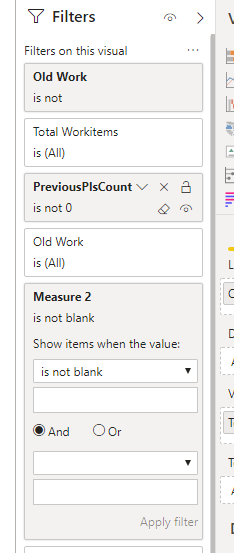
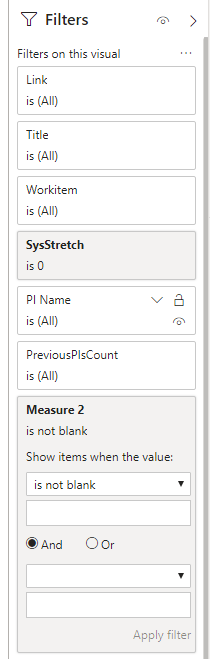
2.    Add measure2 to visual filters.

1.PNG2.PNG

3.    Results would be shown as below:

3.PNG

Pbix as attached, hopefully works for you.


Community Support Team _ Jay Wang

If this post helps, then please consider Accept it as the solution to help the other members find it more quickly.

View solution in original post

2 REPLIES 2
Anonymous
Not applicable

hi @Shamsbutt ,


Please check following steps as below:

1.    Create measure:

       Measure 2 =

       VAR A =

           CALCULATE ( DISTINCTCOUNT ( 'Dim PI'[Name] ), ALLSELECTED ( Fact_PI ) )

       VAR B =

          MAX ( Fact_PI[PreviousPIsCount] )

       RETURN

           IF (

              ISBLANK ( B ),

              BLANK (),

               IF ( A = 6, 1, IF ( A = 1, 1, IF ( B = 1, BLANK (), 1 ) ) )

       )

2.    Add measure2 to visual filters.

1.PNG2.PNG

3.    Results would be shown as below:

3.PNG

Pbix as attached, hopefully works for you.


Community Support Team _ Jay Wang

If this post helps, then please consider Accept it as the solution to help the other members find it more quickly.

Shamsbutt
Helper II
Helper II

Help Please


Helpful resources

Announcements
November Power BI Update Carousel

Power BI Monthly Update - November 2025

Check out the November 2025 Power BI update to learn about new features.

Fabric Data Days Carousel

Fabric Data Days

Advance your Data & AI career with 50 days of live learning, contests, hands-on challenges, study groups & certifications and more!

FabCon Atlanta 2026 carousel

FabCon Atlanta 2026

Join us at FabCon Atlanta, March 16-20, for the ultimate Fabric, Power BI, AI and SQL community-led event. Save $200 with code FABCOMM.

Top Solution Authors
Top Kudoed Authors