cancel
Showing results for 
Search instead for 
Did you mean: 

Get Fabric Certified for FREE during Fabric Data Days. Don't miss your chance! Request now

Reply
cnxanalytics1
Frequent Visitor

Need help in calculating time difference from Timestamps in same column

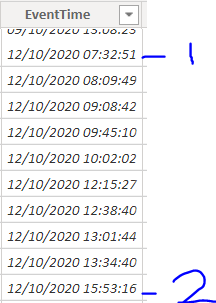
I've different Timestamps in same column, I want to calculate the difference between each Timestamp and add the result in new column(hh:mm), please help,

image.png
I also have two seprate columns for date and time that I created in source data just in case if they can be used.

1 ACCEPTED SOLUTION
Anonymous
Not applicable

Hi @cnxanalytics1 

I build a table to have a test.
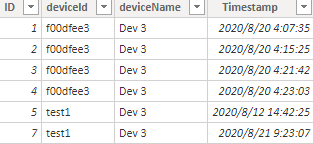
1.png

Due to I don't know your calcualte logic, so I build a new column which calculate the difference between Timestamp and the biggest timestamp but smaller than this one in the same Deviceld.(hh:mm)

Column = 
VAR _Datediff =
    DATEDIFF (
        CALCULATE (
            MAX ( 'Table'[Timestamp] ),
            FILTER (
                'Table',
                'Table'[deviceld] = EARLIER ( 'Table'[deviceld] )
                    && 'Table'[Timestamp] < EARLIER ( 'Table'[Timestamp] )
            )
        ),
        'Table'[Timestamp],
        MINUTE
    )
VAR _hh =
    IF (
        DIVIDE ( _Datediff, 60 ) < 1,
        "00",
        FORMAT ( DIVIDE ( _Datediff, 60 ), 0 )
    )
VAR _mm =
    IF (
        MOD ( _Datediff, 60 ) = 0,
        "00",
        IF ( MOD ( _Datediff, 60 ) < 10, MOD ( _Datediff, 60 ), MOD ( _Datediff, 60 ) )
    )
VAR _Result = _hh & ":" & _mm
RETURN
    _Result

Result:
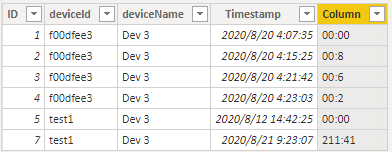
2.png

The first value in each deviceld will show 00:00.

If this reply still couldn't help you solve your problem, please show me more details about your calculated logic.

1. What does "calculate the difference between each Timestamp" mean, you can give me an example like:

if Timestamp = 2020/8/20 4:21:42, the result is 2020/8/20 4:21:42 - all other Timestamps or 2020/8/20 4:21:42 - other specific Timestamps.

2. You can give me a screenshot of the result you want, and they can make it easier for me to understand.

You can download the pbix file from this link: Need help in calculating time difference from Timestamps in same column


Best Regards,

Rico Zhou


If this post helps, then please consider Accept it as the solution to help the other members find it more quickly. 


View solution in original post

4 REPLIES 4
Anonymous
Not applicable

Hi @cnxanalytics1 

Could you tell me if your problem has been solved? If it is, kindly Accept it as the solution. More people will benefit from it. Or you are still confused about it, please provide me with more details about your table and your problem or share me with your pbix file from your Onedrive for Business.


Best Regards,

Rico Zhou

Anonymous
Not applicable

Hi @cnxanalytics1 

I build a table to have a test.

1.png

Due to I don't know your calcualte logic, so I build a new column which calculate the difference between Timestamp and the biggest timestamp but smaller than this one in the same Deviceld.(hh:mm)

Column = 
VAR _Datediff =
    DATEDIFF (
        CALCULATE (
            MAX ( 'Table'[Timestamp] ),
            FILTER (
                'Table',
                'Table'[deviceld] = EARLIER ( 'Table'[deviceld] )
                    && 'Table'[Timestamp] < EARLIER ( 'Table'[Timestamp] )
            )
        ),
        'Table'[Timestamp],
        MINUTE
    )
VAR _hh =
    IF (
        DIVIDE ( _Datediff, 60 ) < 1,
        "00",
        FORMAT ( DIVIDE ( _Datediff, 60 ), 0 )
    )
VAR _mm =
    IF (
        MOD ( _Datediff, 60 ) = 0,
        "00",
        IF ( MOD ( _Datediff, 60 ) < 10, MOD ( _Datediff, 60 ), MOD ( _Datediff, 60 ) )
    )
VAR _Result = _hh & ":" & _mm
RETURN
    _Result

Result:

2.png

The first value in each deviceld will show 00:00.

If this reply still couldn't help you solve your problem, please show me more details about your calculated logic.

1. What does "calculate the difference between each Timestamp" mean, you can give me an example like:

if Timestamp = 2020/8/20 4:21:42, the result is 2020/8/20 4:21:42 - all other Timestamps or 2020/8/20 4:21:42 - other specific Timestamps.

2. You can give me a screenshot of the result you want, and they can make it easier for me to understand.

You can download the pbix file from this link: Need help in calculating time difference from Timestamps in same column


Best Regards,

Rico Zhou


If this post helps, then please consider Accept it as the solution to help the other members find it more quickly. 
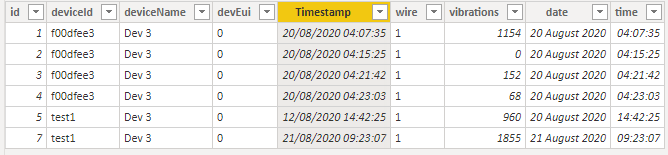
                            

I have looked at this as I have a similar issue.  I would however like to calculate the difference between the first time on that day and the last time that day. Is this possible?  I have used the measure above and managed to create the different time difference between entries but want to go one step further.


I look forward to your response.


jtdws_0-1615472197072.png


amitchandak
Super User
Super User

@cnxanalytics1 , try a new column like


[timestamp]- maxx(filter(table, [deviceid] =earlier([deviceid]) && [timestamp] <earlier([timestamp])),[timestamp])

or

[timestamp]- maxx(filter(table,  [timestamp] <earlier([timestamp])),[timestamp])

Share with Power BI Enthusiasts: Full Power BI Video (20 Hours) YouTube
Microsoft Fabric Series 60+ Videos YouTube
Microsoft Fabric Hindi End to End YouTube

Helpful resources

Announcements
November Power BI Update Carousel

Power BI Monthly Update - November 2025

Check out the November 2025 Power BI update to learn about new features.

Fabric Data Days Carousel

Fabric Data Days

Advance your Data & AI career with 50 days of live learning, contests, hands-on challenges, study groups & certifications and more!

FabCon Atlanta 2026 carousel

FabCon Atlanta 2026

Join us at FabCon Atlanta, March 16-20, for the ultimate Fabric, Power BI, AI and SQL community-led event. Save $200 with code FABCOMM.

Top Solution Authors
Top Kudoed Authors