cancel
Showing results for 
Search instead for 
Did you mean: 

Get Fabric Certified for FREE during Fabric Data Days. Don't miss your chance! Request now

Reply
Shree_185
Helper I
Helper I

Need help in GroupBy for few fields/columns

Hi Everyone,


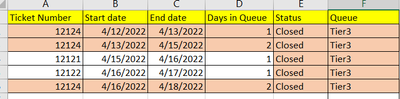
I have data something like this, and I want to count no days in the queue, group by Incident Number and status.


Available Data: 

Shree_185_0-1650428671844.png


Ticket NumberStart dateEnd dateDays in QueueStatus Queue
121244/12/20224/13/20221ClosedTier3
121244/13/20224/15/20222ClosedTier3
121214/15/20224/16/20221ClosedTier3
121224/16/20224/17/20221ClosedTier3
121244/16/20224/18/20222ClosedTier3


Required Output:


Shree_185_1-1650428706846.png


Ticket NumberDays in QueueStatus Queue
121245ClosedTier3
121211ClosedTier3
121221ClosedTier3
1 ACCEPTED SOLUTION
Samarth_18
Community Champion
Community Champion

Hi @Shree_185 ,


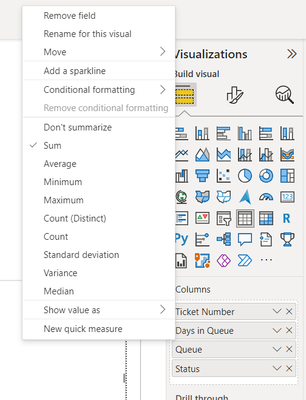
You can directly drag your required field and mark ticket number column as dont summerize and mark days column summerized as sum.

Samarth_18_0-1650430607366.png

Samarth_18_1-1650430628132.png

And if you need a separate table then you could use below code:-

Table 2 = SUMMARIZE('Table','Table'[Ticket Number],'Table'[Queue],'Table'[Status ],"Number of Days",SUM('Table'[Days in Queue]))

BR,

Samarth


Best Regards,
Samarth

If this post helps, please consider accepting it as the solution to help the other members find it more quickly.
Appreciate your Kudos!!
Connect on Linkedin

View solution in original post

1 REPLY 1
Samarth_18
Community Champion
Community Champion

Hi @Shree_185 ,


You can directly drag your required field and mark ticket number column as dont summerize and mark days column summerized as sum.

Samarth_18_0-1650430607366.png

Samarth_18_1-1650430628132.png

And if you need a separate table then you could use below code:-

Table 2 = SUMMARIZE('Table','Table'[Ticket Number],'Table'[Queue],'Table'[Status ],"Number of Days",SUM('Table'[Days in Queue]))

BR,

Samarth


Best Regards,
Samarth

If this post helps, please consider accepting it as the solution to help the other members find it more quickly.
Appreciate your Kudos!!
Connect on Linkedin

Helpful resources

Announcements
November Power BI Update Carousel

Power BI Monthly Update - November 2025

Check out the November 2025 Power BI update to learn about new features.

Fabric Data Days Carousel

Fabric Data Days

Advance your Data & AI career with 50 days of live learning, contests, hands-on challenges, study groups & certifications and more!

FabCon Atlanta 2026 carousel

FabCon Atlanta 2026

Join us at FabCon Atlanta, March 16-20, for the ultimate Fabric, Power BI, AI and SQL community-led event. Save $200 with code FABCOMM.

Top Solution Authors
Top Kudoed Authors