cancel
Showing results for 
Search instead for 
Did you mean: 

Join the FabCon + SQLCon recap series. Up next: Power BI, Real-Time Intelligence, IQ and AI, and Data Factory take center stage. All sessions are available on-demand after the live show. Register now

Reply
Anonymous
Not applicable

Need help for creating Line Graph

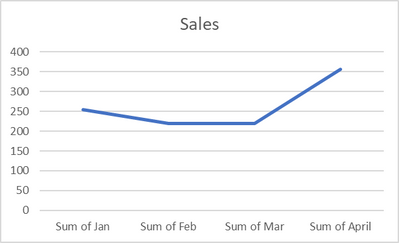
Need help to create a line graph with months in the x axis for the given below table. Project number is not necessary to be displayed or even used in graph. 

I want to show the performance on monthly bases.

For example - jan = "sum of all the sales in Jan" is one value

ProjectJanFebMarApril
122222222
234343434
333333333
455555555
566666666
677777777


Example of line graph 

Jeunifer_0-1652853574193.png


1 ACCEPTED SOLUTION

In Power Query, you can try the following (you need a column for sorting purposes):

1) If the periods are sorted properly, add an index column

2 If the periods are not sorted chronologically, add a conditional column along the lines of:
If the period table = Sales P01 (actual) then 1

If the period table = Sales P02 (actual) then 2

....


Once the table is loaded, go into the table view, select the period table and in the ribbon, select "Sort by column" and select the order column.


Did I answer your question? Mark my post as a solution!
In doing so, you are also helping me. Thank you!

Proud to be a Super User!
Paul on Linkedin.


View solution in original post

3 REPLIES 3
PaulDBrown
Community Champion
Community Champion

You need to unpivot the month columns in Power Query. Then setting up the graph os straightforward .


Did I answer your question? Mark my post as a solution!
In doing so, you are also helping me. Thank you!

Proud to be a Super User!
Paul on Linkedin.


Anonymous
Not applicable

Hi i used the unpivot in power query. 

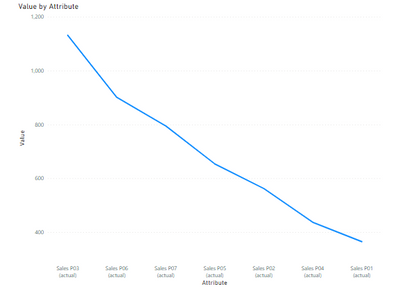
When i tried the line chart, im getting the below output. 

Please advise on how to have the x axis values from P01 - P07 


Jeunifer_0-1652864048376.png

The x axis in not in ascending order. I did sort the coloumn in table but still the graph is shown like this.

In Power Query, you can try the following (you need a column for sorting purposes):

1) If the periods are sorted properly, add an index column

2 If the periods are not sorted chronologically, add a conditional column along the lines of:
If the period table = Sales P01 (actual) then 1

If the period table = Sales P02 (actual) then 2

....


Once the table is loaded, go into the table view, select the period table and in the ribbon, select "Sort by column" and select the order column.


Did I answer your question? Mark my post as a solution!
In doing so, you are also helping me. Thank you!

Proud to be a Super User!
Paul on Linkedin.


Helpful resources

Announcements
April Power BI Update Carousel

Power BI Monthly Update - April 2026

Check out the April 2026 Power BI update to learn about new features.

New to Fabric survey Carousel

New to Fabric Survey

If you have recently started exploring Fabric, we'd love to hear how it's going. Your feedback can help with product improvements.

Power BI DataViz World Championships carousel

Power BI DataViz World Championships - June 2026

A new Power BI DataViz World Championship is coming this June! Don't miss out on submitting your entry.

FabCon and SQLCon Highlights Carousel

FabCon &SQLCon Highlights

Experience the highlights from FabCon & SQLCon, available live and on-demand starting April 14th.