cancel
Showing results for 
Search instead for 
Did you mean: 

The Power BI Data Visualization World Championships is back! Get ahead of the game and start preparing now! Learn more

Reply
chrisB13
Frequent Visitor

Need a simple calculation Currentvalue - previousvalue, cannot find a good method

Hi,


I am trying to do a very very simple calculation, and maybe I am overthinking this.   I did some research and I cannot seem to find a "simple" way to achieve this and what I have found it seems that other users are experiencing similar problems.   I know that this calculation is very easy in Excel


I need to calculate the most current value (based on date), and subtract the previous value (based on date)


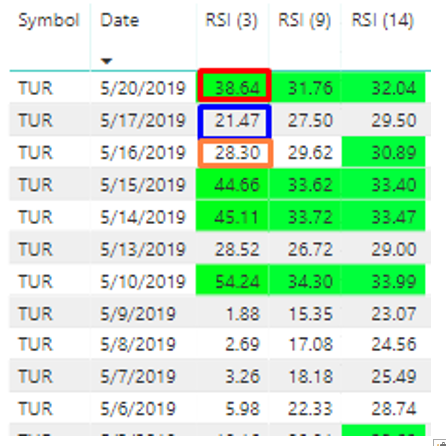
Here is the data, I need the red value 38.64 - the blue value 21.47, then to the end of the list (blue 21.47 - orange 28.30) and so on. 

I have about 300 different symbols and this is just 1, so indexing created an issue 

Screenshot_1.png


The end goal of this is simply to determine if the most recent value is greater than the previous.   So I am open to suggestions on this.   I will need to conditionally format the cells "green" if its greater and "red" or no formating if its less than.  (I can take care of the formatting, just adding it for context)


Thank you in advance

1 ACCEPTED SOLUTION
Anonymous
Not applicable

@chrisB13  - One way to do this is in Power Query. Try these steps:

0. If the different Symbols are in separate columns, you will need to first select the date and "Unpivot Other Columns".

1. Order by Symbol and Date.

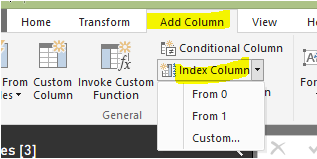
2. Add an index column starting from 0, and another starting from 1.

Add Column - Index.png

3. Merge the table with itself, joining the one index column to the other. This way, you can retrieve the previous value.

4. Add a Custom Column that returns 0 if the current and previous Symbols are different, otherwise the current minus the previous value.

Hope this helps,

Nathan

View solution in original post

1 REPLY 1
Anonymous
Not applicable

@chrisB13  - One way to do this is in Power Query. Try these steps:

0. If the different Symbols are in separate columns, you will need to first select the date and "Unpivot Other Columns".

1. Order by Symbol and Date.

2. Add an index column starting from 0, and another starting from 1.

Add Column - Index.png

3. Merge the table with itself, joining the one index column to the other. This way, you can retrieve the previous value.

4. Add a Custom Column that returns 0 if the current and previous Symbols are different, otherwise the current minus the previous value.

Hope this helps,

Nathan

Helpful resources

Announcements
Power BI DataViz World Championships

Power BI Dataviz World Championships

The Power BI Data Visualization World Championships is back! Get ahead of the game and start preparing now!

December 2025 Power BI Update Carousel

Power BI Monthly Update - December 2025

Check out the December 2025 Power BI Holiday Recap!

FabCon Atlanta 2026 carousel

FabCon Atlanta 2026

Join us at FabCon Atlanta, March 16-20, for the ultimate Fabric, Power BI, AI and SQL community-led event. Save $200 with code FABCOMM.