Get certified for free when you join Fabric Data Days 2026 and dive into Fabric, Power BI, SQL, AI, and other essential data skills.
Join nowJuly 7 - July 17 | Round 2 of the Power BI Dataviz World Championships. Don't miss your chance! Learn more
Before i go into the details, here is the sample data that i am working on.
this is swipecard data and it contains all the in's and out's of users..
https://1drv.ms/x/s!AhiQ2f7YQHC-gbNYMGJz0l0KU70svg
I am trying to calculate the spent hours of each users by calculating their differences between
First In(MIN) and Last Out(MAX)
I have used below dax Calculated column for the Min InTime and MaxOutTime.
MinInTIME = CALCULATE(
MIN('BaseData'[Date-Time]),
FILTER(ALLEXCEPT('BaseData','BaseData'[EMP_ID],'BaseData'[Begin_Date]),'BaseData'[Type]="IN"))
OutTime
MAXOutTIME = CALCULATE(
MAX('BaseData'[Date-Time]),
FILTER(ALLEXCEPT('BaseData','BaseData'[EMP_ID],'BaseData'[Begin_Date]),'BaseData'[Type]="OUT"))Then i have calculated the spent hours by using below dax.
Spent Hours = SWITCH(TRUE(),
'BaseData'[MAXOutTime]=BLANK() && 'BaseData'[MinInTIME]='BaseData'[MinInTIME],BLANK(),
'BaseData'[MinInTIME]=BLANK() && 'BaseData'[MAXOutTime]= 'BaseData'[MAXOutTime],BLANK(),
'BaseData'[MAXOutTime] < 'BaseData'[MinInTIME],BLANK(),
'BaseData'[MinInTIME]='BaseData'[MinInTIME] && 'BaseData'[MAXOutTime]= 'BaseData'[MAXOutTime],FORMAT( 'BaseData'[MAXOutTime]-'BaseData'[MinInTIME],"HH:MM")) I got the right values. But when i tried to calculate the average using below dax, then the issue occurs.
AvgSpendHours = FORMAT(AVERAGE('BaseData'[Spent Hours]),"HH:MM")
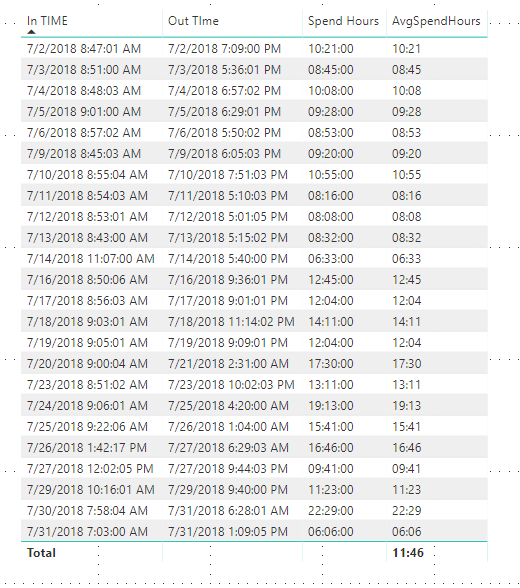
And the out put is
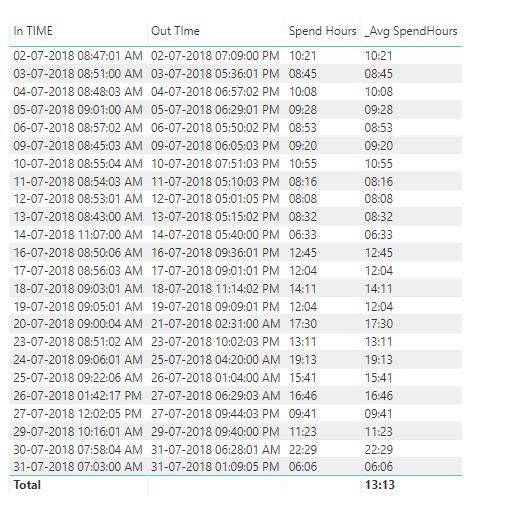
And then i exported it into excel and checked the values then it is giving me below value
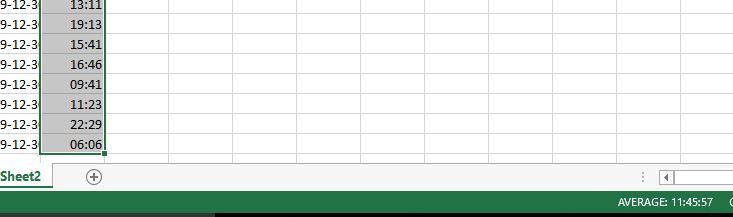
I really dont understand why this is happening.
Is it with my DAX or PowerBI or with Excel.
Please correct me.
Thanks,
Mohan V
Solved! Go to Solution.
@v-danhe-msft thanks for the reply.
I tried the below dax and it worked for me.
New table Dax:-
NewTable =
ADDCOLUMNS(
SUMMARIZE(
Table,
Table[EMP_ID],
Table[BEGIN_DATE],
Table[Emp Name]
),
"InTime", CALCULATE(MIN(Table[Date-Time]),FILTER(ALLEXCEPT(Table,Table[EMP_ID],Table[BEGIN_DATE]),
Table[Type]="IN")),
"OutTime",
CALCULATE(MAX(Table[Date-Time]),FILTER(ALLEXCEPT(Table,Table[EMP_ID],Table[BEGIN_DATE]),
Table[Type]="OUT"))
)Then the output of this gives the correct values.
Thanks.
Mohan V
Hi @Anonymous,
Based on my test, it could work on my side:
To find the cause as soon as possible, I would suggest you share pbix file if possible. Also you can test with our sample report on your side to see if the same issue occurs.
Regards,
Daniel He
@v-danhe-msft thanks for the reply.
I tried the below dax and it worked for me.
New table Dax:-
NewTable =
ADDCOLUMNS(
SUMMARIZE(
Table,
Table[EMP_ID],
Table[BEGIN_DATE],
Table[Emp Name]
),
"InTime", CALCULATE(MIN(Table[Date-Time]),FILTER(ALLEXCEPT(Table,Table[EMP_ID],Table[BEGIN_DATE]),
Table[Type]="IN")),
"OutTime",
CALCULATE(MAX(Table[Date-Time]),FILTER(ALLEXCEPT(Table,Table[EMP_ID],Table[BEGIN_DATE]),
Table[Type]="OUT"))
)Then the output of this gives the correct values.
Thanks.
Mohan V
Join us in Barcelona for FabCon and SQLCon, the Fabric, Power BI, SQL, and AI community event. Save €200 with code FABCMTY200.
Join Data Days 2026: 60 days of free live/on-demand sessions, challenges, study groups, and certification opportunities.
| User | Count |
|---|---|
| 27 | |
| 24 | |
| 18 | |
| 15 | |
| 15 |
| User | Count |
|---|---|
| 63 | |
| 42 | |
| 41 | |
| 38 | |
| 37 |