Join us at FabCon Atlanta from March 16 - 20, 2026, for the ultimate Fabric, Power BI, AI and SQL community-led event. Save $200 with code FABCOMM.
Register now!Get Fabric certified for FREE! Don't miss your chance! Learn more
Hello friends,
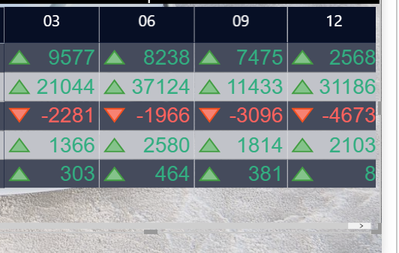
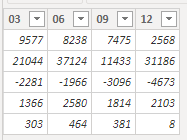
I have the table attached
And I try to always have the high numbers at the top of the table and the lower ones below.
how do I do it?
Solved! Go to Solution.
Hi, @netanel
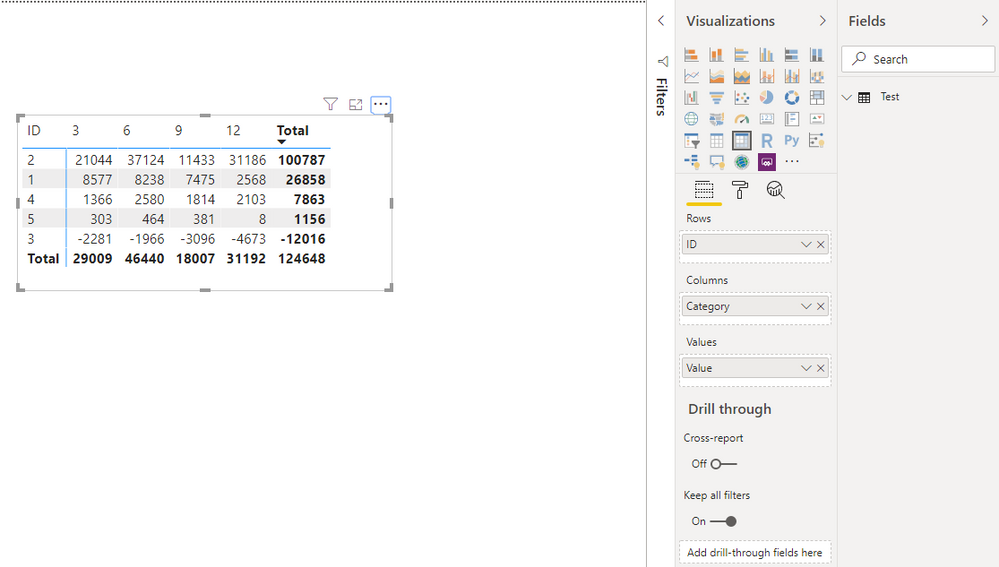
Based on your description, I created data to reproduce your scenario.
Test:
Then you may click 'more options'=>'Sort by', make 'Value' selected.
Result:
What you need to pay attention to is that result is sorted by the 'Total' column even though 'Total' is hidden.
Best Regards
Allan
If this post helps, then please consider Accept it as the solution to help the other members find it more quickly.
Hi, @netanel
Based on your description, I created data to reproduce your scenario.
Test:
Then you may click 'more options'=>'Sort by', make 'Value' selected.
Result:
What you need to pay attention to is that result is sorted by the 'Total' column even though 'Total' is hidden.
Best Regards
Allan
If this post helps, then please consider Accept it as the solution to help the other members find it more quickly.
It's working, Thank you so mach!
Not very clear , but in table/matrix you have both font and icon under conditional formatting
https://docs.microsoft.com/en-us/power-bi/desktop-conditional-table-formatting
You can use
I'll try to explain,
I want the numbers to be presented this way
5
4
3
2
1
Or in my case
21,044
9,577
1,366
303
2,281-
The table is simple as in the attached image all numbers come from a single sum column.
I can attach anything but everything in Hebrew ...
Share feedback directly with Fabric product managers, participate in targeted research studies and influence the Fabric roadmap.
Check out the January 2026 Power BI update to learn about new features.
| User | Count |
|---|---|
| 68 | |
| 59 | |
| 44 | |
| 20 | |
| 15 |
| User | Count |
|---|---|
| 104 | |
| 103 | |
| 37 | |
| 27 | |
| 26 |