cancel
Showing results for 
Search instead for 
Did you mean: 

Level up your Power BI skills this month - build one visual each week and tell better stories with data! Get started

Reply
gaurav1991
Regular Visitor

Need Help!

I have a query. Please help!


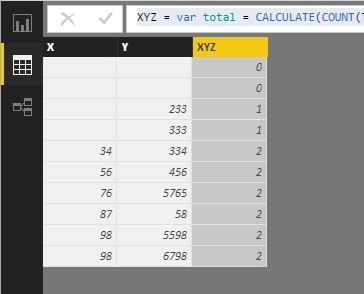
I have 2 columns (X and Y) with 10 rows each.


1. In X column top 4 rows are blank and rest 6 rows have values.

"X" Column Values: [Blank, Blank, Blank, Blank, 34,56,76,87,98,98]


2. In Y column top 2 rows are blank and rest of the rows have values.

"Y" Column Values: [Blank, Blank, 233, 333, 334, 456, 5765, 58, 5598, 6798]


Now as per the requirement, I need a calculated column Named "XYZ", 

this column needs to be populated by the count of values in each row of both columns X and Y

"XYZ" Column Values: [0, 0, 1, 1, 2, 2, 2, 2, 2, 2]

5 REPLIES 5
v-jiascu-msft
Microsoft Employee
Microsoft Employee

Hi @gaurav1991,


How about this formula, which is created for the scenario you depicted?


XYZ =
VAR total =
    CALCULATE ( COUNT ( Table31[X] ) + COUNT ( Table31[Y] ) )
RETURN
    IF ( ISBLANK ( total ), 0, total )

Need Help!.JPG


Best Regards!

Dale

Community Support Team _ Dale
If this post helps, then please consider Accept it as the solution to help the other members find it more quickly.

Hi @gaurav1991,


Could you please tell me if your problem was resolved? Please mark the proper answer if it worked. That will be a help to the others.

Best Regards!
Dale

Community Support Team _ Dale
If this post helps, then please consider Accept it as the solution to help the other members find it more quickly.
GilbertQ
Super User
Super User

Hi @gaurav1991


What I would do is in the Query Editor I would create a Conditional column (Is Blank X) (Is Blank Y) and if it has a value then make it 1 else make it zero for your X and Y columns.


Then I would create another Conditional Column based the two columns above. And simply add them together with the new conditional column of (XYZ) 


Did I answer your question? Mark my post as a solution!

Proud to be a Super User!


Power BI Blog

Hello Guavaq,


I can't hard code the columns as column X and Y are actually the month's name and that will varies as the new sales data will be uploaded.


Actual Case, Its quarterly sales data, Month's names are used in columns after pivoting the data. I just need a dynamic function in which I don't need to hardcode the column name as that would be changed in next quarter.


Hi @gaurav1991


You could possibly do this with a function.


Do you have some sample data or sample images to see what you are trying to achieve?


Did I answer your question? Mark my post as a solution!

Proud to be a Super User!


Power BI Blog

Helpful resources

Announcements
April Power BI Update Carousel

Power BI Monthly Update - April 2026

Check out the April 2026 Power BI update to learn about new features.

Fabric SQL PBI Data Days

Data Days 2026 coming soon!

Sign up to receive a private message when registration opens and key events begin.

New to Fabric survey Carousel

New to Fabric Survey

If you have recently started exploring Fabric, we'd love to hear how it's going. Your feedback can help with product improvements.

Power BI DataViz World Championships carousel

Power BI DataViz World Championships - June 2026

A new Power BI DataViz World Championship is coming this June! Don't miss out on submitting your entry.