cancel
Showing results for 
Search instead for 
Did you mean: 

The Power BI Data Visualization World Championships is back! Get ahead of the game and start preparing now! Learn more

Reply
Zaky
Helper IV
Helper IV

Need Help with a Measure Formula

Hi All,

Wondering if someone would able to help me with formula to count/filter based on ‘AUPEC definition’  column as per data table below.

So it will become:

Physically on-site = 4

Require engineer to travel = 4


Thanks.


REGIONAreaMain SiteAUPEC DefinitionPhysical or Travel
EAST COASTKTKTINSTEPphysically on-site
EAST COASTKTKTKLCCUHphysically on-site
EAST COASTPakaKIPC KIPCphysically on-site
EAST COASTPakaKIPC PCLDPEphysically on-site
WEST COASTSabahKimanisKimanisrequire engineer to travel
CENTRALKuala LumpurEtiqaEtiqarequire engineer to travel
CENTRALKuala LumpurBinjaiBinjairequire engineer to travel
CENTRALKuala LumpurIntermarkIntermarkrequire engineer to travel
1 ACCEPTED SOLUTION
Anonymous
Not applicable

Hi @Zaky ,

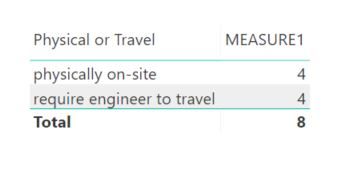
MEASURE1 = DISTINCTCOUNT( 'Table'[AUPEC Definition] )


Capture.JPG

Hope that helps.
Cheers,
Rob

If this post helps, then please consider Accept it as the solution to help the other members find it more quickly.

View solution in original post

3 REPLIES 3
Anonymous
Not applicable

Hi @Zaky ,

MEASURE1 = DISTINCTCOUNT( 'Table'[AUPEC Definition] )


Capture.JPG

Hope that helps.
Cheers,
Rob

If this post helps, then please consider Accept it as the solution to help the other members find it more quickly.

Hi @Anonymous ,


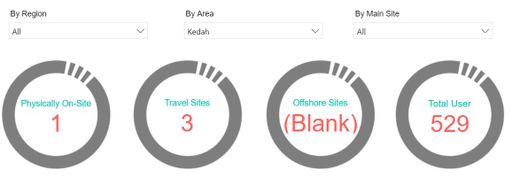
Thanks for your help. The formula working well. Since I wanted it to be seen in KPI visual, i just modify a bit the measure as follow based on "Physical  or  Travel" field column.


#OFF Measure =
CALCULATE(DISTINCTCOUNT('ICT Key Statistics July 2019'[AUPEC Definition]), 'ICT Key Statistics July 2019'[Physical or Travel] IN { "offshore"})
 
Apart of that, is there any chance to make the "(Blank)" series to be default as "0"?
 
capture1.JPG
Anonymous
Not applicable

Hi @Zaky ,


Sorry for late reply, please try:


#OFF Measure =
IFERROR(
CALCULATE(DISTINCTCOUNT('ICT Key Statistics July 2019'[AUPEC Definition]), 'ICT Key Statistics July 2019'[Physical or Travel] IN { "offshore"})  
, 0 )

Cheers,
Rob

Helpful resources

Announcements
Power BI DataViz World Championships

Power BI Dataviz World Championships

The Power BI Data Visualization World Championships is back! Get ahead of the game and start preparing now!

December 2025 Power BI Update Carousel

Power BI Monthly Update - December 2025

Check out the December 2025 Power BI Holiday Recap!

FabCon Atlanta 2026 carousel

FabCon Atlanta 2026

Join us at FabCon Atlanta, March 16-20, for the ultimate Fabric, Power BI, AI and SQL community-led event. Save $200 with code FABCOMM.