Get Fabric or SQL Certified for Free.
Get certified for free when you join Fabric Data Days 2026 and dive into Fabric, Power BI, SQL, AI, and other essential data skills.
Join now- Power BI forums
- Get Help with Power BI
- Desktop
- Service
- Report Server
- Power Query
- Mobile Apps
- Developer
- DAX Commands and Tips
- Custom Visuals Development Discussion
- Health and Life Sciences
- Power BI Spanish forums
- Translated Spanish Desktop
- Training and Consulting
- Instructor Led Training
- Dashboard in a Day for Women, by Women
- Galleries
- Data Stories Gallery
- Themes Gallery
- Contests Gallery
- QuickViz Gallery
- Quick Measures Gallery
- Visual Calculations Gallery
- Fabric Apps Gallery
- Notebook Gallery
- Translytical Task Flow Gallery
- TMDL Gallery
- R Script Showcase
- Webinars and Video Gallery
- Ideas
- Custom Visuals Ideas (read-only)
- Issues
- Issues
- Events
- Upcoming Events
July 7 - July 17 | Round 2 of the Power BI Dataviz World Championships. Don't miss your chance! Learn more
- Power BI forums
- Forums
- Get Help with Power BI
- Desktop
- Re: Need Help with Recursive Measure
- Subscribe to RSS Feed
- Mark Topic as New
- Mark Topic as Read
- Float this Topic for Current User
- Bookmark
- Subscribe
- Printer Friendly Page

- Mark as New
- Bookmark
- Subscribe
- Mute
- Subscribe to RSS Feed
- Permalink
- Report Inappropriate Content
Need Help with Recursive Measure
Hello,
I need help with the following recursive measure, I've been trying unsuccessfully something like this:
Measure =
var x = CALCULATE(sum(GIACENZA[LQNTY]) , GIACENZA[ITNBR] = max('ITMRVA chiave'[ITNBR])) - sum(ORDERS[ORDER QTY])
return
CALCULATE ( x , FILTER ( ALL('Calendar'), 'Calendar'[Date] <= MAX ('Calendar'[Date] ) ) )
Thank you.
| t | 0 (today) | 1 | 2 |
| ITEM A | |||
| ORDER QTY | 200 | 100 | 400 |
| STOCK [LQNTY] | 1000 | blank | blank |
| MEASURE | 800 | 700 | 300 |
| ITEM B .... |
Solved! Go to Solution.
- Mark as New
- Bookmark
- Subscribe
- Mute
- Subscribe to RSS Feed
- Permalink
- Report Inappropriate Content
Hi @Anonymous ,
I updated your sample pbix file(see attachment) for you, please check whether that is what you want. You can update the formula of Measure as below:
MEASURE =
VAR _selitnbr =
    SELECTEDVALUE ( 'ITEM_KEY'[ITNBR] )
VAR _stqty =
    CALCULATE (
        SUM ( 'STOCK'[STOCKQTY] ),
        FILTER ( ALLSELECTED ( 'STOCK' ), 'STOCK'[ITNBR] = _selitnbr )
    )
VAR _minstdate =
    CALCULATE (
        MIN ( 'STOCK'[Date] ),
        FILTER ( ALLSELECTED ( 'STOCK' ), 'STOCK'[ITNBR] = _selitnbr )
    )
VAR _maxorddate =
    CALCULATE (
        MAX ( 'ORDERS'[Date] ),
        FILTER ( ALLSELECTED ( 'ORDERS' ), 'ORDERS'[ITNBR] = _selitnbr )
    )
VAR _seldate =
    SELECTEDVALUE ( 'Calendar'[Date] )
VAR _culordqty =
    CALCULATE (
        SUM ( 'ORDERS'[ORDERSQTY] ),
        FILTER (
            ALLSELECTED ( 'ORDERS' ),
            'ORDERS'[ITNBR] = _selitnbr
                && 'ORDERS'[DATE] <= _seldate
        )
    )
RETURN
    IF (
        _seldate < _minstdate
            || _seldate > _maxorddate,
        BLANK (),
        CALCULATE ( SUM ( STOCK[STOCKQTY] ), ALLSELECTED ( 'Calendar'[Date] ) ) - _culordqty
    )
If the above one can't help you get the desired result, please provide some sample data in your tables (exclude sensitive data) with Text format and your expected result with backend logic and special examples. It is better if you can share a simplified pbix file. You can refer the following link to upload the file to the community. Thank you.
How to upload PBI in Community
Best Regards
- Mark as New
- Bookmark
- Subscribe
- Mute
- Subscribe to RSS Feed
- Permalink
- Report Inappropriate Content
Hello @Anonymous ,
I was trying to figure out if it was possible to:
- Show measure values in dates where I'm not having Orders/Stock
- Filter the measure for negative values (i.e. Delta <0) without breaking up the logic behind the Measure.
BR,
Marco
- Mark as New
- Bookmark
- Subscribe
- Mute
- Subscribe to RSS Feed
- Permalink
- Report Inappropriate Content
I've developed this one, which seems to be working but NOT with multiple items.

How can I solve the following problems with multiple items?
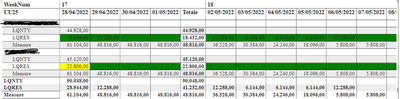
It's not executing separate calculation for different items, but aggregating them...
Thank you
- Mark as New
- Bookmark
- Subscribe
- Mute
- Subscribe to RSS Feed
- Permalink
- Report Inappropriate Content
Hi @Anonymous ,
Please update the formula of your measure as below and check whether that can return the correct result.
Measure =
SUM ( GIACENZA[LQNTY] )
    - CALCULATE (
        SUM ( ORDERS[LQRES] ),
        FILTER (
            ALLSELECTED ( 'ORDERS' ),
            IF (
                TODAY () > FIRSTDATE ( ORDERS[Data Consegna] ),
                TODAY (),
                ORDERS[Data Consegna]
            )
                <= MAX ( 'Calendar'[Date] )
        )
    )
If the above one can't help you get the desired result, please provide some sample data in your tables GIACENZA and ORDERS (exclude sensitive data) with Text format and your expected result with backend logic and special examples. It is better if you can share a simplified pbix file. You can refer the following link to upload the file to the community. Thank you.
How to upload PBI in Community
Best Regards
- Mark as New
- Bookmark
- Subscribe
- Mute
- Subscribe to RSS Feed
- Permalink
- Report Inappropriate Content
Thank you for your answer. It's not contextualizing items still.
Here is the .pbix --> https://easyupload.io/rvndjm
BR,
Marco
- Mark as New
- Bookmark
- Subscribe
- Mute
- Subscribe to RSS Feed
- Permalink
- Report Inappropriate Content
Hi @Anonymous ,
I updated your sample pbix file(see attachment) for you, please check whether that is what you want. You can update the formula of Measure as below:
MEASURE =
VAR _selitnbr =
    SELECTEDVALUE ( 'ITEM_KEY'[ITNBR] )
VAR _stqty =
    CALCULATE (
        SUM ( 'STOCK'[STOCKQTY] ),
        FILTER ( ALLSELECTED ( 'STOCK' ), 'STOCK'[ITNBR] = _selitnbr )
    )
VAR _minstdate =
    CALCULATE (
        MIN ( 'STOCK'[Date] ),
        FILTER ( ALLSELECTED ( 'STOCK' ), 'STOCK'[ITNBR] = _selitnbr )
    )
VAR _maxorddate =
    CALCULATE (
        MAX ( 'ORDERS'[Date] ),
        FILTER ( ALLSELECTED ( 'ORDERS' ), 'ORDERS'[ITNBR] = _selitnbr )
    )
VAR _seldate =
    SELECTEDVALUE ( 'Calendar'[Date] )
VAR _culordqty =
    CALCULATE (
        SUM ( 'ORDERS'[ORDERSQTY] ),
        FILTER (
            ALLSELECTED ( 'ORDERS' ),
            'ORDERS'[ITNBR] = _selitnbr
                && 'ORDERS'[DATE] <= _seldate
        )
    )
RETURN
    IF (
        _seldate < _minstdate
            || _seldate > _maxorddate,
        BLANK (),
        CALCULATE ( SUM ( STOCK[STOCKQTY] ), ALLSELECTED ( 'Calendar'[Date] ) ) - _culordqty
    )
If the above one can't help you get the desired result, please provide some sample data in your tables (exclude sensitive data) with Text format and your expected result with backend logic and special examples. It is better if you can share a simplified pbix file. You can refer the following link to upload the file to the community. Thank you.
How to upload PBI in Community
Best Regards
- Mark as New
- Bookmark
- Subscribe
- Mute
- Subscribe to RSS Feed
- Permalink
- Report Inappropriate Content
Hello @Anonymous ,
Works perfectly!
Thank you.
BR,
Marco
Helpful resources

FabCon & SQLCon – Barcelona 2026
Join us in Barcelona for FabCon and SQLCon, the Fabric, Power BI, SQL, and AI community event. Save €200 with code FABCMTY200.

Fabric Community Sticker Challenge - Barcelona 2026
If you love stickers, then you will definitely want to check out our community sticker challenge, Barcelona edition!

Power BI Monthly Update - July 2026
Check out the July 2026 Power BI update to learn about new features.

Power BI DataViz World Championships - June 2026
A new Power BI DataViz World Championship is coming this June! Don't miss out on submitting your entry.

| User | Count |
|---|---|
| 30 | |
| 26 | |
| 23 | |
| 23 | |
| 14 |


| User | Count |
|---|---|
| 46 | |
| 33 | |
| 20 | |
| 18 | |
| 16 |


